EasyManua.ls Logo

JBL KX180 - Microphone Channel Settings; Effect Parameters

JBL KX180
16 pages
Print Icon
To Next Page IconTo Next Page
To Previous Page IconTo Previous Page
Loading...
10
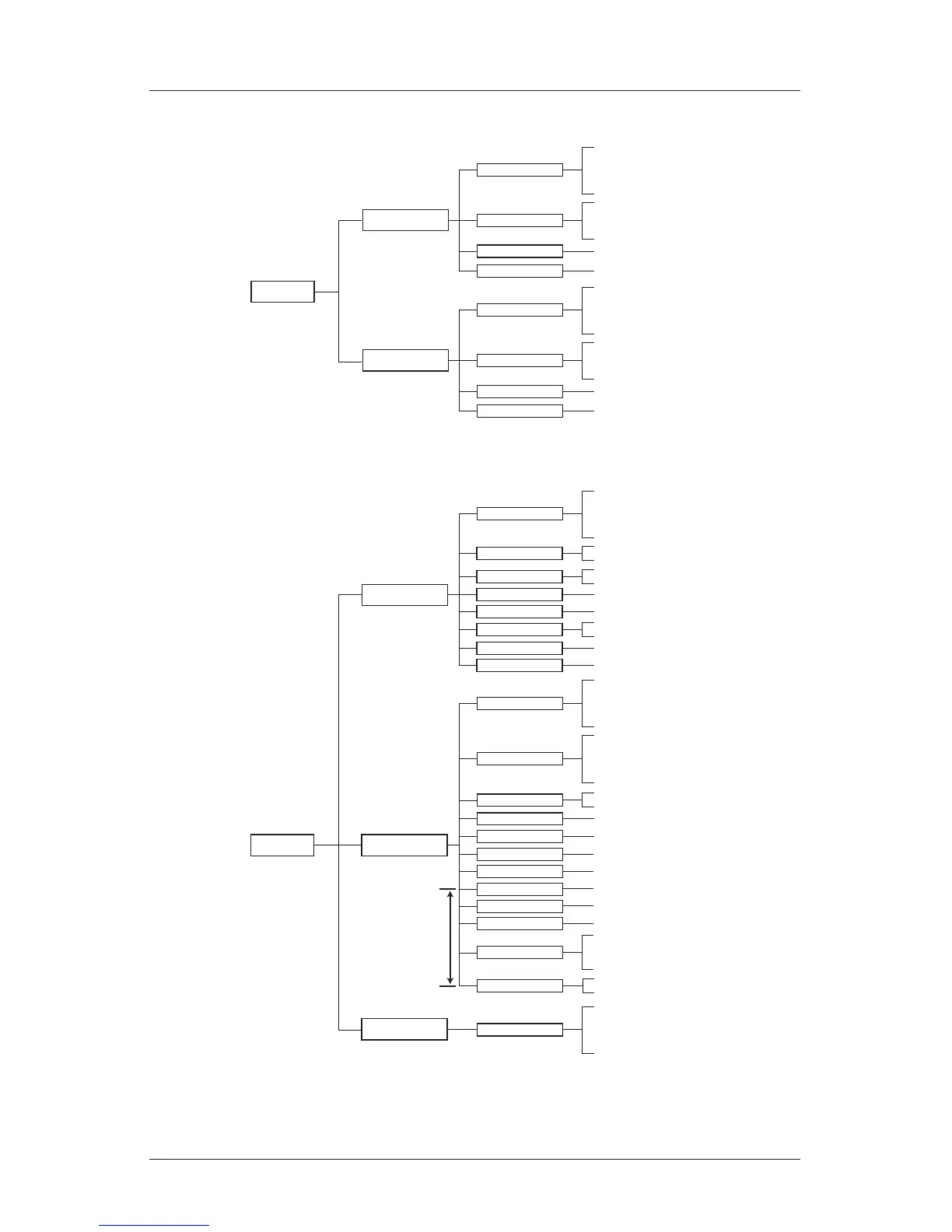
Section 3 - Menu Structure
MIC
Mic Channel 1.2
EQ 01-15
Compressor: Mic 1.2
Mic Setup
On / Bypass
PEQ / LS / HS
Q
Gain
Frequency
Threshold
Ratio
Attack
Release
Mic1.2 Volume
Cutoff Setup: HPF Frequency
Mic Channel 3
EQ 01-15
Compressor: Mic 3
Mic Setup
On / Bypass
PEQ / LS / HS
Q
Gain
Frequency
Threshold
Ratio
Attack
Release
Mic3 Volume
Cutoff Setup: HPF Frequency
EFFECT
Echo Model
Reverb Model
Effect Input EQ
EQ 01-05
Echo Setup
On / Bypass
PEQ / LS / HS
Q
Gain
Frequency
Echo Volume + Polarity
Direct Volume + Polarity
On / Bypass
PEQ / LS / HS
Q
Gain
Frequency
Custom
Room
Small Hall
Large Hall
Voice
Reverb Volume + Polarity
Direct Volume + Polarity
Ref. Volume + Polarity
Late Volume + Polarity
Echo Setup: Time
PreDelay
Delay
Echo Setup: ----
Repeat
Echo Setup: HF Damping
Frequency
Echo Setup: Time
PreDelay R
Delay R
Echo Setup: HPF
Frequency
Echo Setup: LPF
Frequency
Reverb Setup: HPF
Frequency
PreDelay
Reverb Setup: LPF
Reverb Setup: Input
Damping
Reverb Setup: Input
Delay
Reverb Setup: Ref.
Damping
Reverb Setup: Ref.HPF
Delay
Rt_HC
Space
Density
Reverb Setup: Late
Reverb Setup
Reverb Time
Reverb Setup: Late
EQ 01-05
Reverb Model: default
Reverb Setup
EQ 01-05
On / Bypass
PEQ / LS / HS
Q
Gain
Frequency
for “Custom” Reverb Model only

Related product manuals