©2024 Harman International | Features, Specications, and Appearance subject to change without notice.
Pg 2 of 9
EN
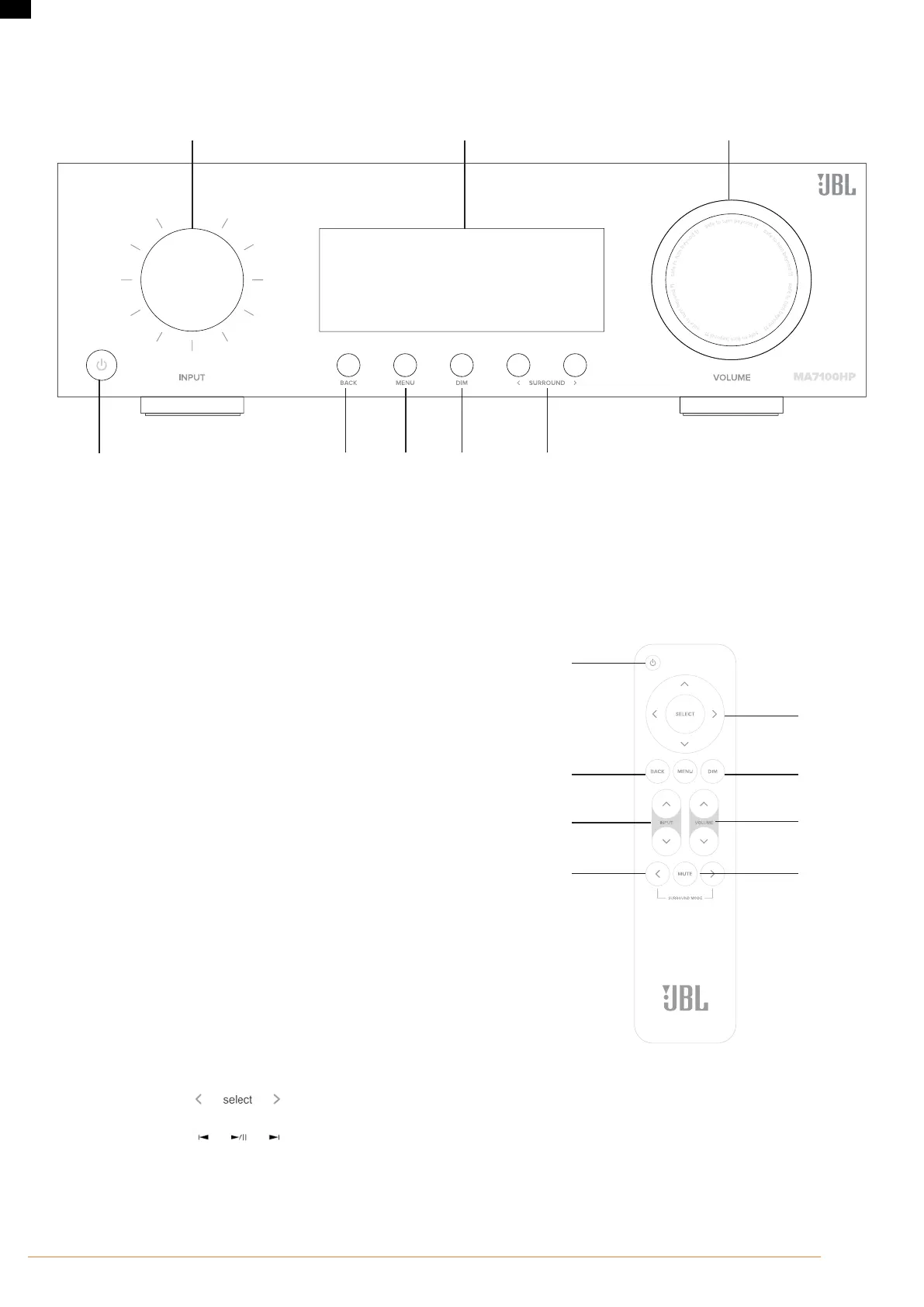
Front Panel
❶ ❹ ❺ ❻ ❼
❽❸❷
1. Standby On/O Button
2. Input Dial/Menu Navigation/Press Select
3. Unit Display
4. Back Menu Button
5. Show/Hide Menu Button
6. Dim Button
7. Surround Down/Up
8. Volume Dial/Press Mute
Remote Control
1. Standby On/O Button
2. Menu Navigation/Select and Transport Control*
3. Menu Back & Menu On/O
4. Dim front panel display and underglow light
5. Input Up/Down
6. Volume Up/Down
7. Surround Mode Cycle
8. Mute
❶
❹
❺
❻
❼
❽
❸
❷
* Use Select, and Left/Right curser buttons on the remote control as transport
keys for Bluetooth and Network Audio Streaming sources



 To Next Page