10
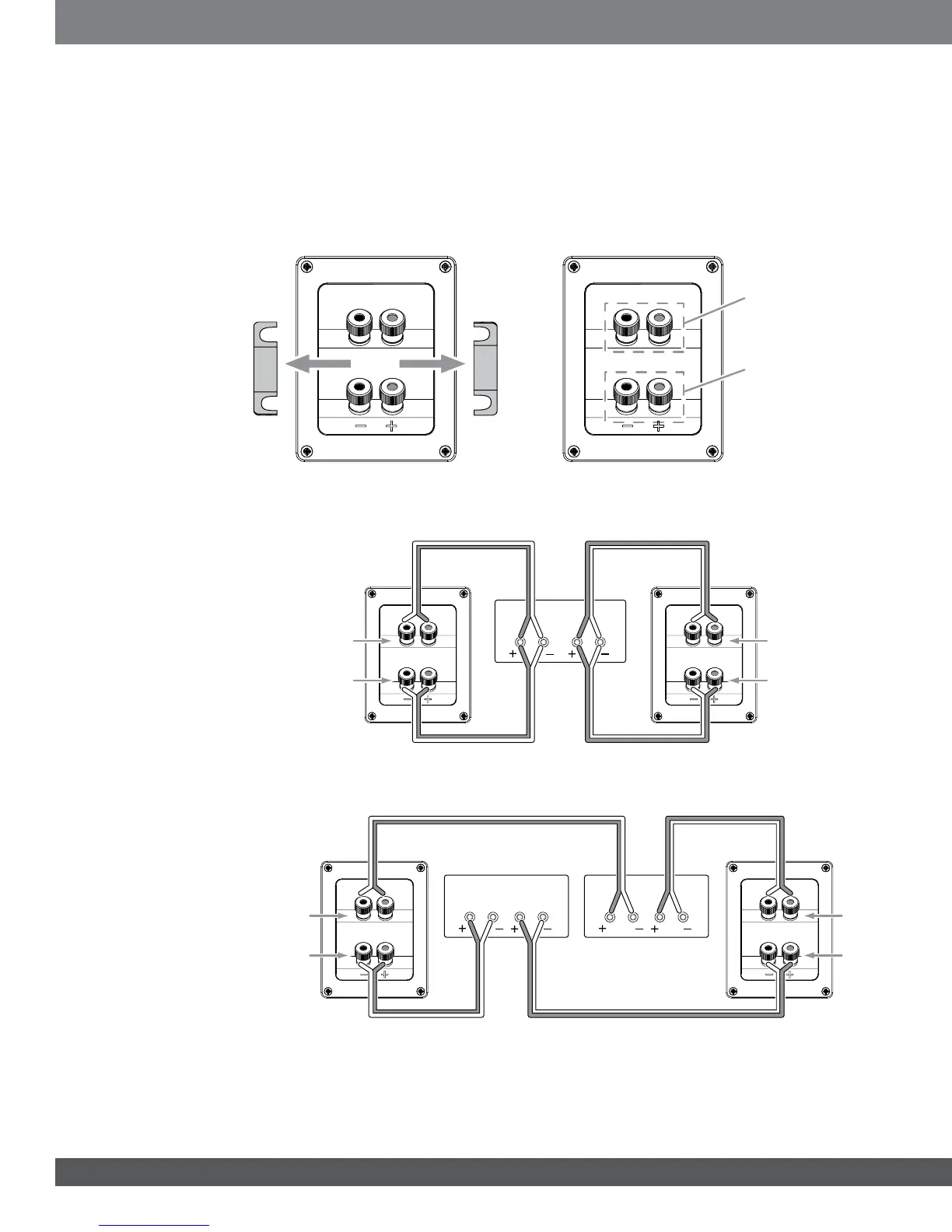
BI-WIRE CONNECTION
All Studio 5 series speaker connector panels have two sets of input connectors that are joined by metal jumper
bars. The upper set of connectors is for the compression-driver/horn assembly, and the lower set of connectors is
for the woofer(s). This arrangement allows you to bi-wire the speakers using a single stereo amplifier or using two
stereo amplifiers. Bi-wiring can offer performance advantages and more flexibility in power-amplifier selection over a
conventional single-wire connection.
Before bi-wiring the speakers, remove the jumper bars.
Remove Jumper Bars
Compression Driver/
Horn Connectors
Woofer
Connectors
SINGLE-AMPLIFIER BI-WIRING
Amplifier
Left
Ch.
Right
Ch.
Left
Speaker
Right
Speaker
Compression Driver/
Horn Connector
Woofer
Connector
Compression Driver/
Horn Connector
Woofer
Connector
DUAL-AMPLIFIER BI-WIRING
Amplifier 1
Amplifier 2
Left
Ch.
Left
Ch.
Right
Ch.
Right
Ch.
Left
Speaker
Right
Speaker
Compression
Driver/Horn
Connector
Compression
Driver/Horn
Connector
Woofer
Connector
Woofer
Connector
For more information about various speaker-wire and connection options, contact your local JBL dealer.



 To Next Page