TRUE WIRELESS FLASH
Quick Start Guide
Guide de démarrage rapide
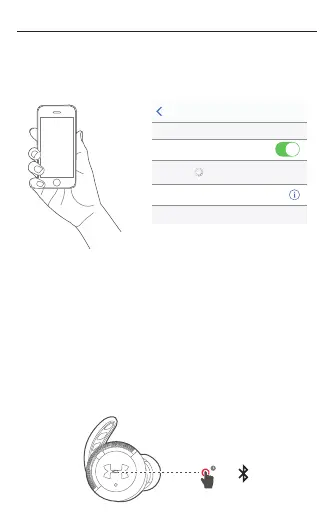
4.2 Connect to Bluetooth device
Choose "UA | JBL True Wireless
Settings Bluetooth
Bluetooth
DEVICES
UA I JBL True Wireless Flash
Now Discoverable
Connected
4.3 Remove the Left headphone from the case. It will
automatically sync to the Right headphone.
4.4 After rst time set up, your headphones will
automatically reconnect when removed from the
case if your device is nearby with Bluetooth ON.
4.5 To connect to a new device, begin with the
headphones powered o, and hold the button on
the Right headphone for 5 seconds to enter Pairing
mode.
5s
<
C)
Q)






 To Next Page