Maintenance
Electrical System
115 9831/0650-3 115
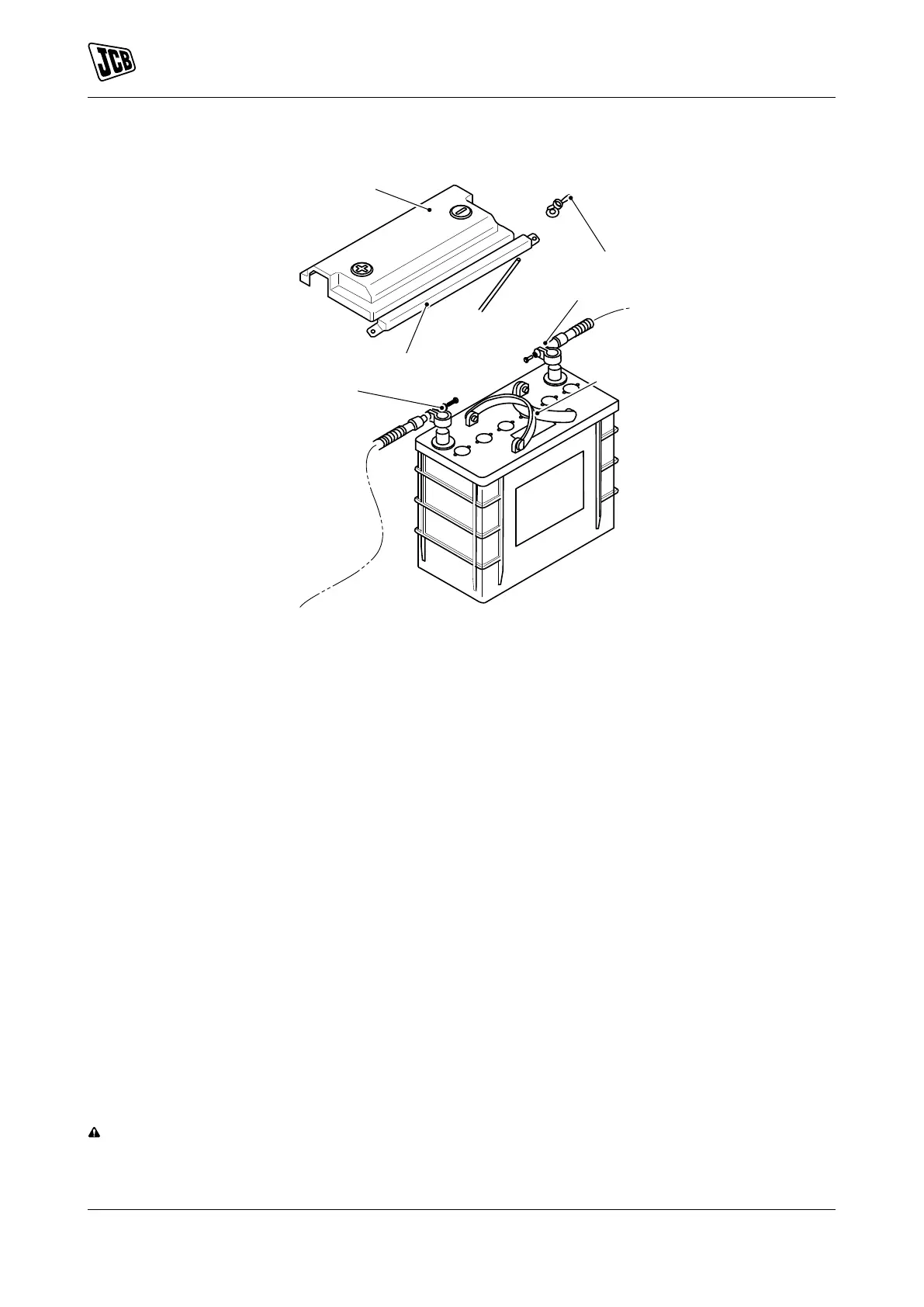
Figure 96.
A Cover B Nut
C Cable 1 D Handle
E Cable 2 F Clamp
1. Make the machine safe.
2. Get access to the battery or batteries (depending on the specification of your machine).
3. If installed, move the battery isolator switch to the off position and then remove the key.
4. Disconnect the negative battery lead first. Refer to Figure 94. and Refer to Figure 95.
5. Disconnect the positive battery lead and put it away from the batteries. Refer to Figure 94. and Refer to
Figure 95.
6. Disconnect and remove the battery link lead or leads. Refer to Figure 94. and Refer to Figure 95.
7. Remove the two nut and the two washers. Refer to Figure 96.
8. Loosen the battery clamp. Refer to Figure 96.
9. Move the clamp.
10. Remove the cover (if installed).
11. Disconnect the cable 1 and the cable 2.
12. Make sure that battery connection wires are clear of the battery top cover.
13. Use the handles to remove the battery from its compartment.
Check (Electrolyte Level)
WARNING Do not top the battery up with acid. The electrolyte could boil out and burn you.



 To Next Page