2626
2626
26.
8. 8.
8. 8.
8.
Cup counter Cup counter
Cup counter Cup counter
Cup counter
-Easy -Easy
-Easy -Easy
-Easy
AccessAccess
AccessAccess
Access
Xplore 400/600W/WCO2Xplore 400/600W/WCO2
Xplore 400/600W/WCO2Xplore 400/600W/WCO2
Xplore 400/600W/WCO2
1.1.
1.1.
1.
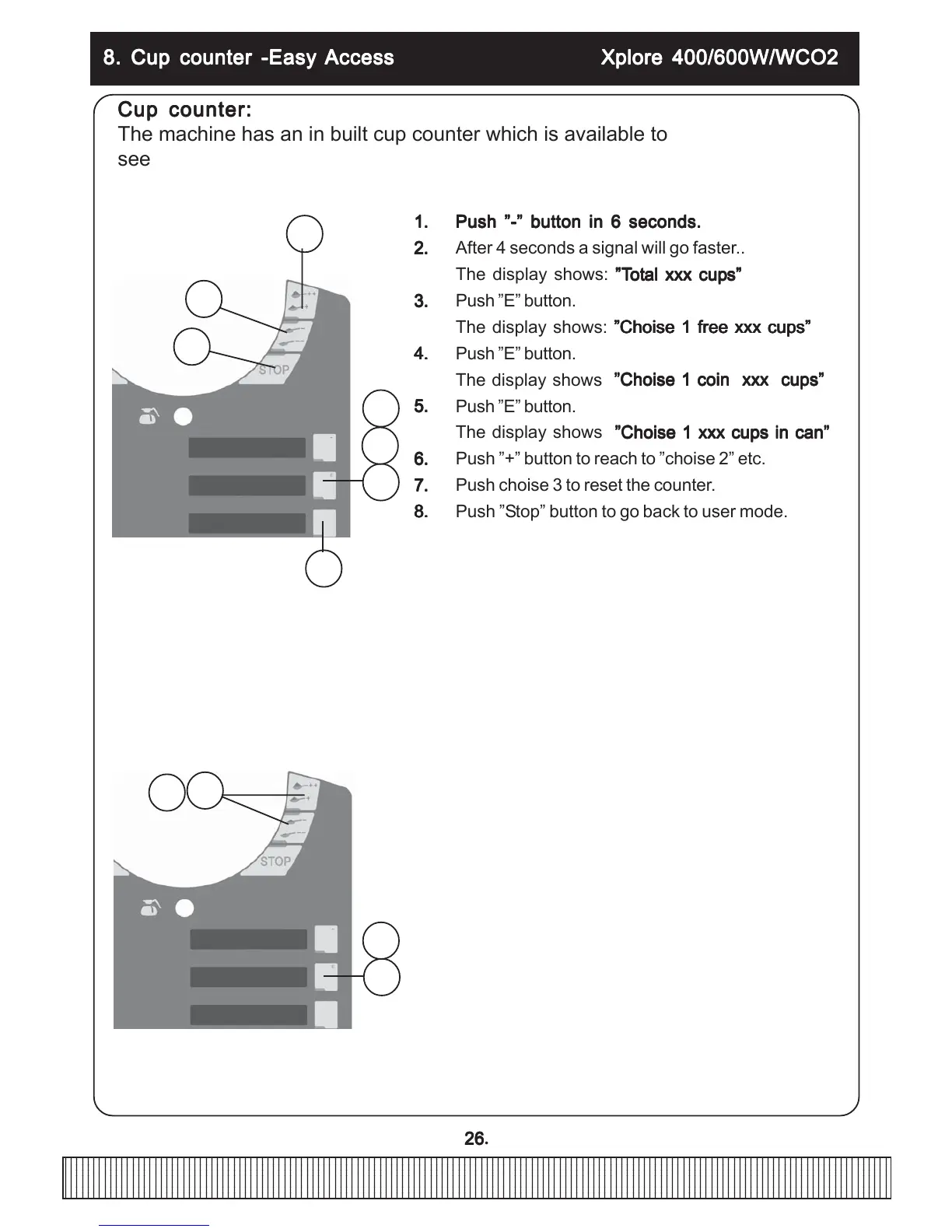
Push ”-” button in 6 seconds.Push ”-” button in 6 seconds.
Push ”-” button in 6 seconds.Push ”-” button in 6 seconds.
Push ”-” button in 6 seconds.
2.2.
2.2.
2. After 4 seconds a signal will go faster..
The display shows:
”T”T
”T”T
”T
otot
otot
ot
al xxx cupal xxx cup
al xxx cupal xxx cup
al xxx cup
s”s”
s”s”
s”
3.3.
3.3.
3. Push ”E” button.
The display shows:
”Choise 1 free xxx cups””Choise 1 free xxx cups”
”Choise 1 free xxx cups””Choise 1 free xxx cups”
”Choise 1 free xxx cups”
4.4.
4.4.
4. Push ”E” button.
The display shows
”Choise 1 coin xxx cups””Choise 1 coin xxx cups”
”Choise 1 coin xxx cups””Choise 1 coin xxx cups”
”Choise 1 coin xxx cups”
5.5.
5.5.
5. Push ”E” button.
The display shows
”Choise 1 xxx cups in can””Choise 1 xxx cups in can”
”Choise 1 xxx cups in can””Choise 1 xxx cups in can”
”Choise 1 xxx cups in can”
6.6.
6.6.
6. Push ”+” button to reach to ”choise 2” etc.
7.7.
7.7.
7. Push choise 3 to reset the counter.
8.8.
8.8.
8. Push ”Stop” button to go back to user mode.
Cup counter:Cup counter:
Cup counter:Cup counter:
Cup counter:
The machine has an in built cup counter which is available to
see and reset with the key switch in ”cup” (normal) position.
Easy Easy
Easy Easy
Easy
Access:Access:
Access:Access:
Access:
Water and ingredient amount can be adjusted with±15% with the key switch
in ”cup” (normal) position.
1.1.
1.1.
1.
Push ”+” and ”-” button at the same time.Push ”+” and ”-” button at the same time.
Push ”+” and ”-” button at the same time.Push ”+” and ”-” button at the same time.
Push ”+” and ”-” button at the same time.
2.2.
2.2.
2. After 4 secondsa signal will go faster.
3.3.
3.3.
3. The display shows: ”Easy access” ”Conc 1 100%”
4.4.
4.4.
4. Go to right button(choise which you want to change
by pushing”+” or ”-” button.
5.5.
5.5.
5. Push ”E” button.
6.6.
6.6.
6. The display shows: for example. Volyme 4 and”
Blinking 100%”
7.7.
7.7.
7. Change by pushing ”+” or ”-” button.
8.8.
8.8.
8. Push ”E” button for entering the change.
Press ”stop” to quit.
8.8.
8.8.
8.
1.1.
1.1.
1.
6.6.
6.6.
6.
3.3.
3.3.
3.
4.4.
4.4.
4.
5.5.
5.5.
5.
7.7.
7.7.
7.
1.1.
1.1.
1.
5.5.
5.5.
5.
8.8.
8.8.
8.
4.4.
4.4.
4.


 To Next Page