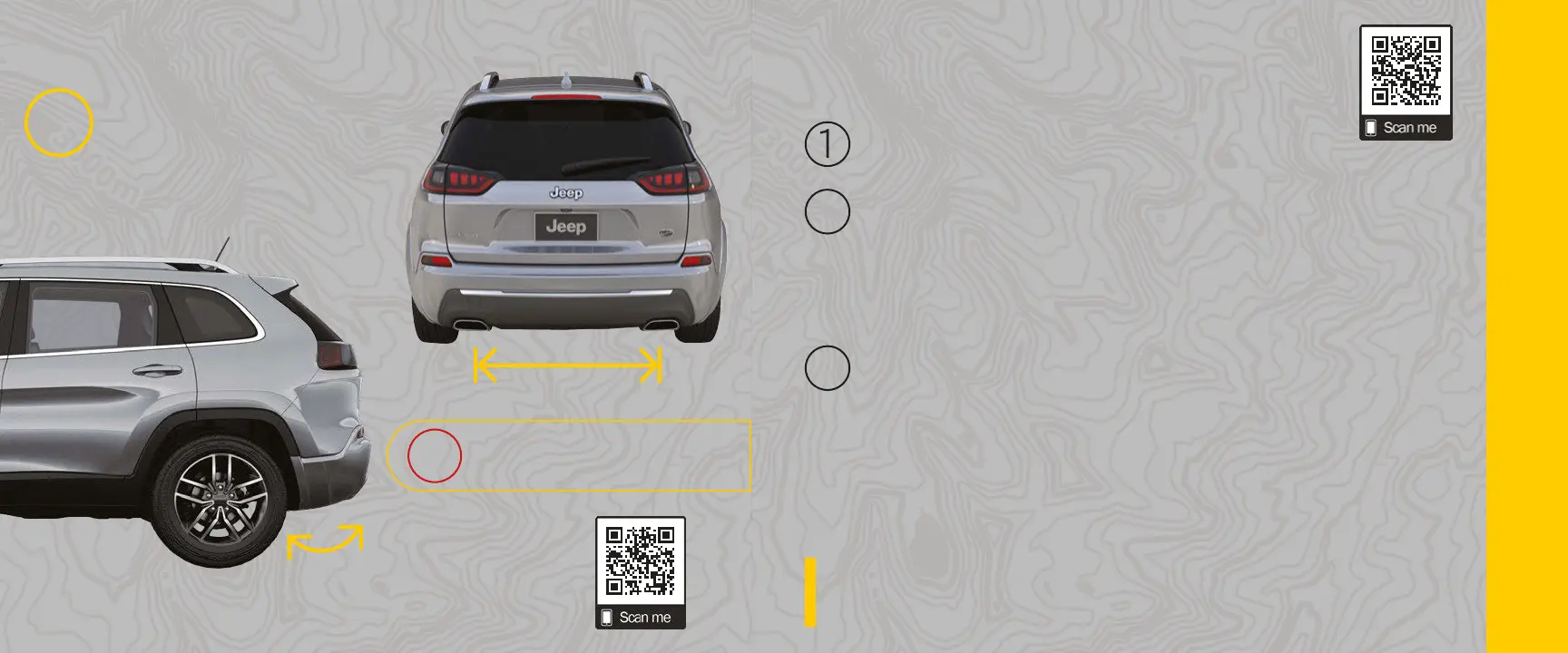
Hands-Free Liftgate
Use a Straight
In-and-Out Kicking Motion
Activation Zone
Make sure your kicking motion is straight
in and out, and within the activation zone.
Please note, this feature is available only
on vehicles equipped with Passive Entry.
LIFTGATE NOT OPENING?
?
Do not move your foot sideways or
in a sweeping motion; the sensors
may not detect the motion.
X
HANDS-FREE LIFTGATE & DRIVER MEMORY
Driver Memory Settings
CREATE A MEMORY PROFILE
MEMORY POSITION RECALLMEMORY POSITION RECALL
To recall the memory settings, push the Memory button that was set or the Unlock button
on the key fob linked to that memory position.
Place the vehicle’s ignition in the ON/RUN position.
Adjust all memory prole settings to your desired preferences, including:
• Driver seat
• Easy Entry seat (if equipped)
• Side mirrors
• Radio station presets
2
Push and release the Set (S) button on the driver's door trim panel, and then push
the Memory button (1) or Memory button (2) within ve seconds. Each of your two
key fobs can be linked to a memory position.
3
Memory proles can be set without the vehicle in PARK, but the vehicle must be in PARK
to recall a memory prole.
KEEP IN MIND:KEEP IN MIND:







 To Next Page