GETTING TO KNOW YOUR VEHICLE 63
The Smart Charging USB ports provide power to
your device up to an hour after the vehicle is
turned off.
NOTE:
Two devices can be plugged in at the same
time and both ports will provide charging
capabilities. Only one port can transfer data
to the system at a time. A pop-up will appear
and allow you to select the device transfer-
ring data.
Both ports share a single data connection.
The user cannot switch between Type A or
Type C.
For example, if a device is plugged into the Type
A USB port and another device is plugged into
the Type C USB port, a message will appear and
allow you to select which device to use.
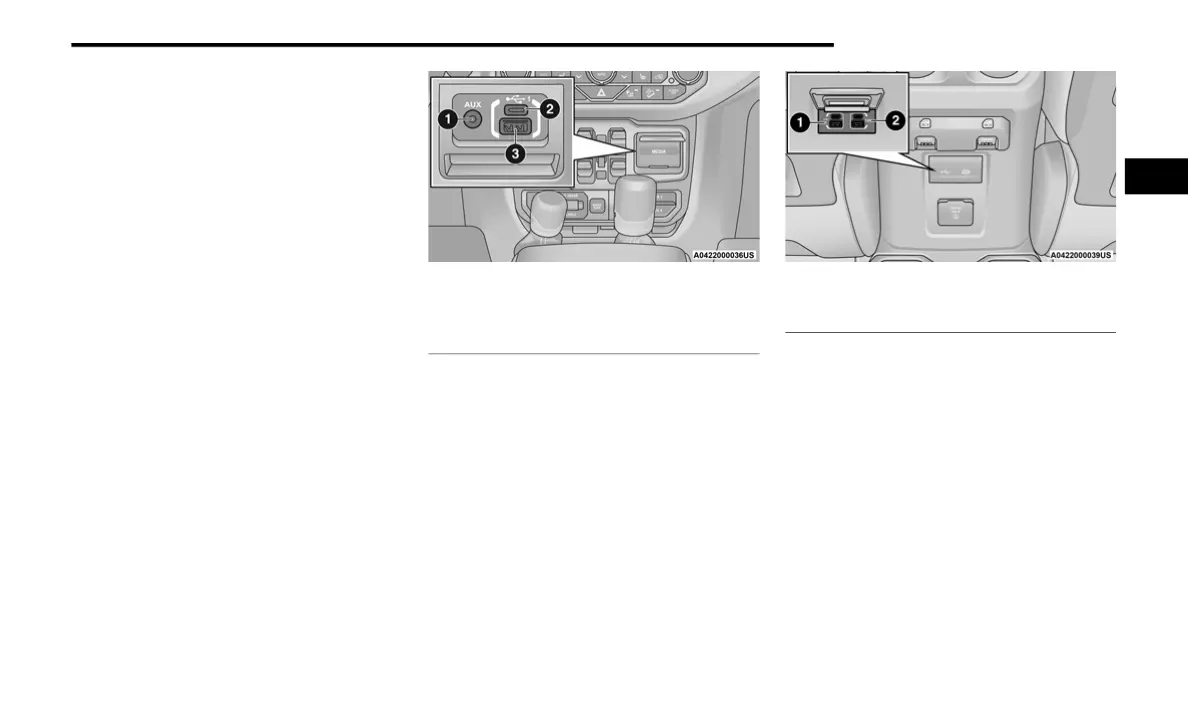
Media Hub
Located inside the center console, a second
USB port allows you to play music from USB
devices through your vehicle’s sound system.
Third and fourth USB ports (if equipped) are
located behind the center console, above the
power inverter. One is a charge only port, and
can only charge USB devices. The other USB
port allows you to play music from USB devices
through your vehicle’s sound system.
USB On The Back Of The Center Console
When a new device or smartphone is plugged
into the USB ports, the following message may
display depending on the device being utilized:
“A new device is now connected. Previous
connection was lost”.
“(Phone Name) now connected. Previous
connection was lost”.
“Another device is in use through the same
USB port. Please disconnect the first device
to use the second device”.
1 — AUX Port
2 — Type C USB Port
3 — Type A USB Port
1 — Type C And Standard USB USB Ports
2 — Type C And Standard Charge Only USB Ports
2
21_JL_OM_EN_USC_t.book Page 63











 To Next Page