9
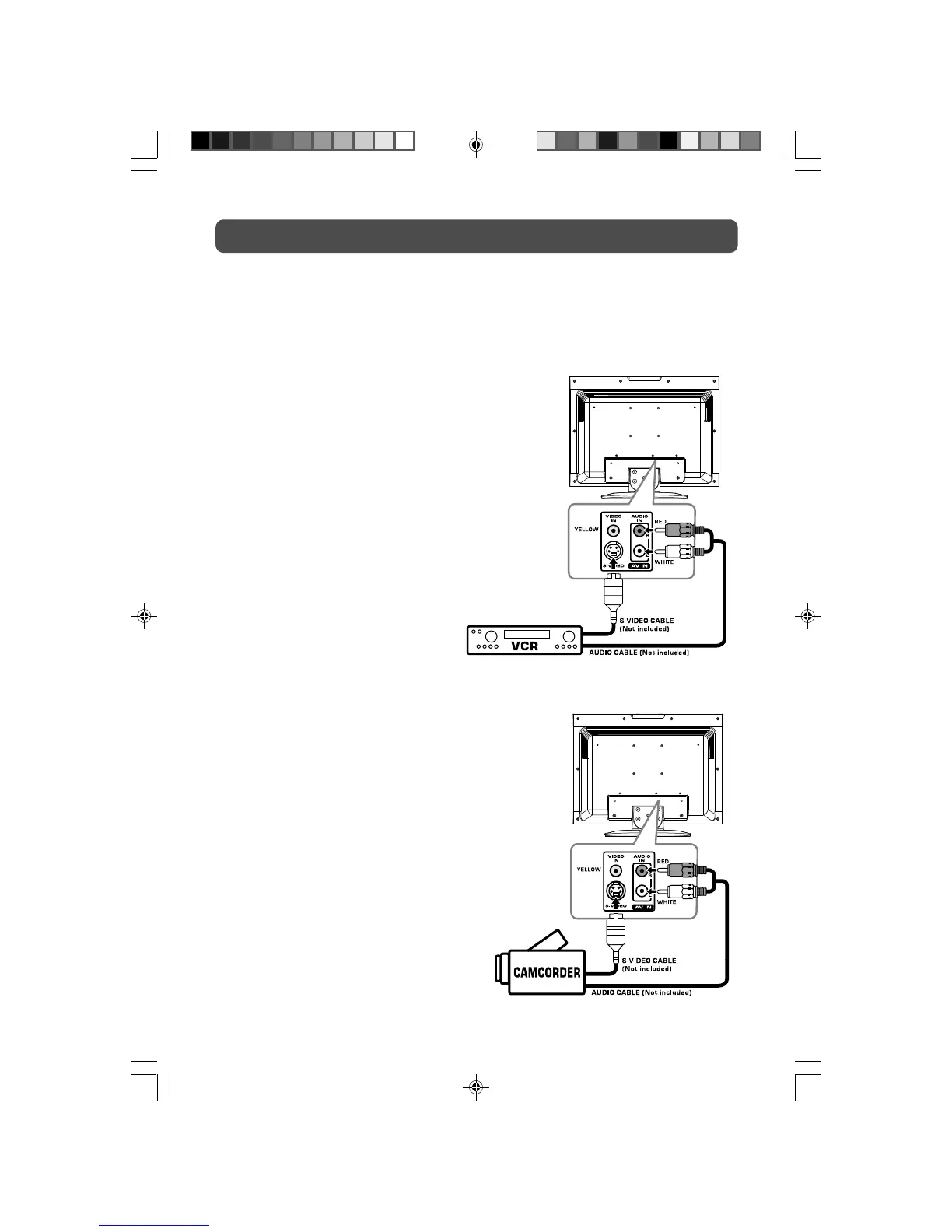
CONNECTING TO A/V DEVICES (VCR, PVR, Camcorder, Game System, etc.)
Connecting to Devices with an S-Video Output
To connect to A/V devices such as a VCR or camcorder:
CONNECTIONS
- Connect to a camcorder
Connect the right (red) and left (white) audio output
from the camcorder to the right (red) and left (white)
input on this unit (Audio cable not included).
Connect the S-VIDEO output from the camcorder to
the S-VIDEO input on this unit (S-VIDEO cable not
included).
Make sure you connect both audio and video from
the same camcorder to the same input (AV IN).
Note:
Please refer to the user manual for the camcorder
for more information.
- Connect to a VCR
Connect the right (red) and left (white) audio output
from the VCR to the right (red) and left (white)
input on this unit (Audio cable not included).
Connect the S-VIDEO output from the VCR to the
S-VIDEO input on this unit (S-VIDEO cable not
included).
Make sure you connect both audio and video from
the same VCR to the same input (AV IN).
Note:
Please refer to the user manual for the VCR for
more information.
PLV36190CS1_IB_ENG_JEN_R1.pmd 11/2/2007, 5:21 PM9



 To Next Page