21
How to calibrate the instrument 7.5
Calibration procedure is described below.
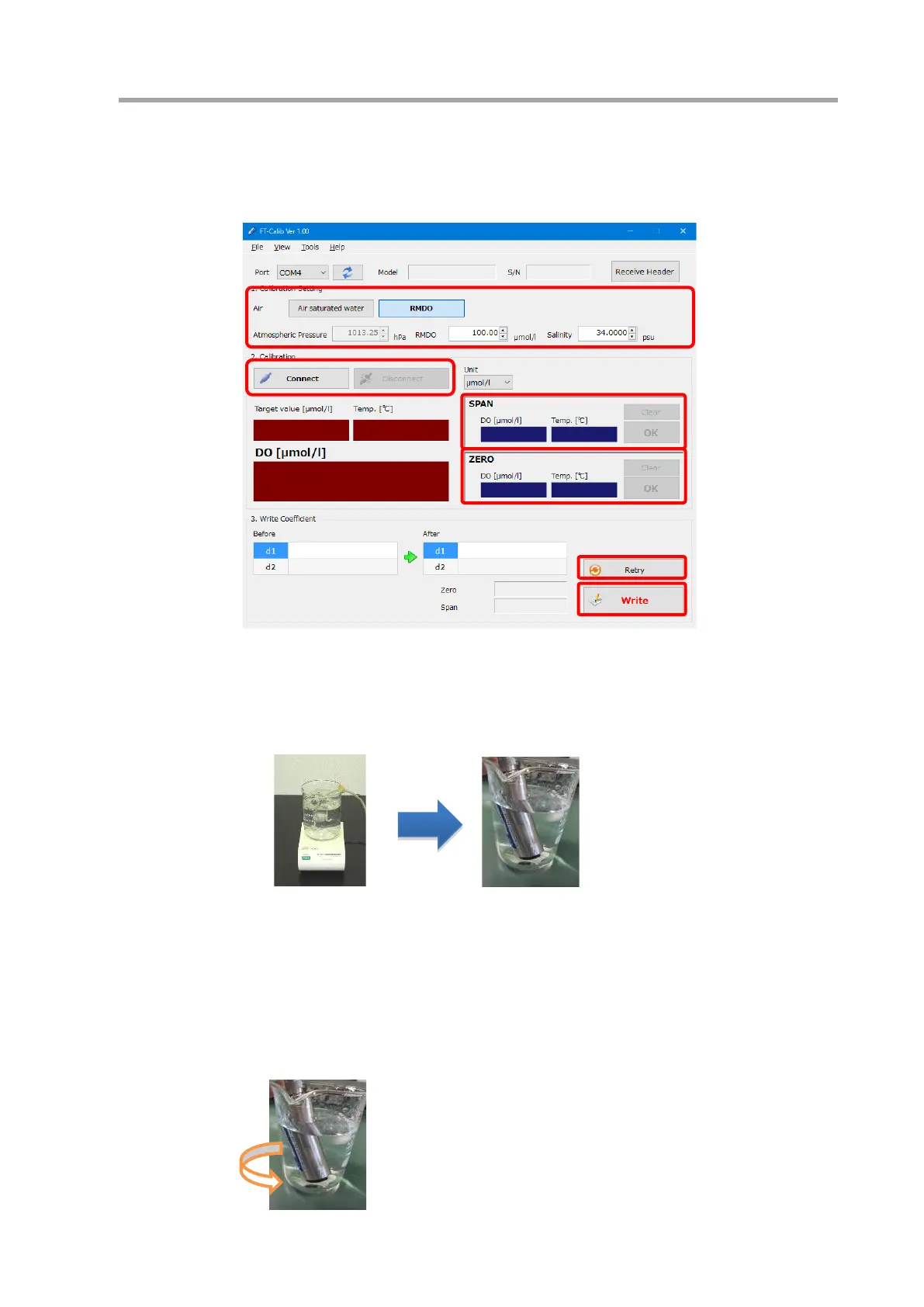
① Prepare the instrument and connect it to the computer.
② Start the software (see 7.4.1)
③ Set calibration settings (see 7.5.3).
④ Connect to the instrument by clicking the [Connect] button.
⑤ Carry out air bubbling process for more than 30 minutes. Stir well during bubbling (using a stirrer is
recommended). Place the DO sensor in bubbled water and wait until the value stabilizes.
⑥ When the value stabilizes, click the [OK] button and obtain the value. The value can be obtained as
many times as desired.
⑦ Next, place the DO sensor in a sodium sulfite solution (see 7.5.2) and obtain the value in the same way.
Measure while slowly turning the instrument so as not to make bubbles. Place the tip of the sensor
approximately 3 cm above the bottom. Note that after pushing [OK] for the zero calibration, it is not
possible to return to the span calibration.



 To Next Page