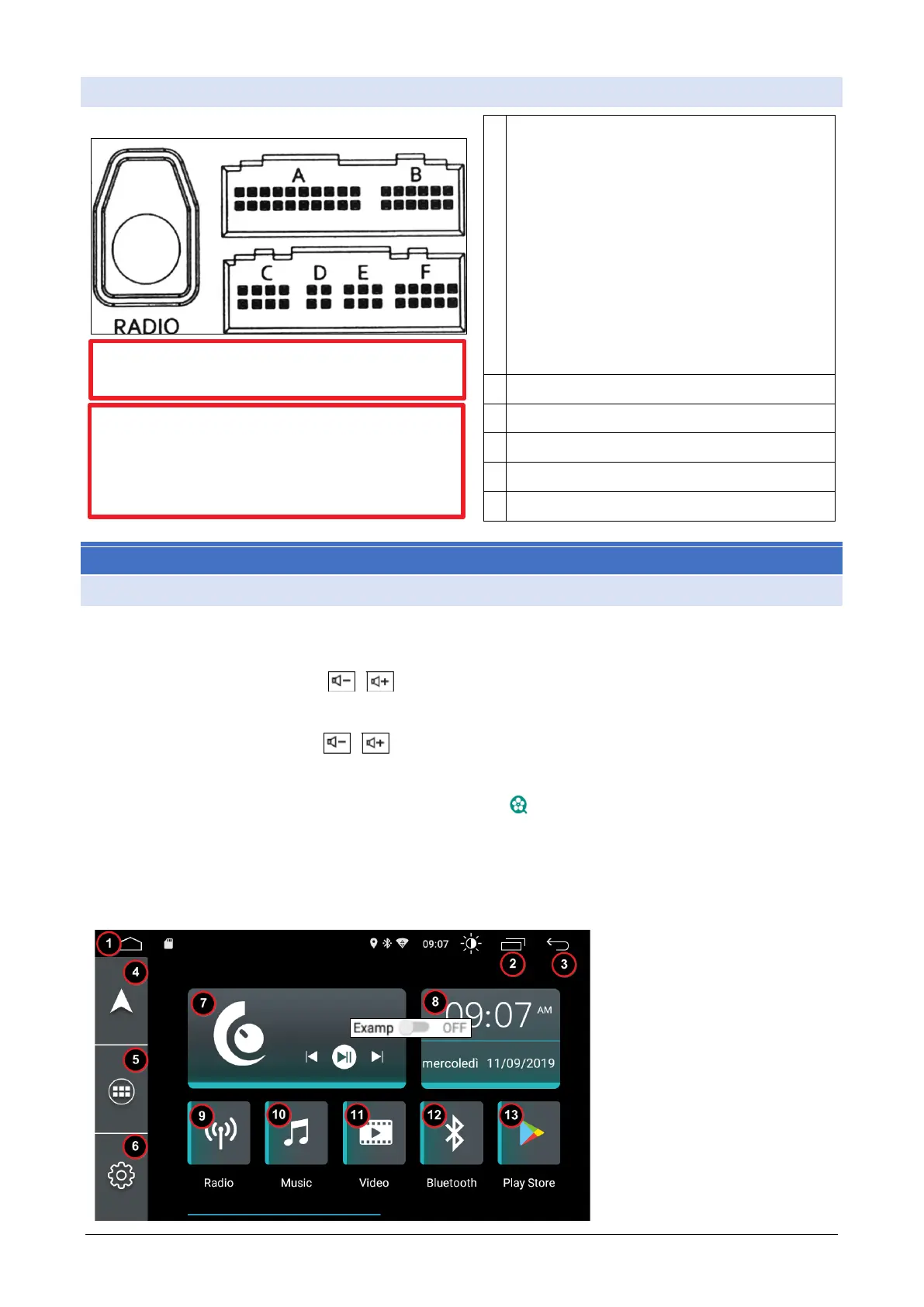
ACCESSORY CABLE:
➢ P.CONT. Amplifier control
➢ AUX L IN Pre- amplified Left Audio Input
➢ AUX R IN Pre- amplified Audio Input
➢ AUX V Video Input
➢ RCA FL Left front channel Pre- amplified
output
➢ RCA FR Right front channel Pre- amplified
output
➢ SUB Pre- amplified output for subwoofer
➢ V-OUT 1 Video Output 1
➢ V-OUT 2 Video Output 2
REAR VIEW CAMERA VIDEO INPUT
JFSOUND X SERIES
BASIC OPERATIONS
1. Turn on the radio
The radio automatically turns on when the panel is turned on
2. Volume adjustment
Volume buttons on the " panel " (some models on the volume control key of the "VOL + / VOL-") panel
can adjust the audio volume.
3. Mute Mode
Press a volume button " " the display will show the volume bar, click on the simbolor volume forthe
"mute" mode.
4. Background brightness
From the settings menu, select the “ "video" settings to adjust the brightness. Or drag the top horizontal
bar down.
5. Rear camera
If the rear camera is present the radio will show the image every time the reverse is inserted.
6. Main menu
The JFS 4C menù principale provides the following functions:
1 Home
2 Close active applications
3 Previous page
4 Start Navigator
5 All applications
6 Settings
7 Date and time
8 Panel playing
9 Radio Tuner
10 Audio Row Player
11 Video file player
12 Bluetooth connection
13 PlayStore app installation
GPS ANTENNA POWER = 3.2V
DAB+ ANTENNA POWER = 5V OR 12V
In the accessory cable there is a MIC Jack socket to
connect an external microphone (the radio is al-
ready equipped with a front panel microphone). The
external microphone is mixed with the internal mi-
crophone. No action is required to activate it.



 To Next Page