43
SETTINGS
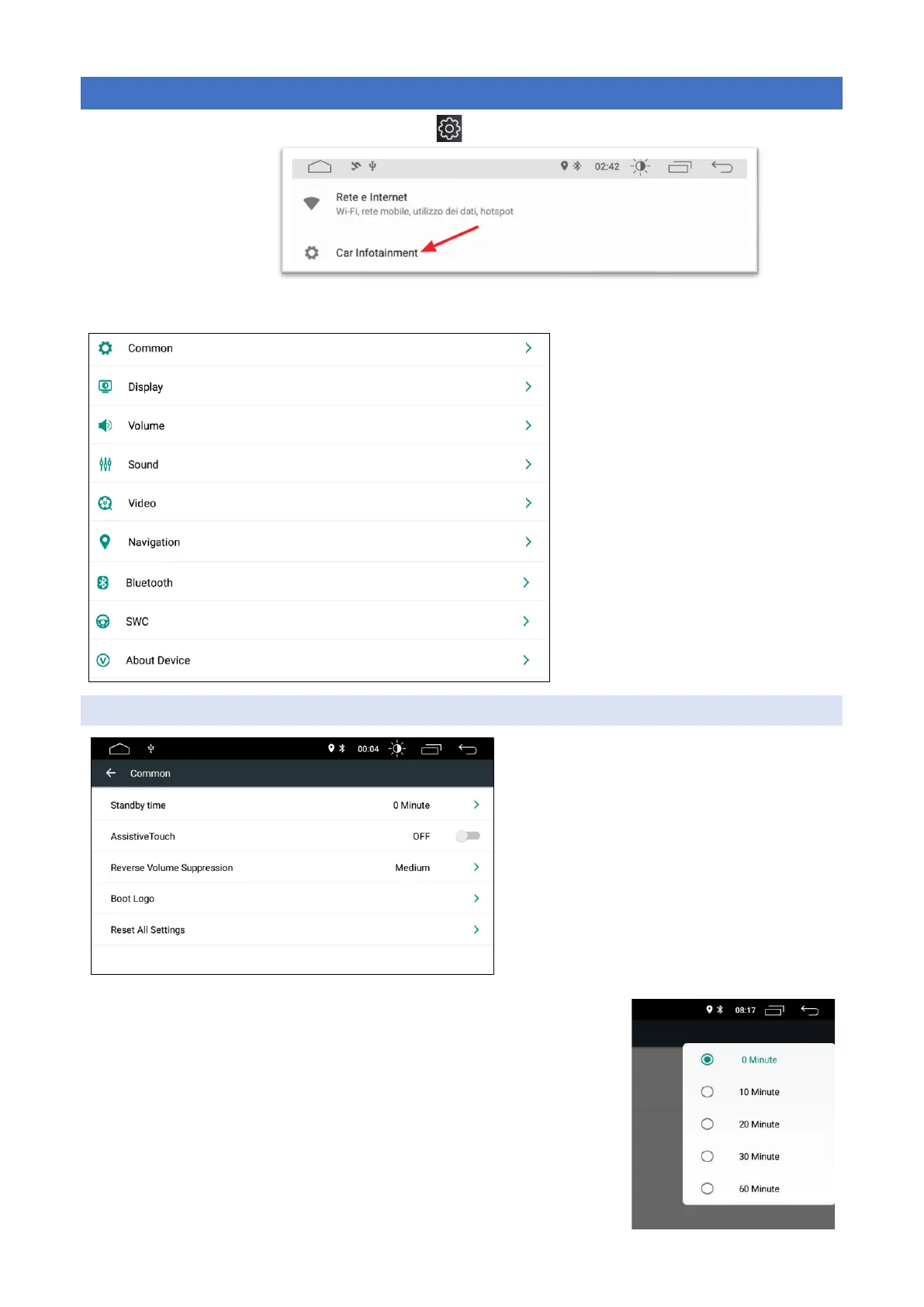
On the main menu, press the " settings " button.
Select CAR INFOTAINMENT
Click the corresponding options to access the settings option, you can drag and drop the options bar to find
the required settings.
→Common settings
→ Display settings
→Volume settings
→Sound settings
→Video settings
→Navigator settings
→Bluotooth settings
→Steering Wheel Commands Settings
→Advanced settings
COMMON
> Real shutdown delay
> Screen Touch Assistant
> Reversing audio source volume
> Logo in boot password 5678
> Reset settings
STANDBY TIME:
In order to have a quick start of the radio in case of shutdown and restart of
the panel the following operation is set: when you turn off the picture turn-
ing the car key only the monitor is turned off but the system continues to
be active, the system will turn off after a certain "Standby time". In this way
we have the possibility to leave the active system for short stops. The "0
minutes" setting sets the delay to about 20seconds. ATTENTION too long
standby time for a frequent number of stops could drain the car battery.



 To Next Page