45
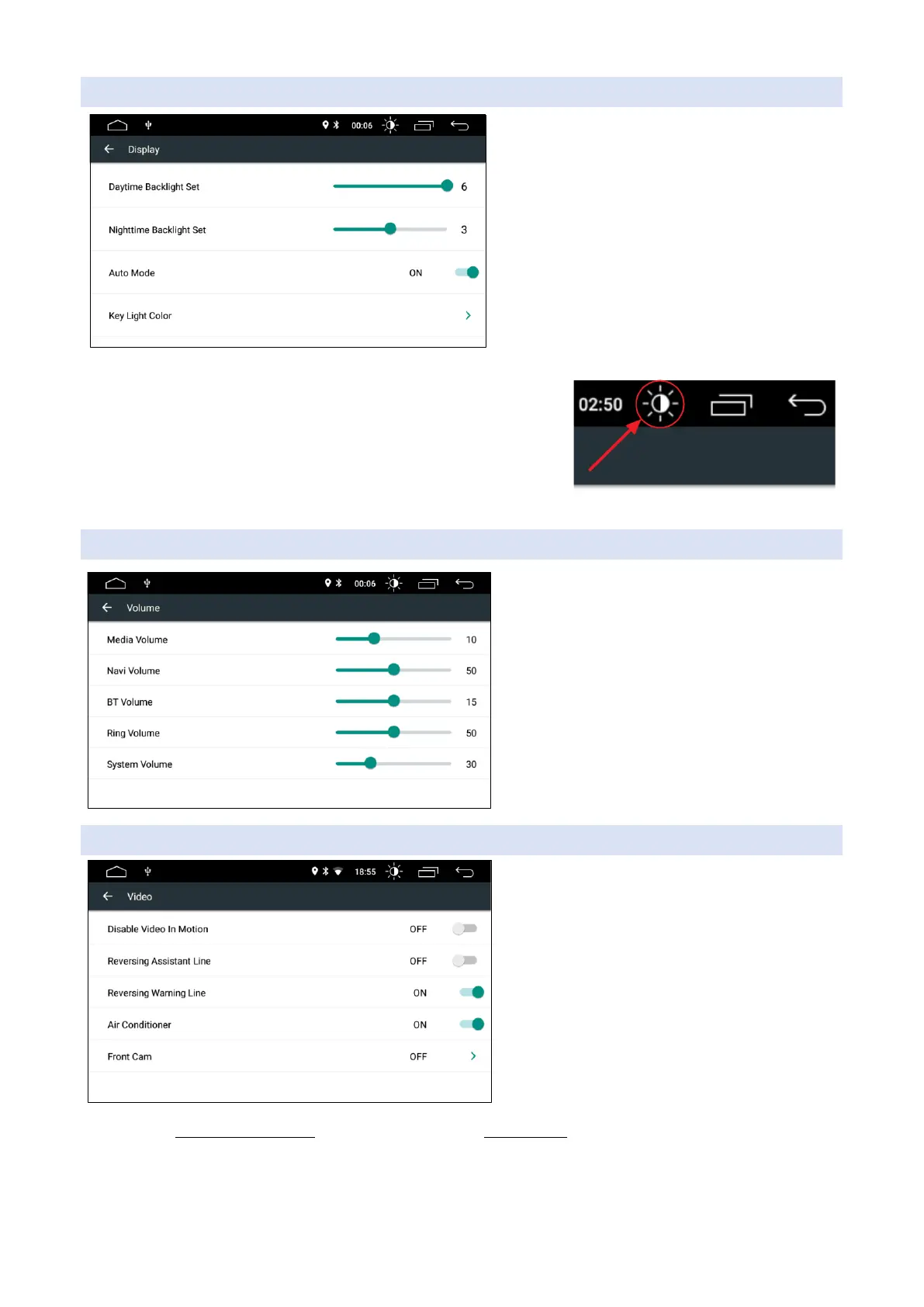
DISPLAY
>Daytime brightness level
>Night brightness level
>Automatic level change (with time)
>Change key lighting
The day and night brightness levels refer to the brightness of the
monitor in the day or night condition, this condition can be deter-
mined by the signal of the headlights (red/black wire, active head-
lights when at 12V) or if we exclude automatic mode we can vary
the three conditions of the monitor (day, night, off) by pressing on
the icon in the figure.
Key coloring will only be present on models that have RGB key lighting
VOLUME
This section controls all audio channels on the
device by setting its level. To change the vol-
ume level, simply move the cursor and exit the
page.
VIDEO
>Enable video lock on the go
>Enable guidelines when reversing
>Enable collision alarm (predisposed cars only)
>View the air conditioner (ready-made cars only)
>Front Camera View Time
ATTENTION: setting the block of moving videos is a legal obligation, the unlock function is allowed only for
non-mobile workstations (exhibitors, audio consoles, etc.) , when Jfsound radio is installed on moving vehi-
cles (vehicles, campers, trucks etc.. vehicle) this option must always remain active.
JFsound srl assumes no responsibility for improper use of the product.



 To Next Page