Need help?
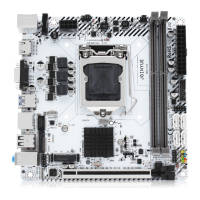
Do you have a question about the JGINYUE H97I-GAMING and is the answer not in the manual?
Step-by-step guide for installing the CPU and its cooler.
Instructions for inserting DDR3 DIMM memory modules into the slots.
Procedure for installing expansion cards into the PCI Express slot.
Diagram and overview of the motherboard's external I/O connectors.
Details the USB 2.0 port functionality for connecting USB devices.
Describes the DisplayPort for high-quality digital imaging and audio output.
Explains the HDMI port capabilities for connecting HDMI-supported monitors.
Covers the USB 3.0 port for high-speed data transfer with USB devices.
Details the Gigabit Ethernet LAN port and its LED status indicators.
Describes the Line-in, Line-out, and Mic-in audio jacks for audio devices.
Explains the PS/2 port for connecting keyboards and mice.
Details front panel connectors like F_PANEL1, SPEAK1, and JAUD1.
Covers SATA connectors, M.2 slot, and WLAN-1 slot for storage and WiFi.
Instructions for discharging the CMOS to reset BIOS settings.
Details the ATXPWR1 and JATXPWR1 power connectors.
Details CPU_FAN1 and SYS_FAN1 for CPU and system cooling fans.
Explains the JUSB2 header for connecting front panel USB 2.0 ports.
Details the FUSB3 header for connecting front panel USB 3.0 ports.
Explains the functions and importance of BIOS settings.
Instructions on how to access the BIOS setup menu.
Methods for restoring default BIOS settings to resolve issues.
 General
| Brand | JGINYUE |
|---|---|
| Model | H97I-GAMING |
| Category | Motherboard |
| Language | English |

 To Next Page