Need help?
Do you have a question about the JGINYUE H97M-VHPLUS and is the answer not in the manual?
Describes the USB 2.0 port functionality for USB devices.
Describes the VGA port for analog video signal transmission.
Supports 4K and 1080p, for HDMI-supported monitors.
Supports USB 3.0 and USB 2.0 specifications for USB devices.
Gigabit Ethernet port for internet connection up to 1000Mbps/s.
Includes Line-in, Line-out, and Mic-in jacks for audio input/output.
Ports for green mouse and blue keyboard.
Connects front panel power switch, LEDs, and reset switch.
Connector for buzzer and speaker on the front panel.
Connects front panel audio jacks (MIC, headphone).
Provides a serial port via an optional COM port cable.
Four SATA 6Gb/s interface ports for connecting SATA devices.
Slot for installing an M.2 SSD at a 30-degree angle.
M.2 WiFi interface compatible with WiFi AC expansion cards.
Jumper for clearing CMOS settings to reset BIOS to defaults.
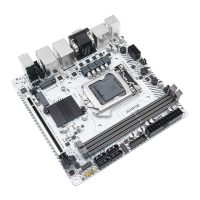
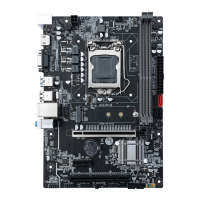
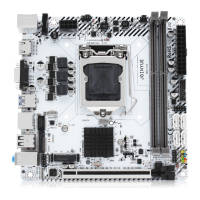
This document serves as a user manual for the H97M-VH PLUS motherboard, providing comprehensive instructions for its installation, configuration, and maintenance. The manual is designed to guide users through the process of setting up their computer system, from installing core components like the CPU and memory to connecting various peripherals and configuring the BIOS.
The motherboard is a central component of any computer system, acting as the main circuit board that connects and allows communication between all other hardware components. Its primary function is to provide the electrical connections and communication pathways for the CPU, RAM, storage devices, expansion cards, and external peripherals. The H97M-VH PLUS is designed to support a range of Intel processors, specifically the Core i7/i5/i3 Celeron/Pentium/E3 LGA1150 pin series, making it suitable for a variety of computing needs, from general office use to more demanding tasks.
The manual begins with a critical section on installing the CPU and its fan. This process requires careful attention to detail to prevent damage to the delicate pins of the CPU socket. Users are instructed to align the CPU correctly with the LGA 1150 socket, ensuring that the locking lever is lifted before insertion and then secured afterward. A crucial maintenance tip provided here is to apply an even layer of thermal paste between the CPU and the heatsink to enhance heat dissipation, which is vital for preventing overheating and ensuring the longevity of the processor. The importance of installing the CPU cooler before powering on the system is also emphasized, as running the CPU without proper cooling can lead to immediate damage.
Following the CPU installation, the manual details the process of installing memory modules. The H97M-VH PLUS motherboard features four DDR3 DIMM slots, supporting a maximum capacity of 32GB. Users are guided to wrench the latches outwards, align the memory module with the notch in the slot, and then flip the latches back to secure it. A key usage feature highlighted is the motherboard's support for Dual Channel Technology, which can enhance memory performance. However, it's noted that Dual-Channel mode requires at least two memory modules to be installed. Maintenance advice includes ensuring that the motherboard supports the specific memory modules being used and, ideally, using memory of the same capacity, brand, speed, and chips for optimal stability. The foolproof design of memory modules, allowing insertion in only one direction, is also mentioned as a helpful feature to prevent incorrect installation.
The installation of expansion cards, such as graphics cards or other PCI Express devices, is also covered. The motherboard provides a PCI Express 3.0 x16 slot and a PCI Express 2.0 x1 slot. Users are instructed to firmly insert the expansion card into an available slot. A critical maintenance warning is given: always turn off the power supply and unplug the power cable before adding or removing expansion cards to prevent hardware damage and short circuits.
The manual then moves on to describe the various connectors available on the H97M-VH PLUS motherboard, both on the back panel and internally.
Back Panel Connectors: These are the ports visible on the rear of the computer case, allowing for easy connection of external peripherals.
Internal Connectors: These connectors are located on the motherboard itself and are used to connect internal components or front-panel ports of the computer case.
The final section of the manual focuses on the BIOS (Basic Input and Output System). The BIOS is firmware that initializes and tests hardware components during startup and loads the operating system. It also allows users to modify basic system configuration settings.
Entering BIOS Setup: Users can access the BIOS setup menu by pressing the
Resetting BIOS: The manual provides methods for resetting BIOS settings to their default values, which is a common troubleshooting step. Users can press F6 within the BIOS to load optimized defaults or short the Clear CMOS jumper (JCMOS1) on the motherboard. A critical maintenance warning reiterates the need to turn off the computer before clearing CMOS data.
Maintenance Features and Important Notes: Throughout the manual, several important notes and maintenance features are highlighted:
In summary, the H97M-VH PLUS user manual provides essential guidance for assembling and maintaining a computer system based on this motherboard. It emphasizes careful installation procedures, highlights key connectivity options, and offers crucial maintenance tips to ensure system stability and longevity.
 General
| Form Factor | Micro ATX |
|---|---|
| Socket | LGA 1150 |
| Chipset | Intel H97 |
| Memory Type | DDR3 |
| Memory Slots | 2 |
| Maximum Memory | 16 GB |
| Memory Standard | DDR3 1600/1333 MHz |
| PCI Express x16 | 1 |
| PCI Express x1 | 1 |
| SATA 6Gb/s | 6 |
| USB 3.0 | 4 |
| USB 2.0 | 6 |
| Video Outputs | VGA, HDMI |
| LAN | Gigabit LAN |

 To Next Page