Need help?
Do you have a question about the JJC SR-RC4 and is the answer not in the manual?
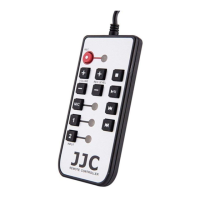
Used for recording standby and marking. Indicator shows red during recording and blinks during standby.
Stops operation of recording and playback.
Manages recording and playback, including temporary stop and restart.
Selects rewinding and files.
Selects fast forwarding and files.
Adjusts recording level.
Adjusts recording level.
Selects input source; indicator shows selected source in green.
Port for connecting the remote commander cable.
The JJC SR-RC4 is a remote commander designed to expand recording scenes for various ZOOM products, such as the H4n. It allows users to operate the main unit from a distance, providing greater flexibility in recording setups.
The SR-RC4 remote commander features several buttons and indicators for controlling recording, playback, and input settings:
The SR-RC4 is designed to enhance the user experience by enabling remote control of ZOOM recording devices. This allows for more convenient placement of the main unit, potentially in locations that are difficult to access directly during recording. Users can manage recording, playback, and audio levels without needing to be physically next to the recorder.
To ensure the longevity and proper functioning of the SR-RC4, users should adhere to the following safety and care guidelines:
Safety Precaution / Usage Precaution:
How to Take Care of SR-RC4:
The JJC SR-RC4 is a trademark of Shenzhen JinJiaCheng Photography Equipment Co., Ltd, and ZOOM is a trademark of ZOOM Corporation.
 General
| Brand | JJC |
|---|---|
| Model | SR-RC4 |
| Category | Remote Control |
| Language | English |

 To Next Page