Page 19 | e110 & e112
WARNING
WARNING! TURN OFF THE E-SUB(S) AND ALL OTHER EQUIPMENT IN THE
SYSTEM BEFORE MAKING OR CHANGING ANY CONNECTIONS!
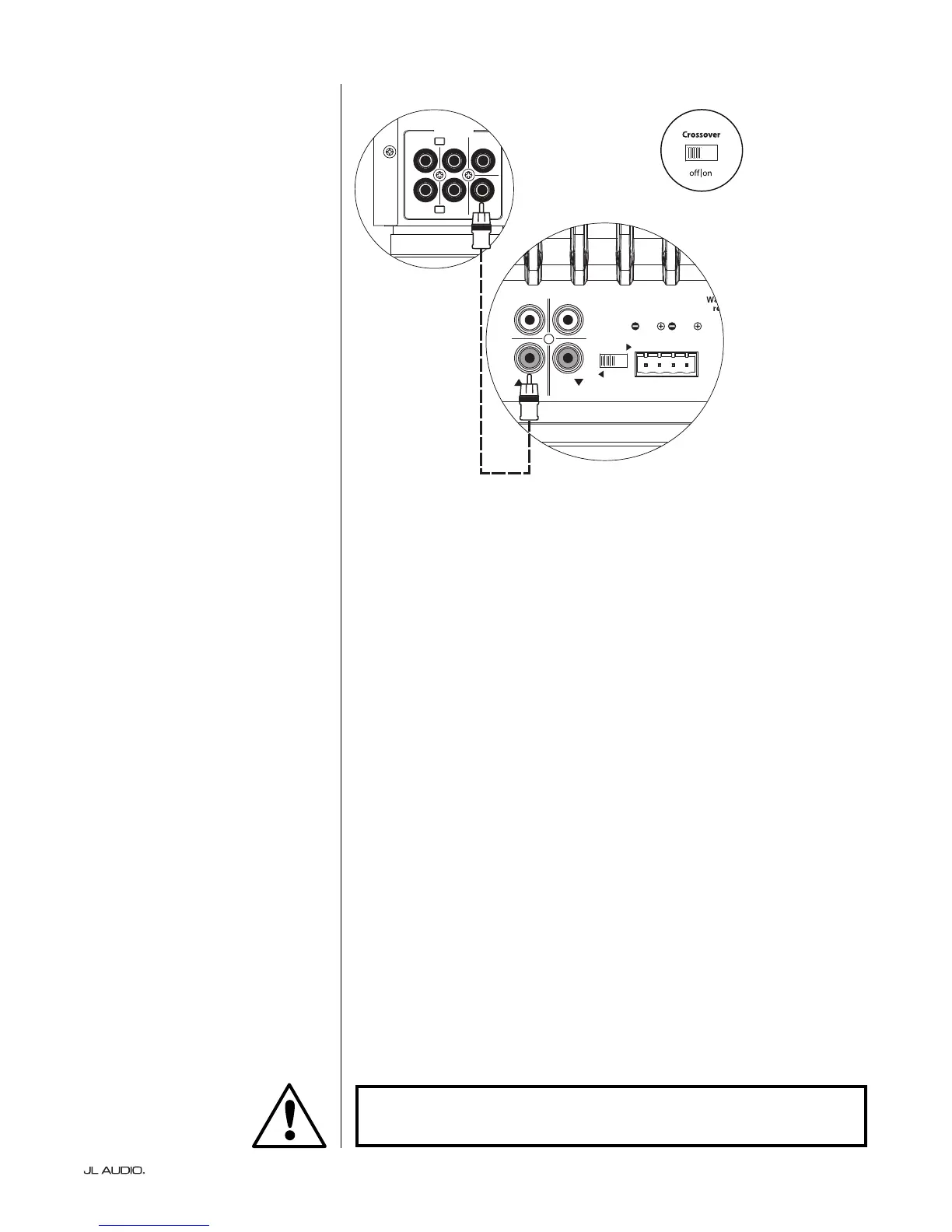
SUB
REAR
REAR CENTER
FRONT
FRONT
R
L
PRE OUT
E-SUB REAR PANEL
RECEIVER / PROCESSOR
E-SUB TOP CONTROL PANEL
SYSTEM CONNECTION DIAGRAM 1:
One E-Sub to Home Theater Receiver
or Home Theater Preamp/Processor
Most home theater receivers and
preamp/processors provide a single
(mono) subwoofer line-level output.
When connecting a mono
subwoofer output to your E-Sub, you
only need to connect to one of the
E-Sub’s “Line Inputs” (Le or Right). Use
a good-quality audio interconnect cable
with RCA-type connectors.
In most cases, you will use the bass
management/crossover features of the
receiver or preamp/processor. is
requires that the E-Sub’s “Crossover”
switch is placed in the “O ” position.


 To Next Page