YOUR WARRANTY
You may register your product at jlabaudio.com/register. All warranty claims are subject to Jlab
Audio authorization and at our sole discretion. Retain your proof of purchase to ensure warranty
coverage.
CONTACT US
Reach out us at: service@jlabaudio.com or visit jlabaudio.com/contact
Contents [ hide
1 AUDIO BURN-IN
2 INSTRUCTIONS FOR USE
3 BUTTON FUNCTIONS
4 EQUALIZER MODES
5 VOICE PROMPTS
6 CONNECT BLUETOOTH HEADPHONES: FIRST TIME SET UP
7 RECURRING USE
8 CONNECTION TROUBLESHOOTING
8.1 I DO NOT SEE JLAB EPIC SPORT IN MY DEVICE
8.2 JLAB EPIC SPORT DOES NOT RECONNECT TO MY DEVICE AFTER POWERING ON
8.3 BLUETOOTH IS CONNECTING TO AN UNWANTED DEVICE
9 FITTING
10 CABLE CLIP USE
11 CHARGING
12 CAUTIONS
12.1 Related Manuals:
AUDIO BURN-IN
Burn-in is the process for exercising new audio equipment. Most headphones require at least 40
hours of burn-in time to reach their optimal performing state. The main purpose of the burn-in
process is to loosen the diaphragm of a newly crafted headphone and to stress the headphone
driver. Most audiophiles agree that the sound quality will be noticeably improved after burn-in.
Burn-in your audio equipment with the JLab Audio app available on the App Store and Google
Play Or download our burn-in method at: jlabaudio.com/pages/audio-burn-in
INSTRUCTIONS FOR USE
1. Lower the volume on your audio device.
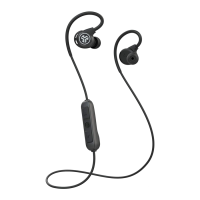
2. Gently insert the earbuds into your ears.
3. Gradually raise the volume to a comfortable level.
4. In order to block outside noise, position the earbuds so they form a seal inside your ear.
5. Test the various gel tip options to find the best fit.




 To Next Page