JLABAUDIO.COM
CAUTIONS
• Avoid getting moisture or liquids on the headphone cups.
• Avoid extreme heat, cold, and humidity.
• Avoid dropping or crushing headphones, stressing the cable by
rapid pulling or extreme force, or bending the cable at a sharp
angle.
• Wax may build up in headphone cups, lowering the sound quality.
Carefully remove the wax with a cotton swab or other small tool to
improve the sound quality.
• If you experience discomfort or pain, try lowering the volume
or discontinuing use temporarily.
• If you experience regular discomfort while using this product,
discontinue use and consult your physician.
• We recommend you treat your headphones as you would a nice
pair of sunglasses and keep them in safe location when not in use.
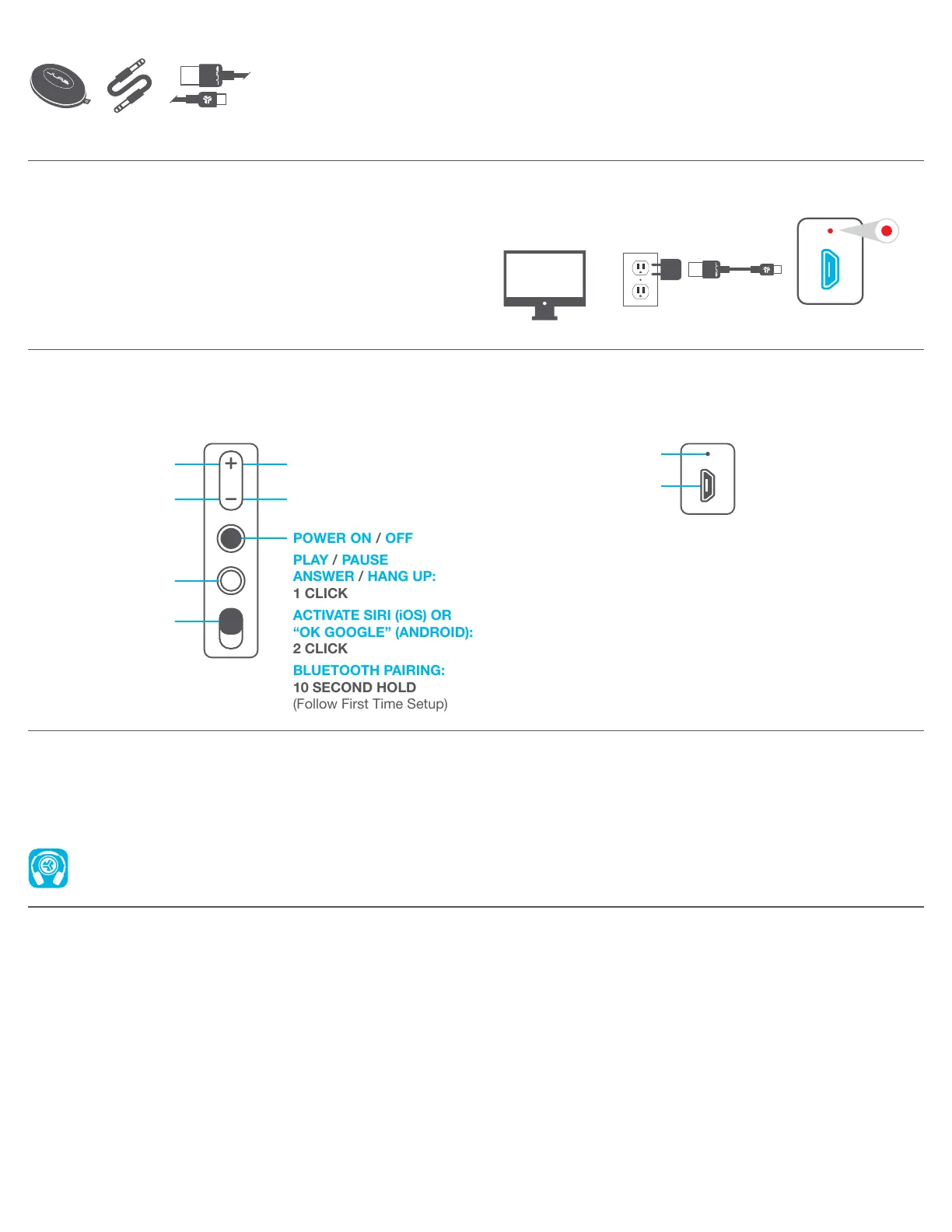
CHARGING
Note: For optimum performance, charge overnight with Micro
USB cable prior to using.
Connect the Micro USB to the headphone and connect the USB
into a computer or AC adaptor (not included). Make sure the USB
connection has a power output source.
Solid red light indicates the headphone is charging. When it turns
off, charging is complete. Allow about 3-4 hours to fully charge.
HEADPHONE PORTS / BUTTON FUNCTIONS
NOISE CANCELING
ON / OFF
3.5MM JACK /
AUX IN
VOLUME UP:
1 CLICK
MIC
MICRO USB
INPUT
LEFT EARCUP RIGHT EARCUP
NC
OR
WARM-UP YOUR HEADPHONES
Optional: Burn-in is the process for exercising new audio equipment. We recommend 40 hours of burn-in time for most headphones to reach
optimal performance. The main purpose of the process is to loosen the diaphragm of a newly crafted headphone and to stress the headphone
driver. Normal, everyday use can also burn-in the headphones though JLab’s proprietary burn-in provides an ideal mix of sounds and
frequency sweeps to achieve this.
Burn-in your audio equipment with the JLab Audio app available on the App Store and Google Play.
Or access the burn-in method at: jlabaudio.com/burnin
ACCESSORIES
TRAVEL
CASE
MICRO USB
CABLE
AUX
CABLE
POWER ON / OFF
PLAY / PAUSE
ANSWER / HANG UP:
1 CLICK
ACTIVATE SIRI (iOS) OR
“OK GOOGLE” (ANDROID):
2 CLICK
BLUETOOTH PAIRING:
10 SECOND HOLD
(Follow First Time Setup)
VOLUME DOWN:
1 CLICK
TRACK FORWARD:
2 SECOND HOLD
TRACK BACKWARD:
2 SECOND HOLD


 To Previous Page