BAND1
BAND2
PROGRAM
Min
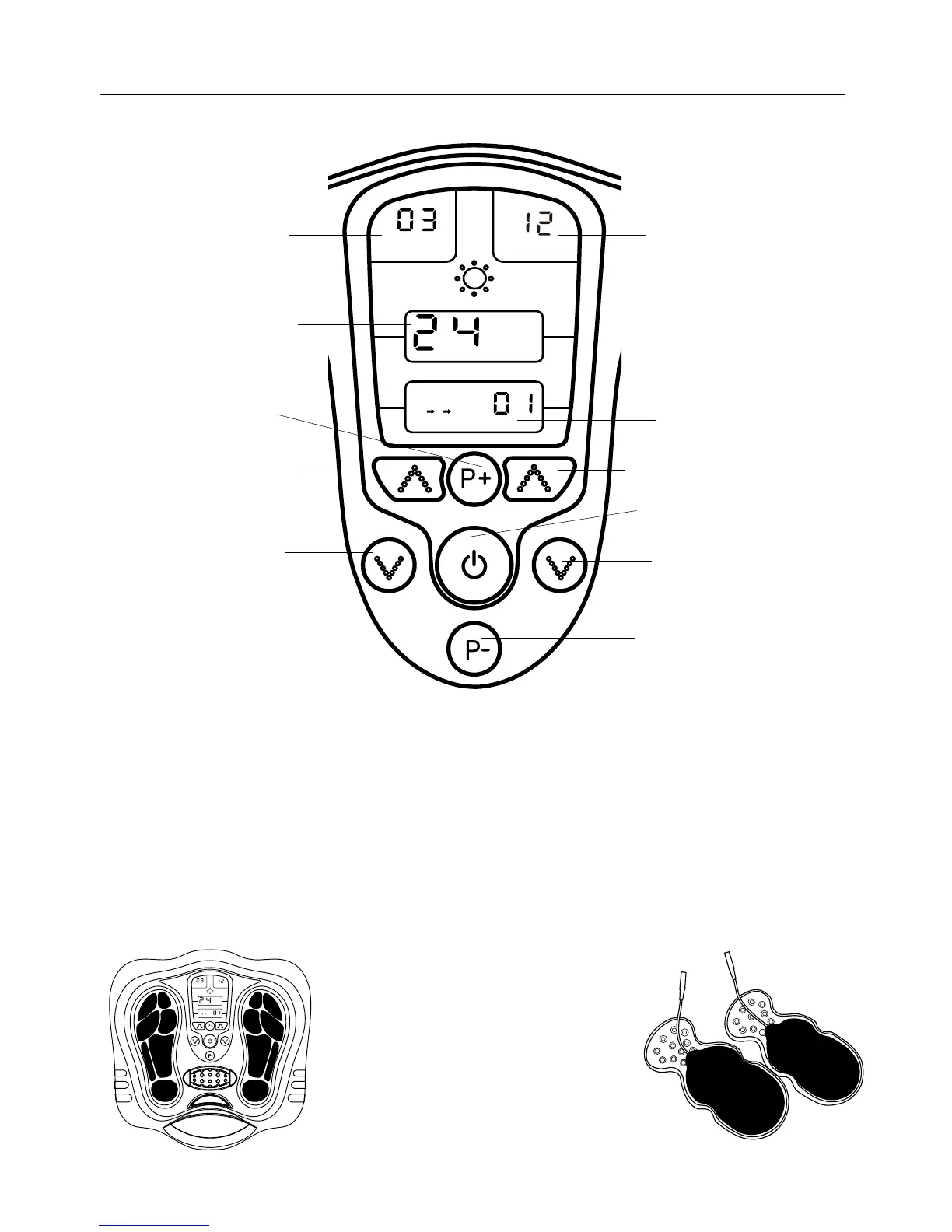
Control Panel
LCD showing the
Intensity Level
for feet – maximum 40
Levels
LCD showing the
Intensity Level
for body – maximum 40
Levels
LCD showing the Timer
LCD showing the
Program
Indication from 1 – 10
Modes
B
A
F
D
C
E
G
BAND1
BAND2
PROGRAM
Min
A. To switch the unit on or off
B. Choose from one of the 10 pre-programmed massage programs ~ Upward
C. Choose from one of the 10 pre-programmed massage programs ~ Downward
D. Increase the output intensity of foot (BAND 1) FROM 1- 40 LEVEL
E. Decrease the output intensity of foot (BAND 1) FROM 1- 40 LEVEL
F. Increase the output intensity of body (BAND 2) FROM 1- 40 LEVEL
G. Decrease the output intensity of body (BAND 2) FROM 1- 40 LEVEL
On the device (Figure 1) the black
colour area on the device which is
the electrode area for the sole.
On the gel pad (Figure 2), the black
colour area on the sticky part is the
electrode area for the body,
size is 5 cm x 9 cm.
Electrode Area
Fig 1 Fig 2
Functions and programmes
9


 To Next Page