EN
17
English
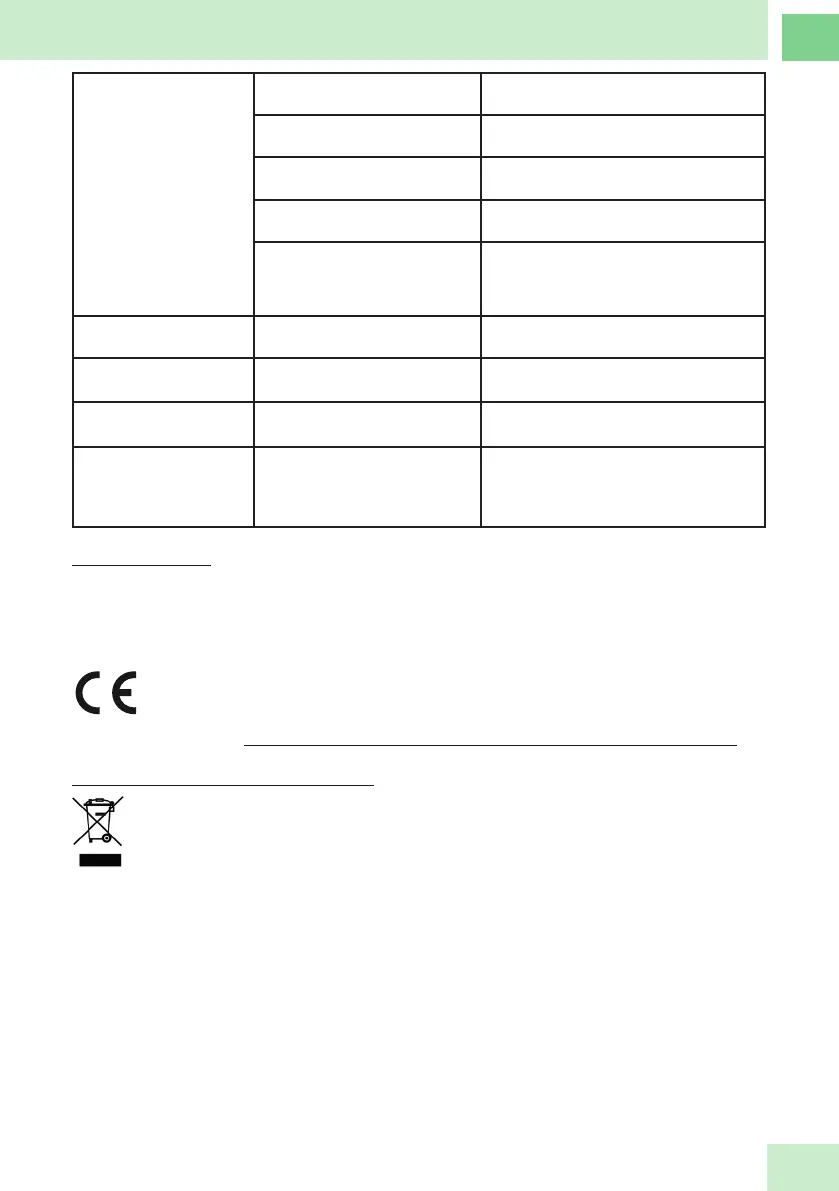
Doesn’t connect with the
app
Is the appliance connected? Check that the device is connected, see
point Wi-Fi connection and rst start-up
Do you have your home Wi-Fi
active?
To make the connection, the device will
use your home Wi-Fi
Do you have your mobile connec-
ted to the Wi-Fi network?
Connect the Wi-Fi network of your mobile
have you assembled the blade
correctly?
Check that the blade is correctly mounted,
see point Removing/Installing the blades
does your Wi-Fi network work at
2.4GHz?
You must adjust your router to the 2.4GHz
frequency, normally by disconnecting the
5G (5GHz) the router will start working at
2.4GHz
The blade does not turn Have you mounted the lid
correctly?
Check that the cover is correctly assem-
bled, see the point to t the cover
Code E01 ashes on the
screen
The NTC temperature sensor is
damaged
Contact technical support
Code E03 ashes on the
screen
The NTC temperature sensor is
damaged
Contact technical support
Code E03 ashes on the
screen
An internal component is
damaged (motor speed is not
controlled, it runs and after 5
seconds it stops)
Contact technical support
TECHNICAL DATA
220-240V ~ 50-60Hz
Engine power 550W
Motor power + heating 1200W.
Maximum weight capacity: 5000g
Weight precision: d=1g
This product complies with directives CE-RED 2014/53/EU, EMC 2014/30/EU, 2011/65/
EU & 2015/863/EU ROHS.
See full CE declaration: https://www.jocca.es/design/Declaration_of_conformity_CE_2145.pdf
PRODUCT RECYCLING – ENVIROMENT
Do not throw this product in the trash at the end of its useful life. Take it to a waste collection
point, designated for this purpose (subject to the 2012/19/ EU WEEE directive)


 To Next Page