C. CONTROL PANEL AND REMOTE CONTROLLER INSTRUCTION
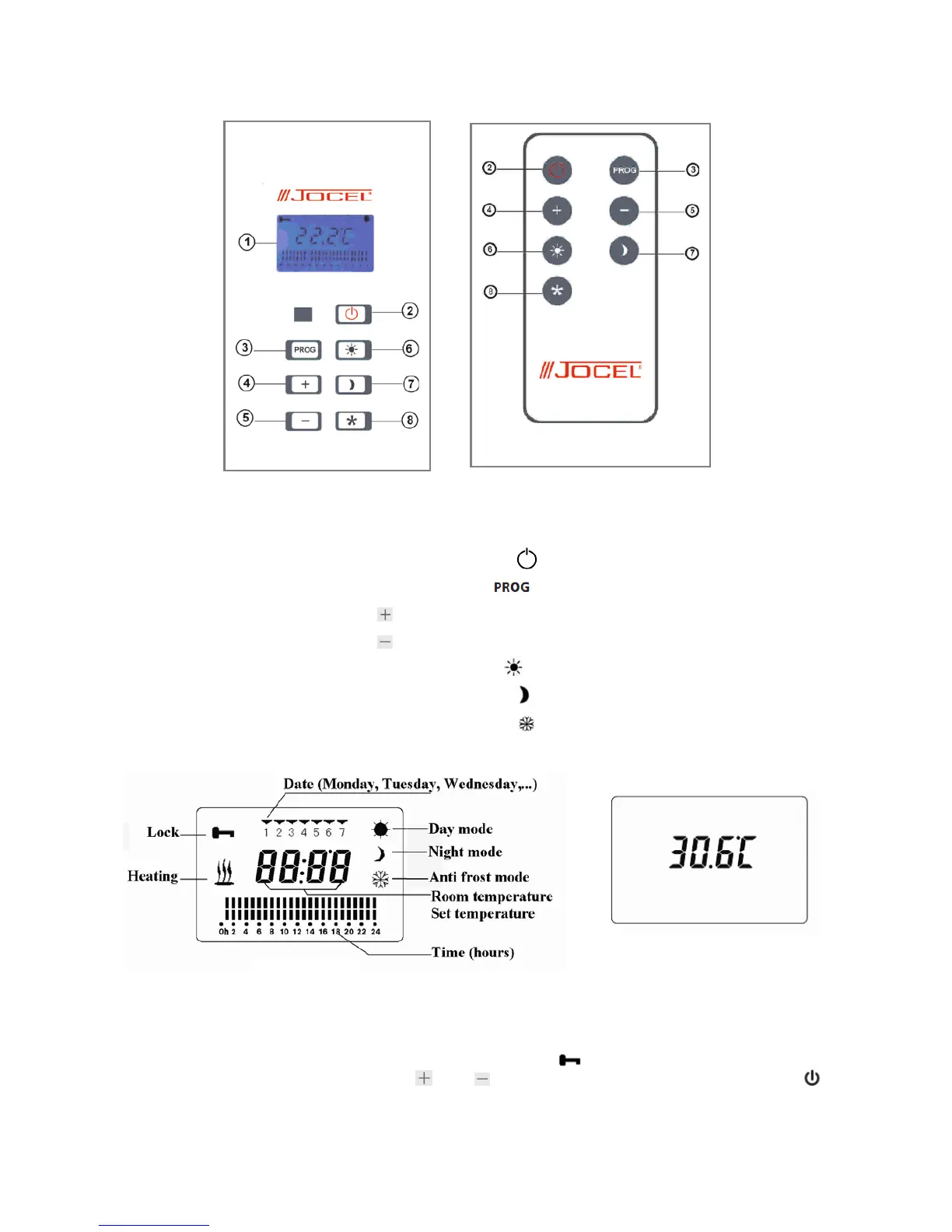
Control panel and remote controller are shown below (figure 7):
(1) Display window
(2) Turn on/off button
(3) Program button “
”
(4) “
” button
(5) “
” button
(6) Day mode button “
” (comfortable mode)
(7) Night mode button “
” (economical mode)
(8) Anti-freezing button“ ”
D. Instruction for LCD
E. OPERATING INSTRUCTIONS
a) Automatic locking
The buttons on the heater become locked in the display “
” if no key is pressed within one
minute. To unlock them you must press “
”and “ ” on the same time for 3 minutes, or press “ ”
twice.
The heater can operate in two different ways, manual or programmed.
-20-
Figure 8
Figure 9
Figure 7


 To Next Page