11
Mix Input
This is a jack on the rear panel, which allows you to connect a second audio
source (for example another Joemeek threeQ!) The Mix input comes after
the threeQ’s Preamp, Compressor and Meequalizer, but before the Output
Gain control. So the second source is not affected by any of the threeQ’s
signal processing but is mixed with the material which has been processed
by the threeQ. The usual application for this is in overdubbing in simple
recording setups.
The Mix Input is balanced and wired as follows:
Tip: + (hot)
Ring: - (cold)
Sleeve: ground
Another application is in a simple live performance setup. For example one
threeQ could process a vocal while a second processed a guitar. The two
signals would then be mixed before feeding a PA slave amplifier. Perhaps
a drum machine would also be added in to the spare Mix input on the first
threeQ. Voila! A complete performance mix without a mixer. In fact three
or more threeQ’s could be “daisy-chained” in this way, by connecting the
output of the first to the Mix input of the second and so on. The Output
Gain control on the last threeQ in the chain provides the overall volume
for the PA.
Output Stage
OUTPUT GAIN
This output volume control provides up to 16dB of gain, which may be
useful when a lot of compression is going on. It also goes right down to
nothing and so acts as a fader to fade a sound out completely.
VU METER
The LED VU Meter shows signal level at the outputs, after the Output
Gain fader. It covers the range -24dB to +12dB in eight steps. Note that
this is relative to the selected operating level of “+4dBu” or “-10dBv”. In
other words if you have selected “4dBu” and the meter reads “0”, then
you have +4dBu coming out of the output sockets. If you have selected
“-10dBv” and the meter reads “0”, then you have -10dBv coming out
of the output sockets.
CONNECTORS
Two identical paralleled output jacks are provided, so you can simul-
taneously feed (say) a recorder and a monitor amplifier. The adjacent
switch selects the output operating level to either +4dBu (suits most
professional studio equipment) or -10dBv (suits semi-pro or hi-fi equip-
ment). Check with the handbook for whatever you are feeding, to find
out which level is required.
These outputs are balanced and wired as follows:
Tip: + (hot)
Ring: - (cold)
Sleeve: ground
Balanced or Unbalanced
Here’s the clever part: to run unbalanced, just plug in a mono jack plug.
This increases the gain of the “+” signal by 6dB, so there is no drop
in level compared with balanced gear. Note that in the threeQ these
two outputs are not isolated from each other, so unbalancing one will
unbalance the other one as well.
Technical Stuff
All outputs on all NextGen Joemeek products are properly balanced,
which is to say there is a signal on both pins! In this way the maximum
possible common-mode rejection of interference, can be achieved at
the receiving end.
10
Meequalizer
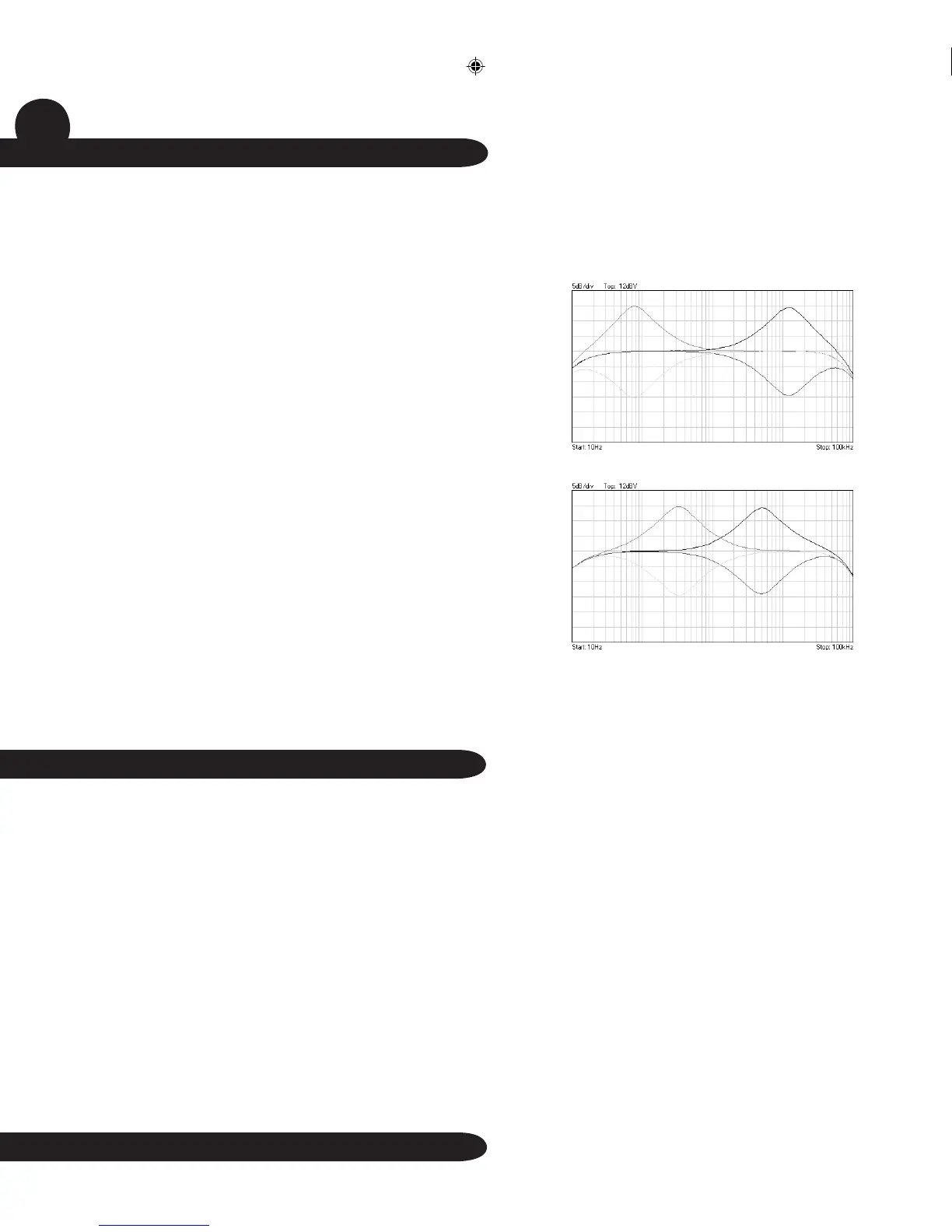
The threeQ “Meequalizer” is a highly effective and musically rewarding
three-band equaliser, or tone control system. Each stage allows boost or
cut of up to 15dB around the frequency in question. The “EQ” switch turns
the equalizer on, and the green LED lights when active.
The LF or bass section is centred on 80Hz, the frequency most effective in
bringing out bass lines and kick drums when boosted. Cutting can be used
to reduce unwanted LF noise, such as hum or rumble.
The HF or treble section is centred at 12kHz and boosting this band gives a
sense of “air” or “sparkle” to vocals, instruments and mixes, without boost-
ing harsh upper-mid frequencies. Alternatively with bass instruments, cut-
ting will reduce HF noise such as hiss and crackle.
The Mid band can be tuned or “swept” anywhere between 300Hz and 5kHz
(at either end it will also have some effect on frequencies below 300Hz or
above 5kHz). This effectively covers the whole of the important range of mid
frequencies. It may help to think of it as like a graphic equalizer, only instead
of lots of frequency bands, you have just one, but it can be moved to cover
any given frequency band. Cutting the Mid can reduce sibilance, boominess
or other annoying resonances. Boosting can bring out the body of a vocal,
or the harmonics of a guitar or any other instrument. Increasing or reducing
the “presence” of an instrument or vocal in this way, can appear to move the
sound forwards or backwards in a mix.
The Meequalizer is after the Preamplifier, the Insert Point and the
Compressor.
Technical stuff
Each section of the Meequalizer has a peaking or “bell” shaped
frequency response, which will be found to be musically more satis-
fying than conventional “shelving” equalisers. The use of bell curves at
LF and HF also avoids boosting subsonics and ultrasonics which can
have adverse effects on other studio equipment, such as recorders,
monitor amplifiers and speakers. The “Q” value of the peaking filters
is 1.9 (or 1 and 2/3 octaves). Zero phase distortion ensures the best
possible audio coherence.
LF and HF frequency response
Mid frequency response (at 300Hz and 5kHz)


 To Next Page
 Loading...