Oxford
®
Smart Monitor
7
English
5. Smart Monitor Display
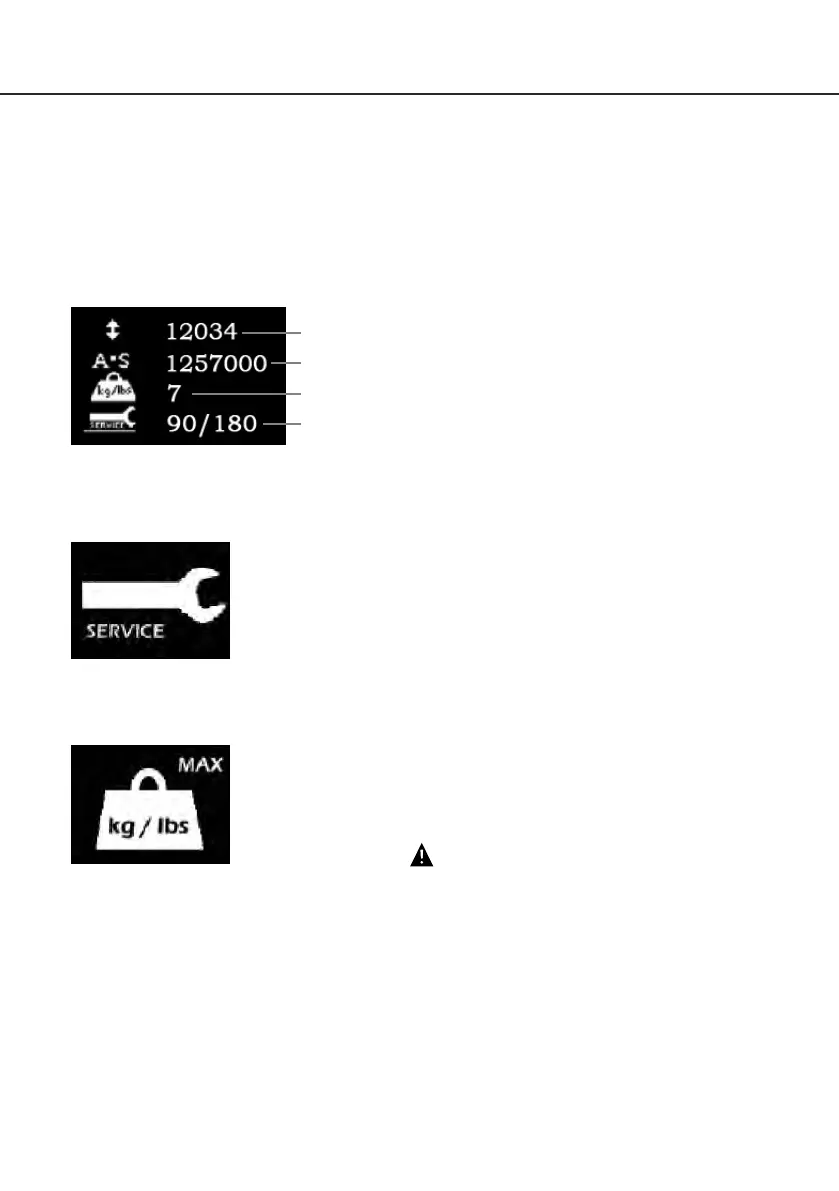
The Oxford Smart Monitor has the option to read out information via the LCD display screen. It is
possible to read out total lifting cycles, total work done, overloads and number of days since last
service, which can be used to quickly and easily evaluate the condition of the lift actuator.
This information is accessed by a ½ second press on the ‘RAISE’ button on the User Handset or
redundant ‘RAISE’ button on the Smart Monitor.
Service & Usage Information
When it is time for a service, the service symbol will appear on the
display. In addition, when the User Handset is activated, the Smart
Monitor will give an audible signal giving notice to users that a service
is required.
The service symbol will be displayed each time the raise or lower keys
are depressed on the User Handset. When the service symbol is displayed,
contact your authorised service provider immediately to arrange a service.
If the lift stops because of an overload (an attempt to lift more than the
safe working load) the overload symbol will appear on the LCD display
and the lift will cease to operate until the additional load (above the
SWL) has been removed.
WARNING
If the LCD display screen on your Smart Monitor has recorded
an overload, Joerns Healthcare recommend that ALL routine
daily checks are carried out on the lift prior to further use (for a
list of daily checks, please refer to your lift user manual). Joerns
Healthcare also recommend that you contact your authorised
Oxford service provider for additional guidance.
Total Lifting Cycles
Total Work Done (Amps * Seconds)
Number of Overloads
Number of Days (since last service) /
Number of Days (between services)


 To Next Page