Issue 2.0W 12/12/2012 Church Organ World Sequencer Plus - User Manual Page 8 of 27
When the card is plugged in correctly the display will show a message:-
If a new card is plugged in the display will show a message:-
Pressing any key will cause the display to show the main menu. With a card installed the system should be
working.
6. Controls
To access the main menu press the Stop and Left Arrow Buttons simultaneously.
7. Display Menu System
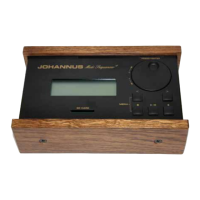
Rotary Selector &
Push Button
Display Screen
SD Card Slot
Arrow Right Button ( > )
Record Button ( )
Play/Pause Button ( /|| )
Stop Button ( )
Arrow Left Button ( < )


 To Next Page