8
Notes:
- VHF cluster: the display shows L05 to L10 for the standard "L" channels and 05 to 12 for the "B/G" standard channels.
-
Single channel mode:
when the Start Channel (
Start
) is selected, the Stop Channel (
Stop
) is automatically set at the same value.
- Park function:
To switch off a cluster, select
Start
and set the value to 00. The
Stop
value is automatically set to 00.
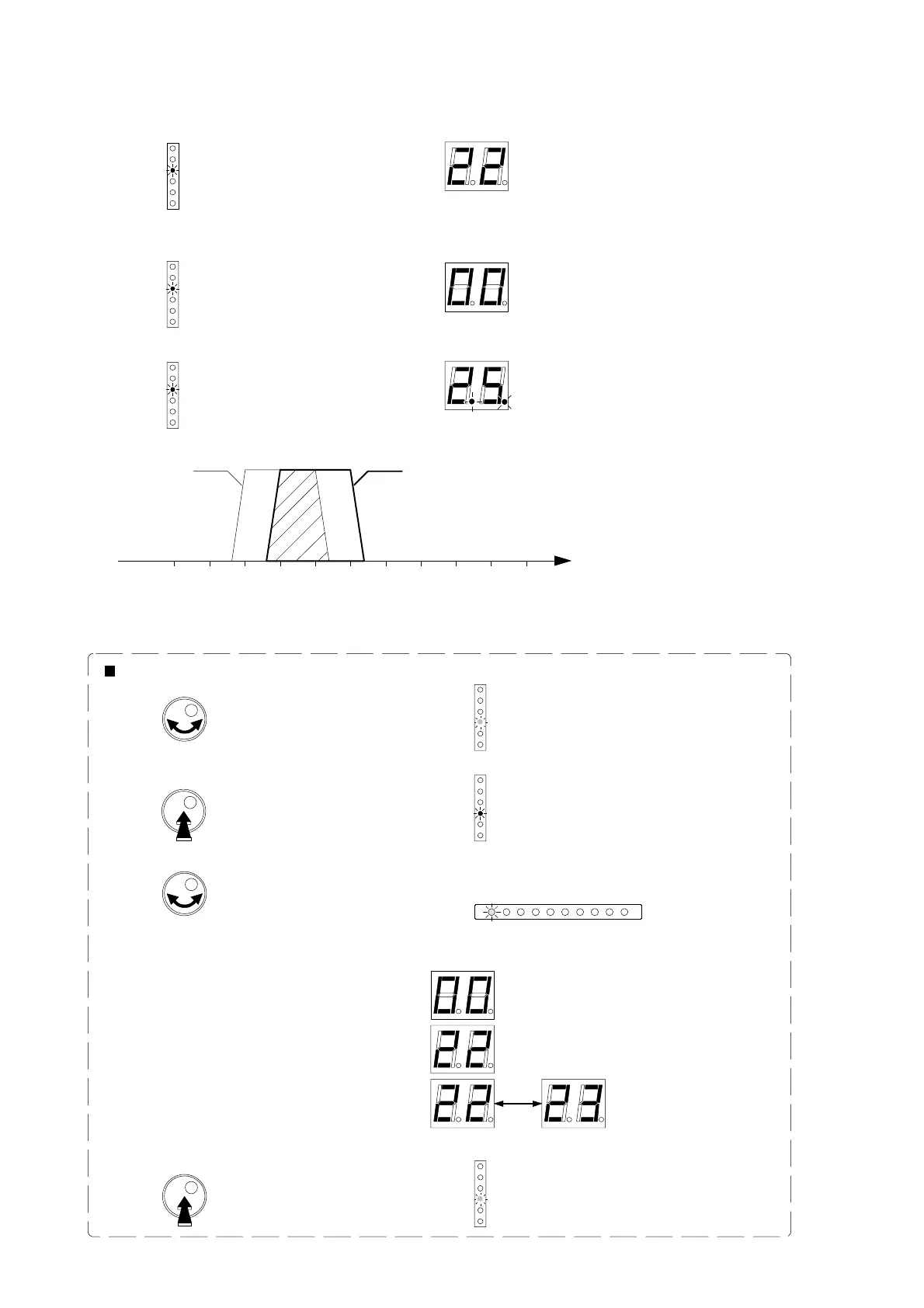
- If there are overlapping clusters, the display dots will blink alternately.
Channel
Cluster 2
Cluster 1
- Turn the button to select
Filter & Input Selection.
- Puch the rotary button to enter the selected mode.
LED is red
LED is green
- Turn the button to choose the cluster to be checked.
- The disoplay shows the channels which have been set.
Examples are:
To check the channel settings of each cluster:
Exemples :
- Push the button to exit.
LED is green
Cluster is parke d
Cluster is set to channel 22
Blinking 22 and 23:
cluster is set from 22 to 23.
Start
Start
Start
Filter & Input Selection
Filter & Input Selection
Filter & Input Selection
Ch. 24 - 25
Ch. 25 - 26
1
2
3
4
56
7
8
9
VHF


 To Next Page
 Loading...