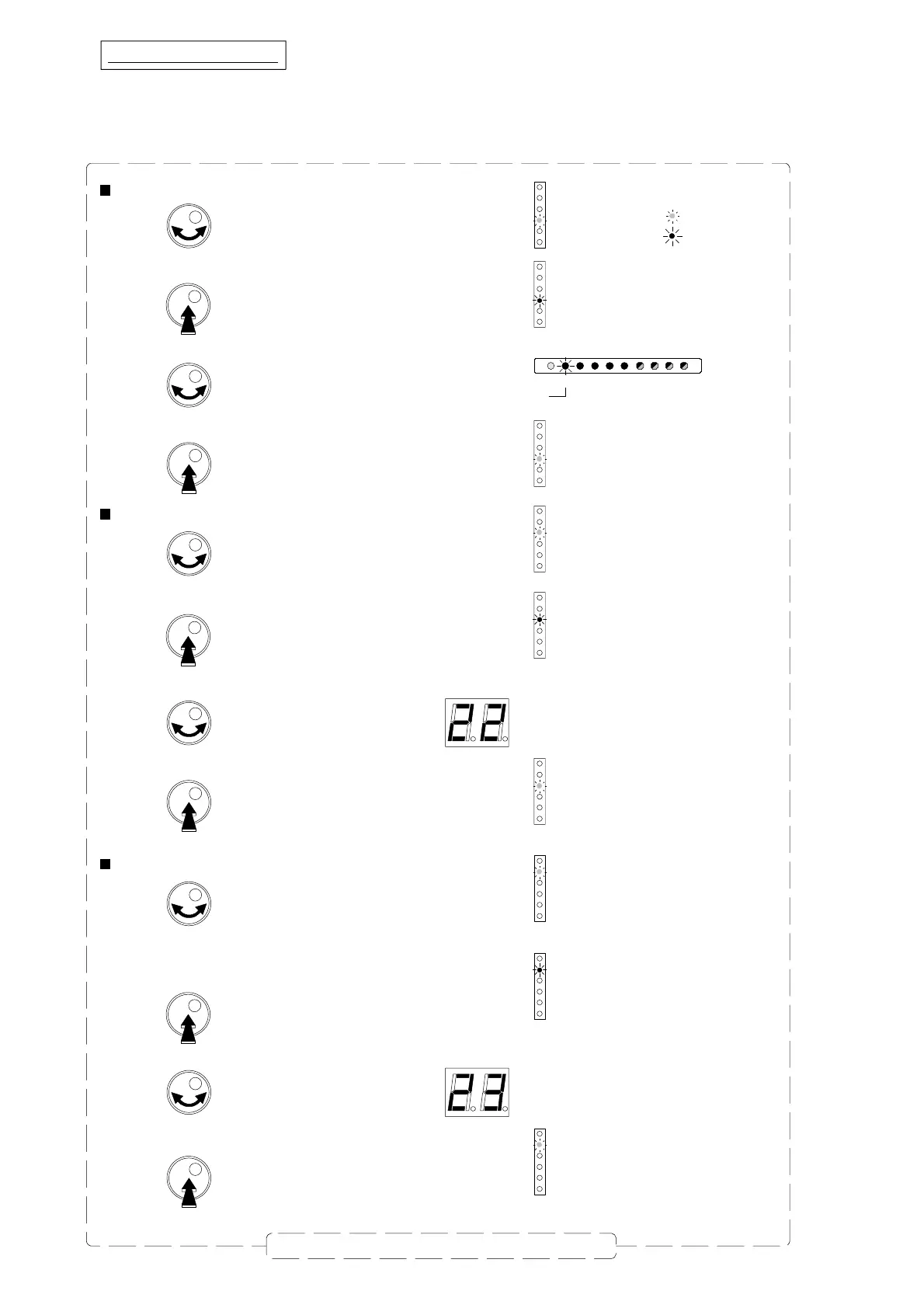
Mode is indicated
with a GREEN coloered LED
LED is red
Display
= GREE N LED
= RED LED
7
Repeat this section to set all clusters
Display
1
2
3
4
56
7
8
9
LED n° 1
Stop
Stop
Stop
LED is green
LED is green
LED is red
LED is green
LED is green
LED is red
LED is green
Filter & Input Selection
Start
Filter & Input Selection
Filter & Input Selection
Start
Start
VHF
- Turn the button to select the
Filter & Input Selection
mode.
- Push the rotary button to enter the selected mode.
- Inside the mode, turn the button to select the cluster to be set.
Setting channels / cluster
Each UHF cluster has a bandwidth which can be programmed from 1 to 2 channels.
Each VHF cluster has one channel bandwidth.
To set the channel(s) per cluster :
- Turn the button to select the
Start
mode.
- Push the rotary button to enter the selected mode.
- Turn the button to select the start channel
- Turn the button to s elect the
Stop
mode.
- Push the rotary button to enter the selected mode.
- Turn the button to select the stop channel
- Push the button to confirm.
- Push the button to confirm.
- Push the button to confirm.
In the following example cluster 1 is set for channel 22 to channel 23.



 To Next Page