Setting clusters per input
- The filter-equalizer has 2 UHF input which are splitted over 9 clusters and 1 VHF input for 1 cluster.
There are three possible configurations:
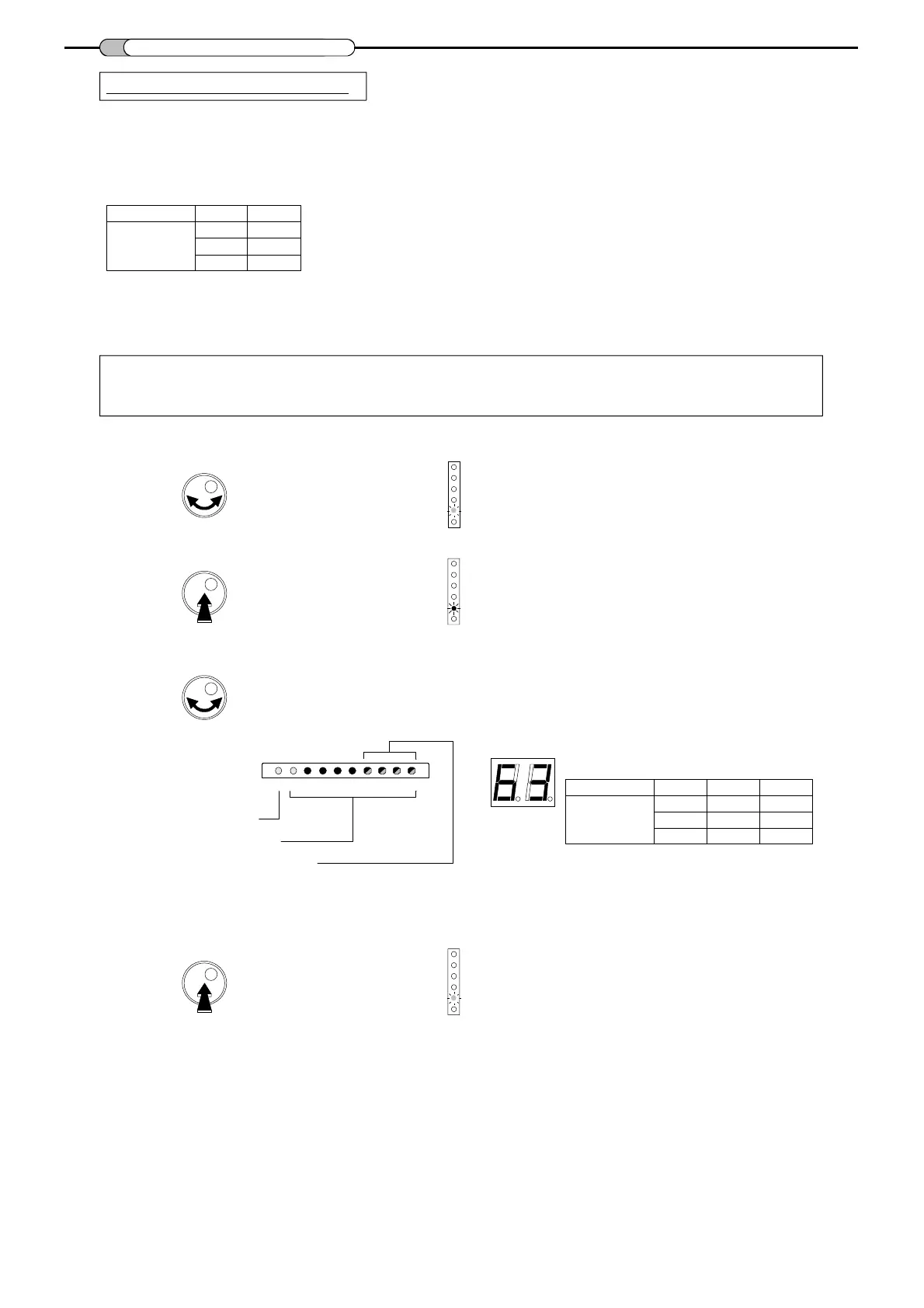
To select the number of UHF clusters:
- Turn the button to select
Split UHF.
6
Input
Number of
cluster(s)
UHF1
9
6
5
UHF2
0
3
4
LED is green
- Turn the button to set one configuration.
VHF cluster indication
Note:
Each non used cluster has to be switched off (park function).
Set the cluster to channel 00 (see "Setting channels / cluster").
- Push the button to confirm.
UHF 1 clusters are indicated by the RED LEDs n° 1 to 9.
UHF 2 clusters are indicated by the GREEN LEDs n° 6 to 9.
LED is red
UHF1 cluster indication
UHF2 cluster indication
LED is green
- Push the button to confirm.
CLUSTER PROGRAMMING
1
2
3
4
5
6
78
9
VHF
Split UHF
Split UHF
Split UHF
Select position n° 00 to have access to the settings
See "Presets" on page 5.
Display of selected configuration :
Input
Number of
clusters
Display
"9.0"
"6.3"
"5.4"
UHF1
9
6
5
UHF2
0
3
4


 To Next Page