Programming
4
OPERATION
123
45678
9
Split UHF
Filter & Input Selection
Start
Stop
Level
Split UHF
Filter & Input Selection
Start
Stop
Level
Preset : 01~40
Preset : 01~40
VHF
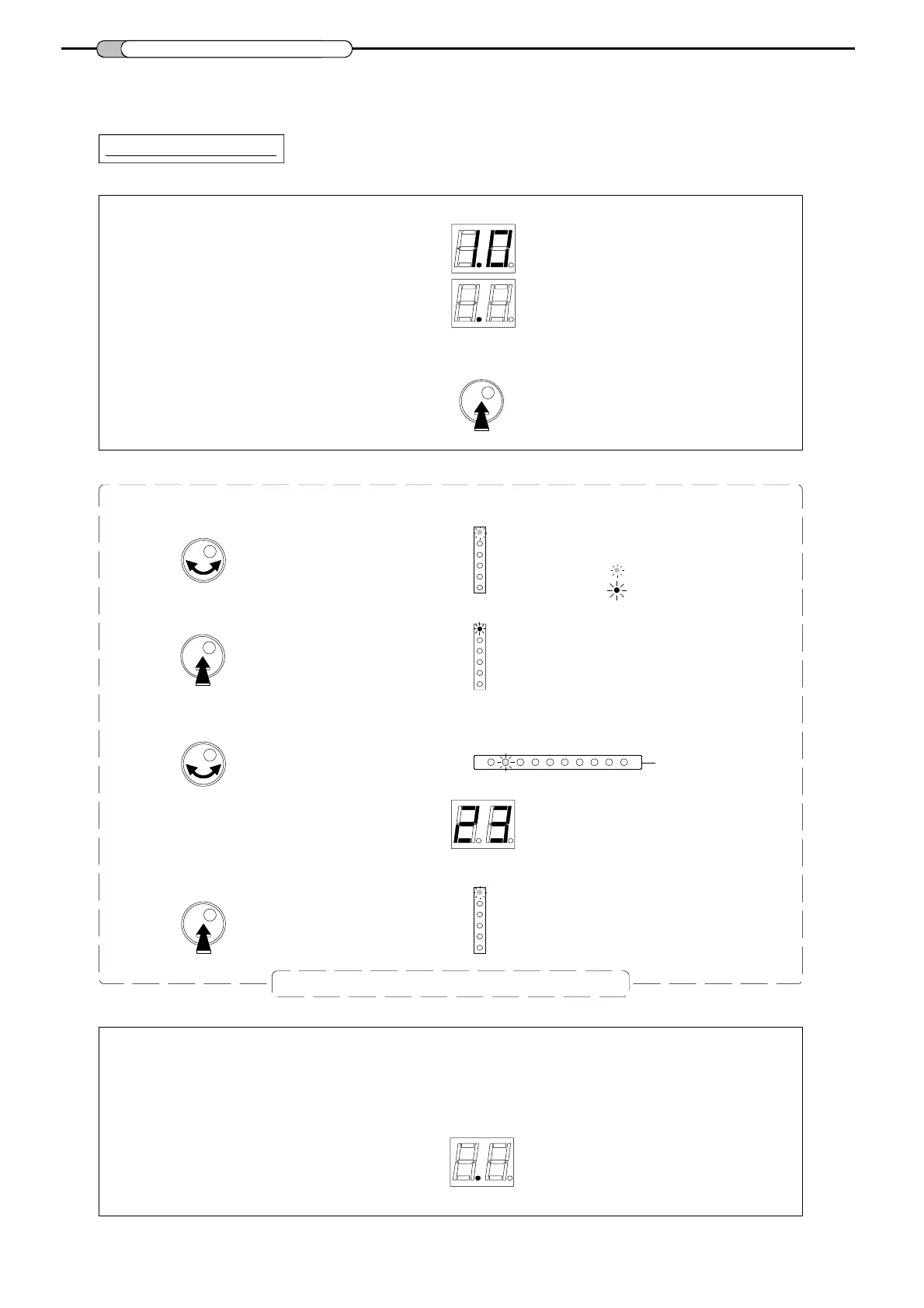
All parameters are set with the rotary push button.
Each function and parameters are shown on 2 digits display and different LEDs .
- Make all the necessary connections and connect the equalizer to mains.
- Push on the rotary button for more than 3 seconds to enter into programming mode.
3sec.
- Turn the button to select the desired mode.
- Push the rotary button to enter the selected mode.
- Ins ide the mode, turn the button to sele ct the parameter
(input, cluster, channels , le vel...)
- Push the button to confirm the parameter setting.
The software version is displayed,
Mode is indicated with
a
GREEN colored LED.
The LED is now RED colored.
Cluster LEDs
Display
LED returns to a GREEN color.
followed by a dot.
= green LED
= red LED
Repeat this section to set all parameters
Split UHF
Filter & Input Selection
Start
Stop
Level
Preset : 01~40
The equalizer will go in "stand-by" and will display a dot after 1 minute
if the rotary / push button is not activated.



 To Next Page