A25 Series Warm Air Control with Manual Reset Product/Technical Bulletin 5
O
peration
Models A25AN and A25CN
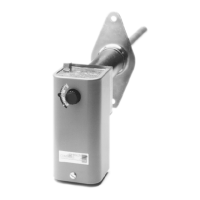
Setpoint Adjustment: Adjust the A25 setpoint by
rotating the setpoint knob (Figure 7). The setpoint
is displayed in the setpoint window.
Test Procedure:
To test (trip) the A25: Raise the temperature
at the sensor above the setpoint or lower the
setpoint below the ambient temperature. The
control should lockout (trip).
To reset after test: Lower the temperature at
the sensor to 20F° (11C°) below the setpoint or
raise the setpoint to 20F° (11C°) above the
ambient temperature. Press the reset lever.
The A25 should reset (closing the circuit).
Reset Procedure: Verify that the temperature has
dropped to 20F° (11C°) below setpoint. Press the
reset lever to reset the A25 (closing the circuit).
Figure 7: Models A25AN and A25CN







 To Next Page