32
TEMPERATURE ADJUSTMENT
THIS OPERATION MUST BE
PERFORMED ONLY BY TECHNICAL CENTERS
JOHNSON APPLIANCES AUTHORIZED
If the oven does not reach the max.
- Set the temperature adjustment knob to the maximum point (230° C)
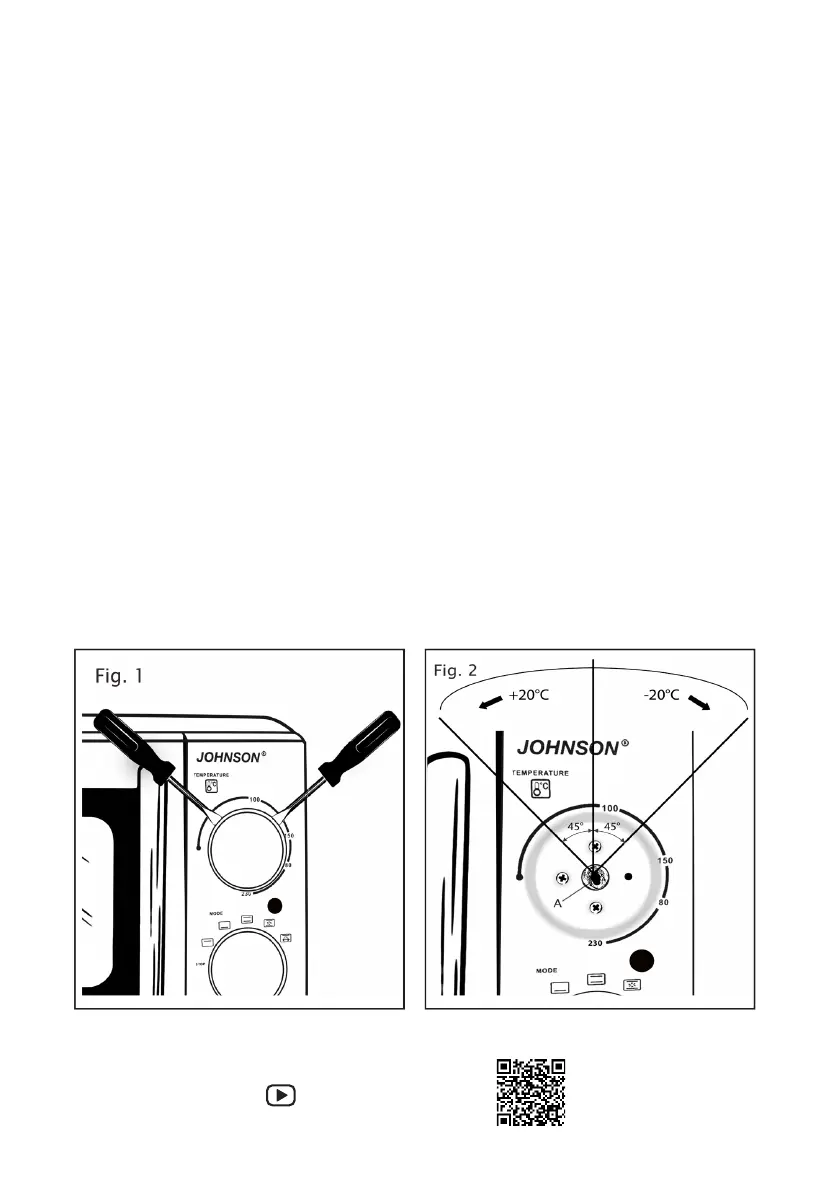
- Remove the knob using 2 slotted screwdrivers, positioning them as shown in fig. 1,
levering outwards.
- Also remove the black plastic pin of the knob if it is not left inside.
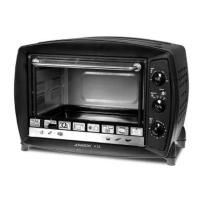
- Insert a small flat screwdriver into the metal pin (A) of the thermostat.
- Turn anticlockwise (to the left) to increase the temperature or clockwise (to the right)
to decrease the temperature as shown in fig. 2
- By turning the screwdriver by about 45 angular degrees in one direction or the other,
the temperature is increased or decreased by about 20° C.
Example:
rotating counterclockwise (to the left) by 45° from the starting point we get + 20° C
turning counterclockwise (to the left) by 90° from the starting point we get + 40° C
turning clockwise (to the right) by 45° from the starting point we will have - 20° C
rotating clockwise (to the right) by 90° from the starting point we will have - 40° C
- After completing the operation, refit the temperature adjustment knob.
Demonstration movie


 To Next Page