10
②Mount the monitor on the wall
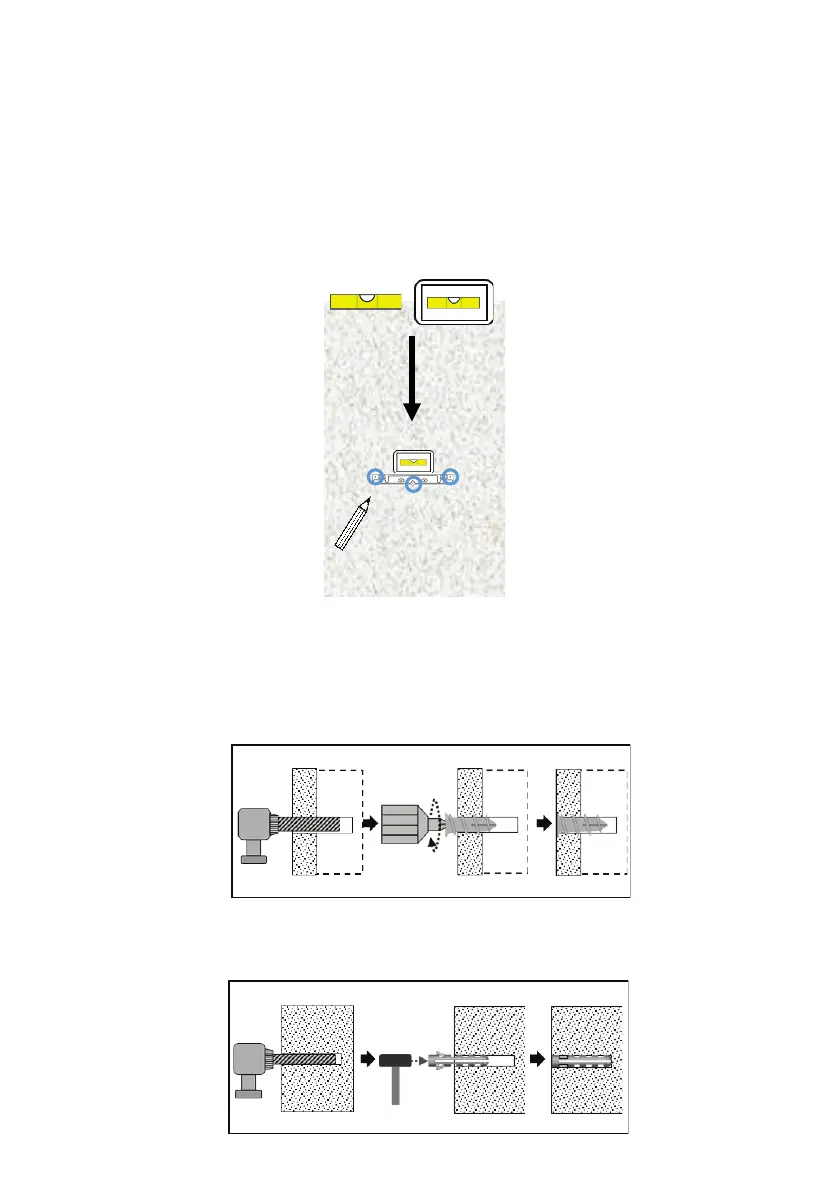
(1)Draw marks for anchors or screws
When using only a standard DC cable (1.5 m in length), set the upper side height of the
wall mount bracket to 1.3 m or less.
Wall
Drill
Anchor
Hammer
Place the wall mount bracket on the wall, check the level with a spirit level or
a smartphone app spirit level, and mark the three holes in the wall mount
bracket with a pencil.
Pencil
❶Gypsum board, Composite panel or plywood (Including the case with a wall of base)
Drill through hole or more than 45 mm depth hole with a drill with a diameter of 9 mm and
screw anchor A in the hole with a screwdriver.
(2)Attach the anchor to the wall
*Make a hole that meets the following conditions. Never insert the anchor in a
hole that does not meet the conditions, as the anchor will be damaged.
❷Concrete or mortar wall
Drill a hole with a depth of more than 30 mm with 6 mm diameter drill, and drive anchor B
with a hammer in the hole.
Base
Screw
driver
Wall
Drill
Anchor
*If you are worried about the holes in the wall, please refer to ”Kabebijin” of "Enjoy doing it
Yourself" on glancy.jp, and https://www.youtube.com/watch?v=tOkI1JV5bPs.
Please purchase "Kabebijin” and download the guide sheet to use it. Only for gypsum board.


 To Next Page