3
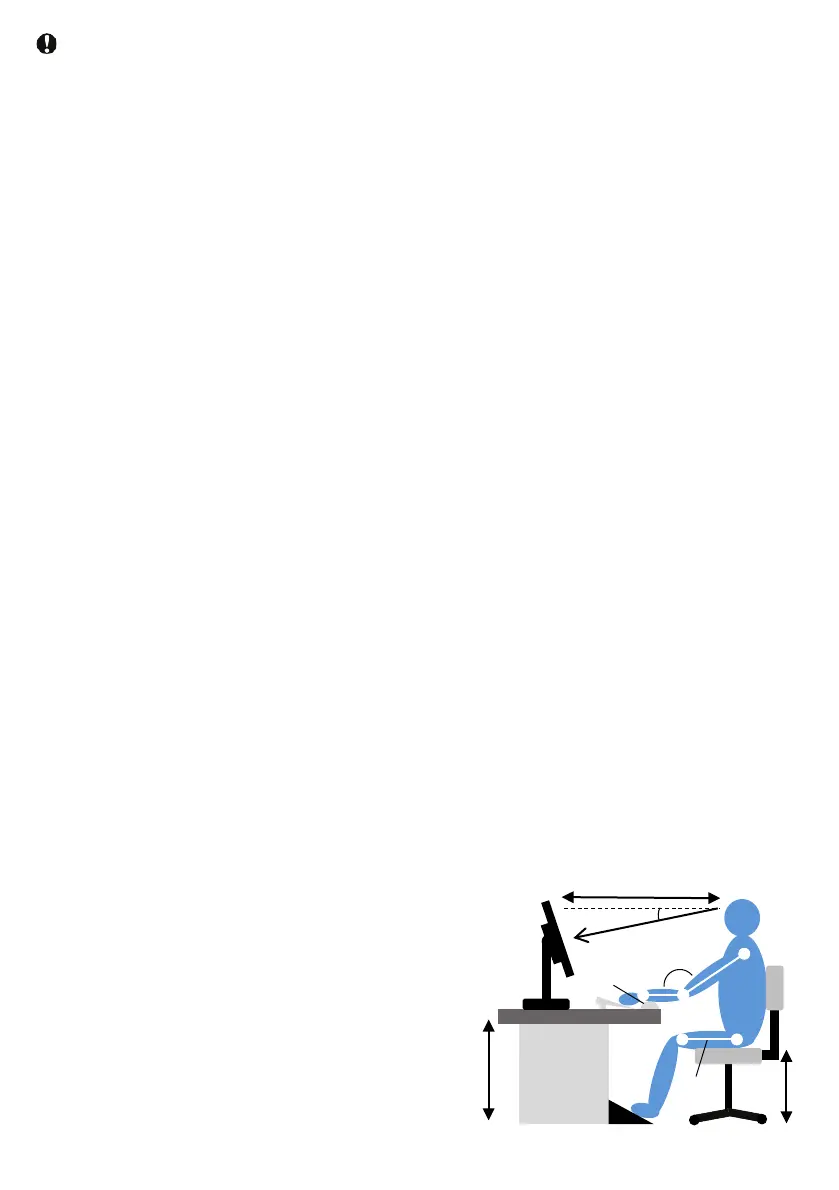
•Please use it in the correct sitting
method as follows.
•After looking at the screen for a long
time, look far away.
•Be conscious while using and ask for
frequent blinking.
•To relax, slowly close your eyes or
move them.
•Adjust the screen to the appropriate
height and angle according to your
height.
•Adjust the brightness and contrast to
the appropriate level.
•Adjust the brightness of the screen as
well as the environmental lighting to
avoid fluorescent light and excessive
surface reflections.
•If you have any symptoms, consult a
doctor.
min20°
40-75cm
90-100°
72-75cm
38-55cm
Footrest
Line of sight
keyboard pad
Parallel to
the floor
•Do not tilt the monitor down beyond
-10 degrees. This may cause
damage, such as the panel peeling
off the bezel. If the maximum tilt
angle of the down direction exceeds
-10 degrees and the monitor is
damaged, it is not covered by the
warranty.
•If the stand is purchased and used as
a PC monitor, excessive use can
cause eye discomfort. It is better to
take shorter breaks frequently than
longer breaks (for example, a 5-10
minute break after 50-60 minutes of
use is better than a 15-minute break
every 2 hours). If you continue to
look at the screen for a certain period
of time, please do the following to
protect your eyes from fatigue.
Caution during operation
• Do not directly expose to direct sunlight
or very strong light. Also, do not place
near the heat source. If left in such an
environment for a long time, the monitor
may be damaged or damaged.
• Keep the oil away from the display. Oil
can damage the plastic cover of the
display and make it out of warranty.
•Do not drop foreign objects or put them
in the opening (air opening). The
monitor's electronics may not cool
properly.
•Do not block the opening (air opening) of
the cabinet.
•Please confirm the distribution system
provide the circuit breaker the customer
region rated voltage(from 100V to 240V)
and 20A(maximum). Please ground the
ground cord or ground pin that came
with the power cord.
•When installing the monitor, make sure
that the power plug and outlet can be
easily connected.
•If you unplug the power cable or DC
power cord and turn off the monitor, wait
6 seconds before connecting the power
cable or DC power cord for normal
operation.
•Do not use anything other than the acdc
adapter and power cord that came with it.
In case of breakdown or loss, please
contact the service center.
•Do not use a monitor other than the
specified power supply. Using the wrong
voltage can cause malfunctions and
cause fire or electric shock. Protect the
cable.
•Do not pull or bend the power or signal
cables. Do not place heavy items such as
monitors on the cable. Damage to the
cable may cause fire or electric shock.
•Do not cause severe vibrations or strong
shocks to the monitor during operation.
•Do not hit or drop the monitor hard
during operation or transportation.
•If the panel cracks, turn it off
immediately and do not operate.


 To Next Page