P/N: 89459 (v.A)
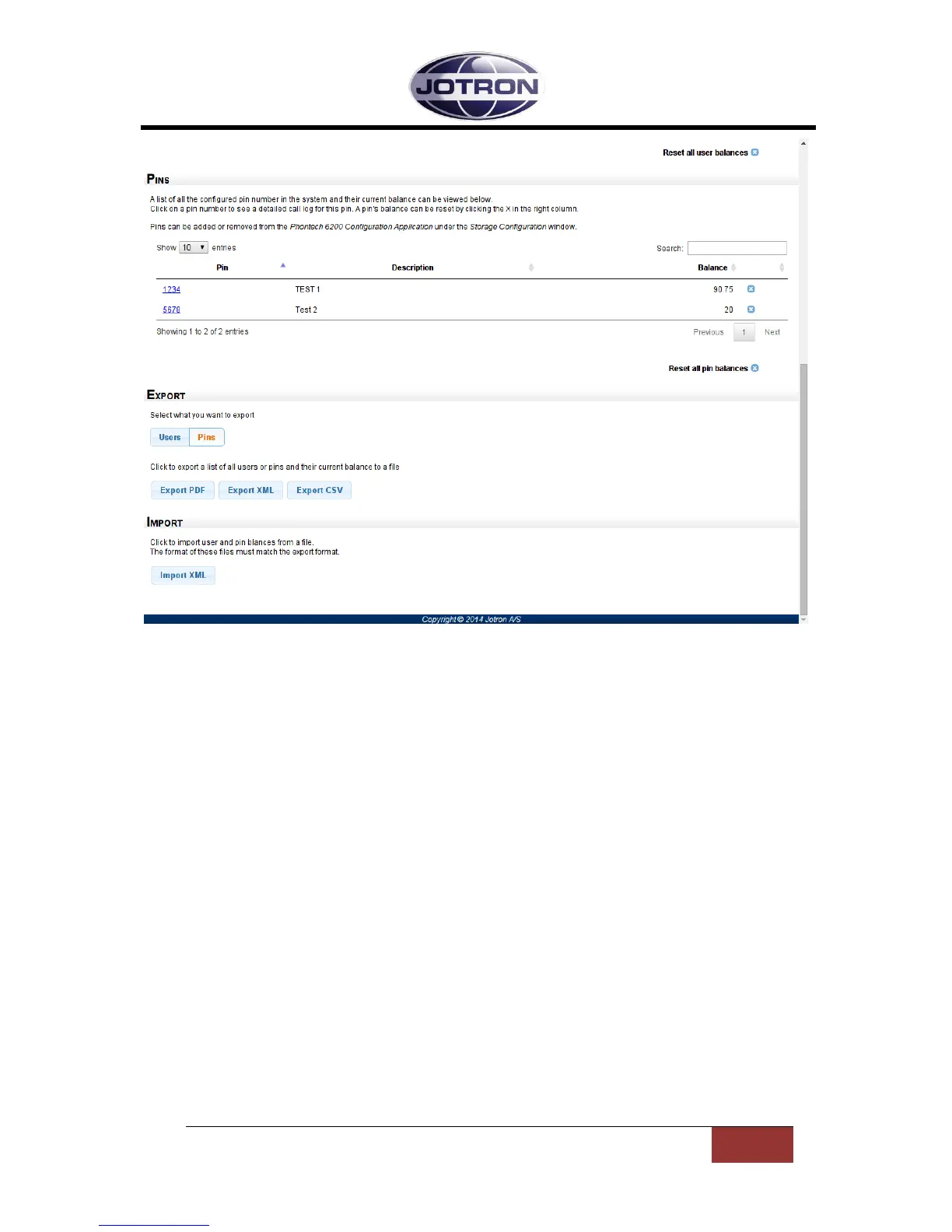
Figure 4 - Users / Pins page – PINs and Export/Import
1.2.3 EXPORT OF USERS AND PINS
The export options are located the bottom of the Users / PINs page as seen in Figure 4. You can
either export a list of current user balances or a list of current PIN balances. The list to export can be
selected with the “Users” and “Pins” buttons in the Export section. The balances can be exported as
PDF, XML or comma separated values (CSV) by clicking the corresponding button in the Export
section. When the button is clicked, a download dialog with the selected format will appear and you
can select where to save the exported data.
1.2.4 IMPORT OF BALANCES
It is also possible to import balances into the call logging system. By clicking the “Import XML” button
in the Import section you will be presented with an open file dialog where you can select the file with
the balances to import. The format of the file must be XML and in the same format as given by the
“Export XML” button. Note that this will change the balances of all the users and pins that are
located in the import file. This operation cannot be undone.


 To Next Page