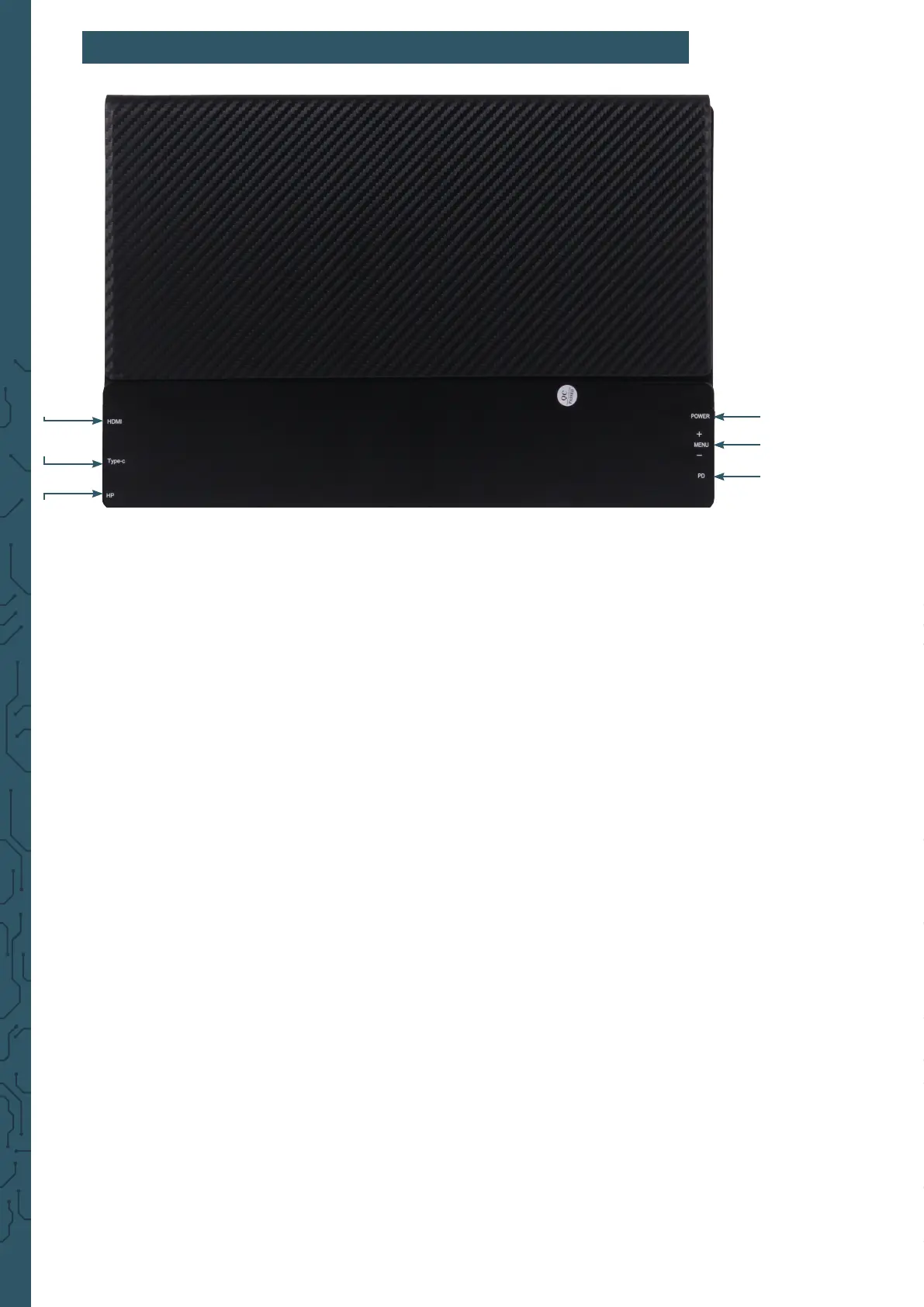
1. POWER
Press and hold down: switching the monitor on/o
Press shortly: 1. Open the signal source menu
2. Close or return in the OSD Menu
2. + / MENU / -
Push the button (MENU) to open the OSD Menu
→ + / - to move through the menue
→ Push the button (MENU) to choose an option
Push up the button towards + to open the brightness menu
→ + / - for brighter/ darker
Push down the button towards - to open the volume menu
→ + / - for volum up and volume down
3. PD
USB-Type-C port (supported PD) for power connection
4. HDMI
Mini-HDMI port for image transmission
5. Type-C
USB-Type-C port for touchscreen and power
6. Headphone jack HP
port for audio output → 3,5 mm headphone jack
4.HDMI
5.Type-C
6.Headphone jack
1.POWER
2.+ / Menu / -
3.PD
5. FUNCTIONALITY OF BUTTONS & INTERFACES


 To Next Page