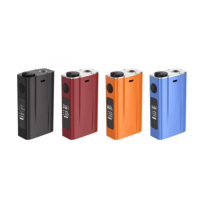
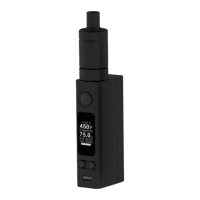
Need help?
Do you have a question about the Joyetech eVic and is the answer not in the manual?
Enables direct adjustment of Voltage (VV) or Wattage (VW) from the main interface by renaming 'Power set' to 'Vapor set'.
Automatically detects atomizer resistance for accurate real-time Watt output and display information.
Wattage range adjusted to 2-11W due to hardware and software limitations.
Allows rapid voltage or wattage increase/decrease by triple-pressing the direction key.
Allows setting of warning temperature threshold ('Alarm C') under 'Temp C' settings.
The eVic Firmware Version 1.1 introduces several enhancements and new features designed to improve the user experience and device functionality. This update focuses on refining existing operations, adding new control options, and optimizing performance for a more intuitive and reliable vaping experience.
A significant change in this firmware version is the renaming of the 'Power set' option to 'Vapor set'. This update also introduces new sub-options, 'VV' (Variable Voltage) and 'VW' (Variable Wattage), within the 'Switch' menu of the 'Vapor set'. Previously, users would navigate through a 'Power set' menu that included options like 'Sleep', 'Power off', 'Battery', and 'Standby'. With eVic Firmware Version 1.1, the 'Power set' is replaced by 'Vapor set', which then offers 'Battery', 'Switch', and 'Exit'. The 'Switch' option now allows users to select between 'VV' and 'W' (Wattage). Once 'VV' or 'VW' is selected, users gain the ability to directly adjust the voltage or wattage from the main interface. This streamlines the process of customizing the vaping experience, making it quicker and more convenient to fine-tune power settings without deep menu navigation. The visual representation shows a transition from a menu with 'Sleep', 'Power off', 'Battery', 'Standby' in eVic V1.0 to 'Sleep', 'Power off', 'Vapor set', 'Standby' in eVic V1.1. When 'Vapor set' is chosen, the subsequent menu displays 'Battery', 'Switch', 'Exit'. Selecting 'Switch' then presents the options 'VV' and 'W', indicating the direct adjustment capability. This change simplifies the user interface for power control, allowing for more immediate and responsive adjustments.
The eVic Firmware Version 1.1 incorporates real-time automatic resistance detection for the atomizer. This feature is crucial for ensuring accurate Watt output and providing precise display information. Whenever an atomizer is changed, the device automatically detects its resistance. This real-time detection guarantees that the power delivered to the atomizer is consistent with the user's settings and that the displayed information, such as resistance and wattage, is always current and correct. This enhances safety and performance by preventing incorrect power delivery due to mismatched atomizer resistances, leading to a more reliable and enjoyable vaping experience.
Due to hardware and software limitations, the eVic device cannot achieve a wattage output of 15W. To reflect this reality and ensure accurate device operation, the wattage range has been modified in Firmware Version 1.1. The new operational range is set from 2W to 11W. It is important to note that the specific wattage range will also depend on the resistance of the atomizer being used. For example, if an atomizer with a resistance of 2.1Ω is used, the effective wattage range will be from 4.2W to 11W. This modification ensures that the device operates within its safe and effective limits, providing a consistent and reliable performance while preventing potential issues that could arise from attempting to operate outside these parameters. This adjustment is a practical improvement that aligns the device's advertised capabilities with its actual performance.
A new convenience feature introduced in this firmware update is the fast voltage/wattage adjustment. From the main interface, users can now quickly increase or decrease voltage or wattage. To activate this feature, the direction key needs to be turned in one direction three times in rapid succession. This action will initiate an automatic fast adjustment of the voltage or wattage. To stop the fast adjustment, the user simply needs to turn the direction key in the opposite direction. This feature significantly speeds up the process of making large adjustments to power settings, eliminating the need for continuous turning of the direction key for extended periods. It provides a more dynamic and user-friendly way to fine-tune the vaping experience.
The eVic Firmware Version 1.1 enhances temperature control and safety features by adding new sub-options within the 'Temp °C' menu. Specifically, 'Current °C' and 'Alarm °C' have been introduced. The 'Temp °C' menu, which previously showed options like 'Atomizer', 'Temp °C', 'User Info', and 'Series No' in eVic V1.0, now includes 'Atomizer', 'Temp °C', 'User Info', and 'Series No' in eVic V1.1, but with an expanded 'Temp °C' sub-menu. When selecting 'Temp °C', users will now see 'Current °C', 'Alarm °C', and 'Exit'. The 'Current °C' option displays the current operating temperature of the device, for example, 21°C. The 'Alarm °C' option allows users to set a specific warning temperature. When the device's internal temperature exceeds this user-defined 'Alarm °C', an overheating mark will flash, alerting the user to potential overheating. For instance, a user might set the 'Alarm °C' to 36°C. This feature provides an additional layer of safety and allows users to customize their device's thermal management, ensuring they are promptly notified if the device begins to run too hot. This proactive warning system helps prevent damage to the device and ensures a safer user experience.
Upgrading the eVic device to Firmware Version 1.1 is a straightforward process that involves a few simple steps:
These instructions ensure a smooth and successful upgrade to eVic Firmware Version 1.1, allowing users to benefit from all the new features and improvements.
 General
| Brand | Joyetech |
|---|---|
| Category | Electronic Cigarettes |
| Model | eVic |
| Battery Capacity | 2600mAh |
| Output Wattage | 1-60W |
| Thread | 510 |
| Display | OLED |
| Charging | Micro USB |
| Temperature Range | 100-315℃/200-600℉ |

 To Next Page