This document describes the DET-306 Infrared Forehead Thermometer, a device designed for the safe and accurate measurement of human body temperature from the forehead. It operates by detecting the intensity of infrared light emitted from the forehead and converting it into a temperature reading displayed on an LCD. The thermometer is intended for intermittent measurement of human body temperature from the skin surface of the forehead for people of all ages, providing quick and accurate assessments. It is suitable for home use but not as a substitute for professional medical consultation.
Function Description
The DET-306 measures core body temperature, which is the temperature of a body's vital organs, by assessing the skin surface temperature over the temporal artery. The temporal artery is connected to the heart via the carotid artery, ensuring constant blood flow, meaning body temperature changes are reflected sooner in the forehead than in other parts of the body.
The device features two primary measurement modes:
- Forehead Mode: Designed for practical use to measure body temperature. It is important to compare results to an individual's regular body temperature.
- Object Mode: Displays the actual, unadjusted surface temperature of objects, useful for monitoring temperatures like baby's milk.
The thermometer includes a Beep Alarm that sounds if a body temperature of 37.8°C (100.0°F) or above is detected in Forehead Mode, alerting the user to a potential fever. A Temperature Indicator displays a happy face for readings below 37.8°C (100.0°F) and a sad face for readings at or above this threshold.
A Real Time Clock records the date and time with each measurement, aiding in tracking temperature trends. The device also has a Memory Mode that stores up to 10 sets of readings for both forehead and object measurements, including the date, time, and mode icon.
The thermometer can display temperature readings in either Celsius (°C) or Fahrenheit (°F), which can be toggled by the user.
Important Technical Specifications
- Measuring Range:
- Forehead Mode: 34.0°C ~ 43.0°C (93.2°F ~ 109.4°F)
- Object Mode: 0°C ~ 100°C (32°F ~ 212°F)
- Measuring Site: Forehead (Forehead Mode)
- Reference Body Site: Oral (converts forehead temperature to display its oral equivalent)
- Operation Mode: Forehead Mode (Adjust mode)
- Laboratory Accuracy:
- Forehead Mode: ±0.2°C (±0.4°F) during 35.5°C ~ 42.0°C (95.9°F ~ 107.6°F) at 15°C ~ 35°C (59.0°F ~ 95.0°F) operating temperature range.
- ±0.3°C (±0.5°F) for other measuring and operating temperature ranges.
- Object Mode: ±4% or ±2°C (±4°F), whichever is greater.
- Display Resolution: 0.1°C or 0.1°F
- Measure Time: Approximately 1 second
- Operating Temperature Range: 10°C ~ 40°C (50°F ~ 104°F), 15% ~ 85% RH, non-condensing.
- Storage and Transport Temperature Range: -25°C ~ 55°C (-13°F ~ 131°F), 15% ~ 95% RH, non-condensing.
- Clinical Accuracy:
- Clinical bias: -0.09°C (-0.16°F)
- Clinical repeatability: 0.13°C (0.23°F)
- Limits of agreement: 0.87°C (1.57°F)
- Shock: Withstands a drop of 3 feet.
- Dimension: 153 x 41 x 44 mm
- Weight: Approx. 84 grams (with batteries)
- Battery: DC3V (2x AAA battery)
- Battery Life: Approx. 1 year / 6000 readings
- Expected Service Life: Three years
- Ingress Protection Rating: IP22
- Electromagnetic Compatibility (EMC): Conforms to IEC 60601-1-2 standards. The device is an electrical medical product requiring special precautions regarding EMC. Portable and mobile HF communications equipment can affect the device, so it should not be used directly adjacent to or between other electrical equipment.
- Safety Standards: Conforms to ISO 80601-2-56, IEC 60601-1-11, IEC 60601-1-2 (EMC), and IEC 60601-1 (Safety) standards. Manufacturer is ISO 13485 certified.
- Warranty: Limited one-year warranty from the date of delivery, covering material and workmanship defects under normal use and service. Does not cover batteries, probe window damage, or damage from misuse, negligence, or accident.
Usage Features
- Real Time Clock Setting: Upon first use, the user must set the time format (AM/PM or 24-hour), hour, minute, year, month, and date. This is done by pressing and holding the BUTTON to enter setting mode, then using the START BUTTON to adjust values and the BUTTON to confirm.
- Measuring Forehead Temperature:
- Press the BUTTON to activate the display.
- Aim the thermometer at the center of the forehead, 2-3 cm away.
- Press the START BUTTON.
- Read the temperature on the display after the final beep. A 3-second waiting period between tests is recommended for accuracy.
- Measuring Object Temperature:
- Press the BUTTON to turn on the thermometer.
- Press the / BUTTON to switch to Object Mode.
- Aim the thermometer at the center of the object, 1-2 cm away.
- Press the START BUTTON and read the temperature.
- Memory Recall:
- After turning on or finishing a test, press and hold the BUTTON for three seconds to enter Memory Mode. The letter "M" will appear.
- Each press of the BUTTON will cycle through the last 10 readings, from most recent (1) to oldest (10).
- Temperature Scale Selection: With the thermometer off, press and hold the START BUTTON for three seconds to enter unit changing mode. Press and release the START BUTTON to select between °C and °F. Press the BUTTON to exit.
- Automatic Shut-off: The device automatically turns off after 1 minute of inactivity to conserve battery life.
Maintenance Features
- Probe Window Care: The probe window is the most delicate part and must be kept clean, dry, and undamaged for accurate readings. Clean with a soft cloth slightly moistened with a 75% isopropyl alcohol solution. Allow at least 10 minutes drying time after cleaning. Do not use abrasive cleaners or any other chemicals.
- General Cleaning: Use a soft, dry cloth to clean the thermometer display and exterior.
- Water Resistance: The thermometer is not waterproof; do not immerse it in water or other liquids.
- Storage: Store in a dry location, free from dust, contamination, and direct sunlight. Keep the battery away from children.
- Battery Replacement: Replace batteries when the "battery" icon appears on the LCD. Slide down the battery cover, remove old batteries, and install two new AAA alkaline batteries. Slide the cover back on. Remove batteries if the device will not be used for a long time.
- Calibration: The thermometer is factory-calibrated. Periodic readjustment is not required under normal use. However, checking calibration every two years or if clinical accuracy is in question is recommended. Contact the dealer or manufacturer for service.
- Disposal: Dispose of the product and used batteries according to national regulations for electronic products.

 Need help?
 General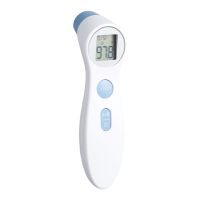

 To Next Page