Need help?
Do you have a question about the JOYTECH Williams F1 and is the answer not in the manual?
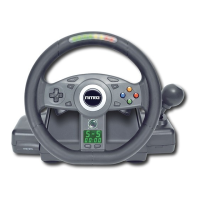
The device described in this manual is the JOYTECH Official WilliamsF1 Team™ Force Feedback Racing Wheel, designed for use with PlayStation®, PSone™, and PlayStation®2 consoles. It is an authentic visual replica of the Official WilliamsF1 Team™ FW23 Racing Wheel, aiming to provide an immersive and realistic racing experience.
The Racing Wheel is primarily designed to simulate the experience of driving a Formula 1 car, offering force feedback, adjustable steering sensitivity, and various control options.
Force Feedback Technology: The core feature of this racing wheel is its Force Feedback technology, powered by ROR3® technology (United States Patent: 6,263,392 B1). This system uses three Air-Cooled Motors to simulate real-life driving sensations, including bumps, jolts, and crashes with "astonishing realism." Users can control the intensity of this force feedback and adjust the resistance level to suit their personal style.
Steering Control: The wheel offers four preset Steering Sensitivity Modes (S-1, S-2, S-3, S-4) to cater to different driving games and personal preferences. For example, S-1 is suggested for Formula 1 / Indy Car, S-2 for Formula 1 / Indy Car / Rally, S-3 for Rally / Street, and S-4 for Buggy / Truck. These modes can be cycled through by pressing the 'SENS' button.
Gear Shifting: The device includes both four wheel-mounted paddles and a Shift-Tronic™ Stick for convenient gear shifting. These "easy-to-access" controls allow users to shift gears up or down quickly.
Pedal Set: A non-slip accelerator and brake pedal set is included, providing realistic foot control for acceleration and braking.
Digital Displays: The wheel features in-built digital displays to monitor car control. These displays show the Mode Display (F for Force Feedback, A for Analog, D for Digital), Steering Sensitivity Display, and a Stopwatch Display.
Stopwatch Function: The integrated stopwatch can be started and stopped by pressing the 'START/STOP' button. It can be reset by pressing the 'RESET' button. The display can toggle between seconds and 1/10th of a second by holding the 'SENS' button and then pressing and releasing the 'START / STOP' button.
Function Mapping: The Racing Wheel allows users to map (program) its action buttons (Π, Δ, Ο, X, L1, L2, L3, R1, R2, R3) to the wheel-mounted paddles, pedals, or the Shift-Tronic™ Stick. This customization allows the wheel to be quickly adapted to various driving styles. Mapping should be performed when the game is paused or displaying a game menu screen. To program a button, press and hold 'SELECT', then press and hold the target button, and finally press the source button. All buttons can be reset to their default function by pressing and holding 'SELECT' and then pressing 'RESET', or by disconnecting the wheel or turning off the console.
Installation:
Calibration: The Racing Wheel calibrates itself automatically when game software loads. It is crucial not to turn the Racing Wheel Head during this loading period.
Centering the Wheel: If the console is switched ON when the Racing Wheel Head is not centered, it may operate incorrectly. To reset, switch the console OFF, rotate the wheel head to the center position, and then turn the console ON.
Dual Clamping System: The device features a dual clamping system, allowing it to be securely attached to a tabletop or lap for stable operation.
Cleaning:
General Care and Safety:
Troubleshooting:
Health Warnings: The manual includes important health warnings regarding photosensitive epileptic seizures, advising users to stop playing and consult a doctor if symptoms occur. Precautions include sitting further away from the screen, using a smaller TV, playing in a well-lit room, and avoiding play when drowsy or fatigued. Regular breaks of 15 minutes every hour are also advised.
 General
| Brand | JOYTECH |
|---|---|
| Model | Williams F1 |
| Category | Video Game Controller |
| Language | English |


 To Next Page