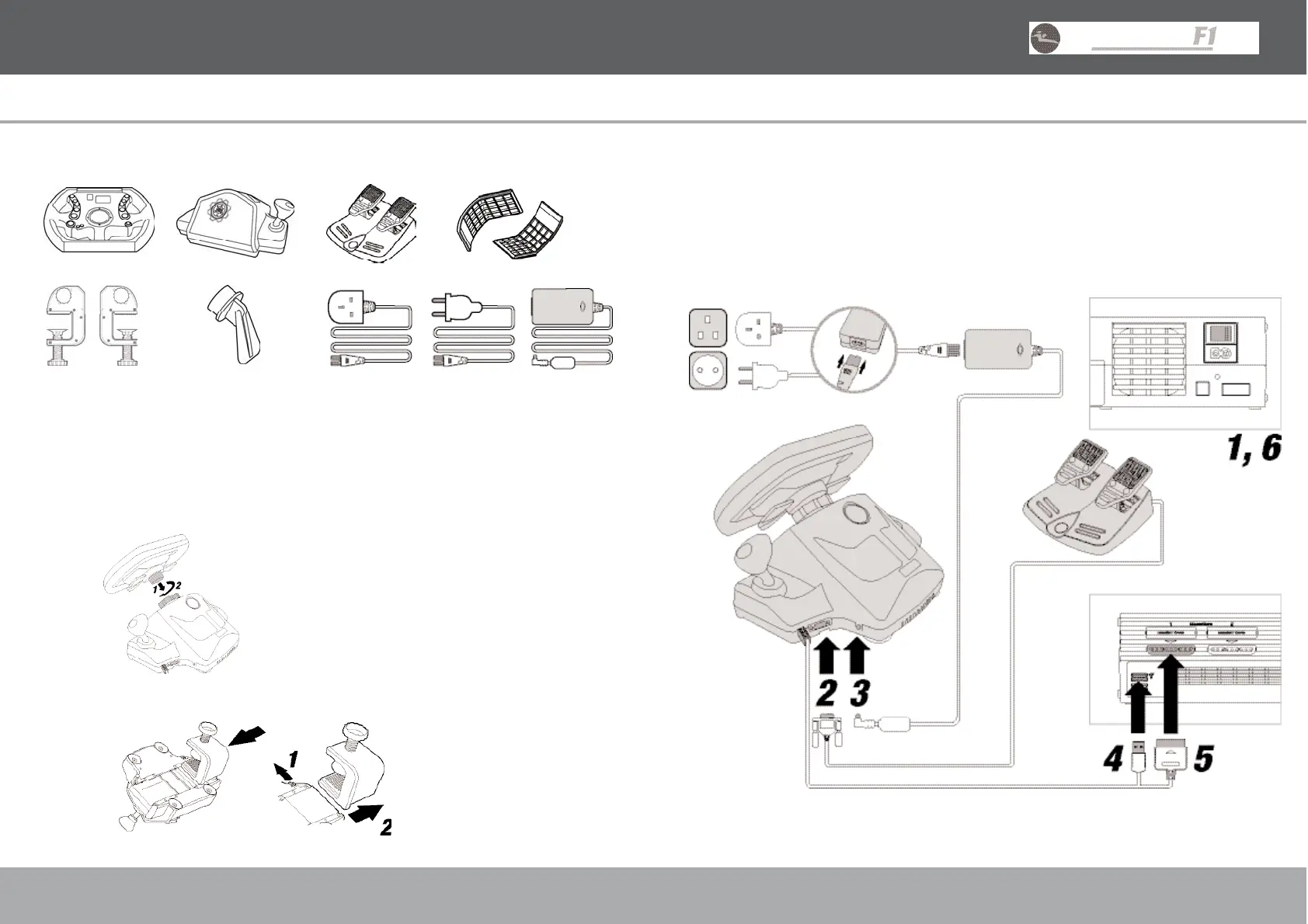
Installation (Fig.3)
1) Turn off PlayStation®2.
2) - 5) Connect Power Supply and Pedals, and then insert the USB and Controller Connectors.
6) Turn on PlayStation®2 and load game.
8
USER GUIDE ENGLISH
Box Contents
Check that you have the following items:
1. 2. 3. 4
5. 6. 7.
1. Racing Wheel Head 5. 2 Adjustable Tabletop Clamps
2. Racing Wheel Base Unit 6. Desktop Wheel Stand
3. Racing Pedal Set 7. Power Supply Unit and UK/EURO connecting cable
4. 2 Adjustable Leg Supports
Installation
1. Connect the Racing Wheel Head (Fig.1) to the Racing Wheel Base Unit by lining up the guide slots
on the Racing Wheel Head and the Steering Column. Screw the collar onto the Racing Wheel Head.
ENSURE THE COLLAR IS TIGHTENED THOROUGHLY
2. Connect the Tabletop Clamps (Fig.2) to the Racing Wheel Base by aligning the guides in each Clamp
with those in the Base. Slide the Release Button (1) to remove each Clamp (2).
7
USER GUIDE ENGLISH
Fig. 3
Fig. 1
Fig. 2
UK EURO



 To Next Page