MANUAL DE INSTRUCCIONES CODIGO 80243 REV A Enero /11 (Sujetas a modicaciones sin previo aviso) Pag.: 38
J.P. SELECTA s.a. Ctra. NII Km 585.1 Abrera 08630 (Barcelona) España Tel 34 93 770 08 77 Fax 34 93 770 23 62
e-mail: selecta@jpselecta.es - website: http://www.jpselecta.es
Enter Quantitative Mode
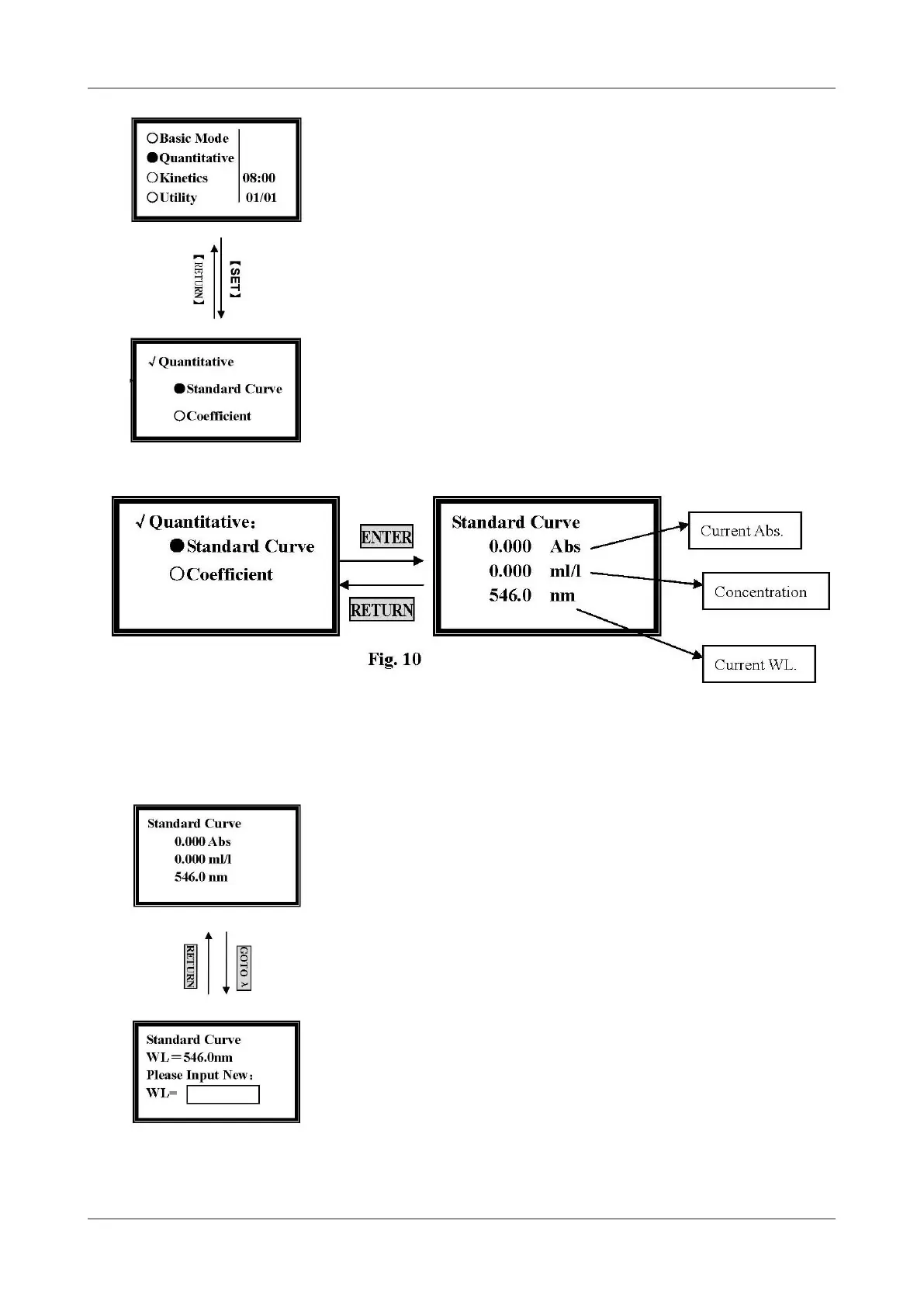
Move the cursor onto the Quantitative Mode, and press [ENTER] to go into the
method choosing interface (Fig. 9).
2-1. Standard Curve Method
It’s a method to establish a standard curve by measuring a group of standard samples.
Move the cursor onto the Standard Curve, then press [ENTER], and it will go into
the pre-testing interface (Fig.10).
Set Wavelength
Press [GOTO] in the pre-testing interface, input the testing wavelength by pressing
the numeric keypad (Fig.11).
Blank
Pull the blank solution in the light path, and then press [ZERO].
Set Parameters
Press [SET] in the pre-testing interface. It goes into parameters setting interface
(Fig.12). You should set Unit, the Number of standard samples, and Concentration
of standard samples before testing.
Figure 9
Figure 11


 To Next Page