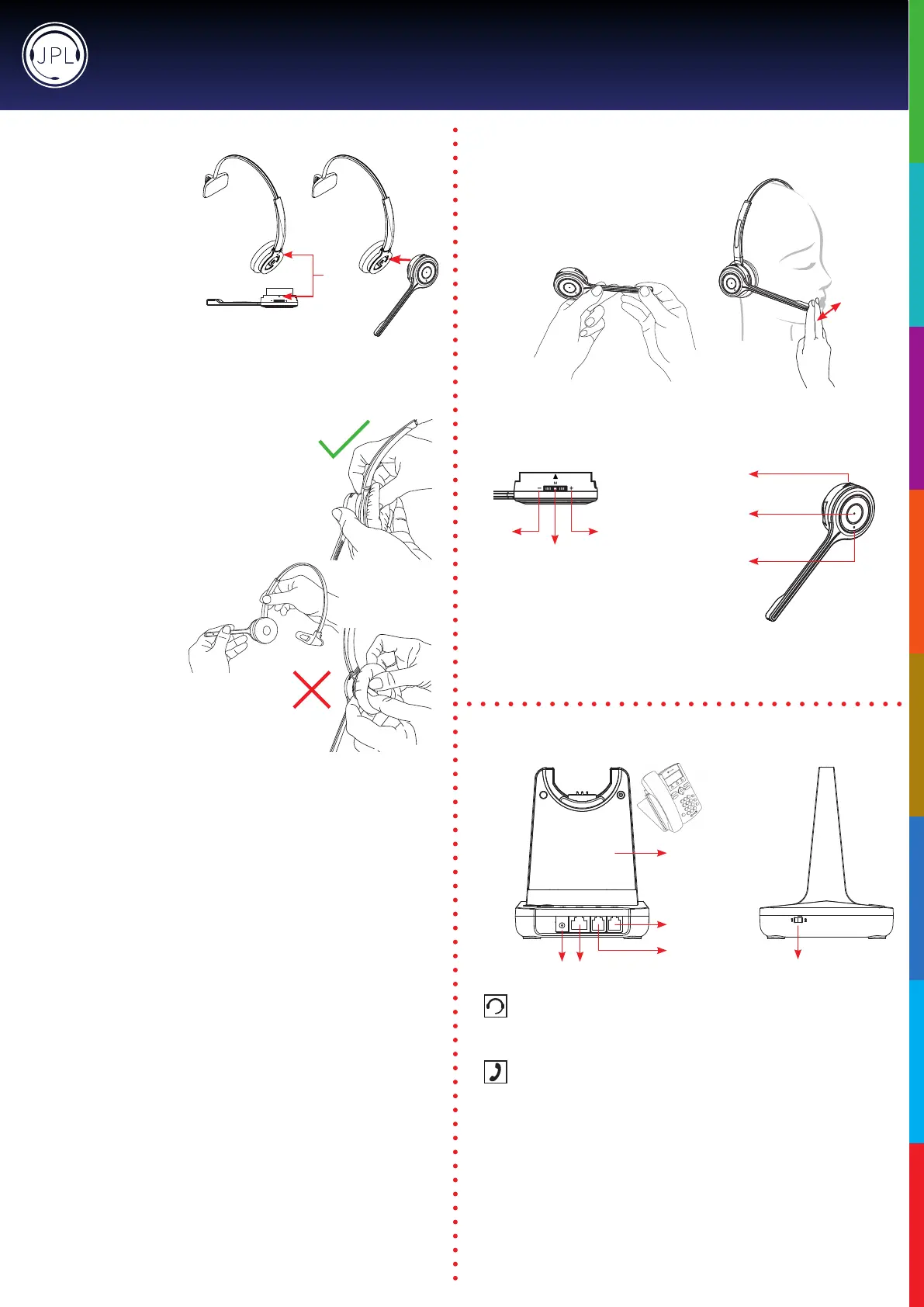
Attaching the microphone boom arm to the headband
To attach the microphone boom arm to
the headband, align the triangle shape
on the microphone boom arm with the
triangle shape on the headband and
pushtoclickintoplace.Themicrophone
boom arm will then rotate to your
requiredposition.
Detaching the microphone boom arm from the headband
Positioning the Microphone
30mm
Themicrophoneboomarmisexible,soyoucan
gently bend the boom and position it to suit the curve
ofyourface.
The ideal position for the microphone is at the corner
ofthemouthapproximately30mm(2ngerwidth)
awayfromthemouth.
Microphone Boom Volume Control
Down Up
Mute
Mute /
Speaker Volume
HookOn/O
Answer / End
a call
In-use / busy
indicator
Tochangethespeakervolume:rollthe
volumeswitchtowardsthe‘plus’signto
increase the volume and roll the switch
towardsthe‘minus’signtoreducethe
volume and press the switch to activate the
microphonemutemode.
Connecting the Base Unit to your Desk Phone
DC Jack AUX Port
Handset Port
Telephone Port
• Plug the supplied telephone cord into the TEL port of the base unit
• Connect the other end of the telephone cord to the HEADSET port of the desk phone
Desk Phone with Headset Port
• On the desk phone, unplug the handset cable from the phone
• Plug the handset cable into the HANDSET port on the base unit
• Plug the telephone cord into the TEL port on the base unit and plug the other end of
the telephone cord into the HANDSET port on the desk phone
Compatibility Switch
• Select‘1’or‘2’untiladialtoneisheardviathetelephoneconnection
Desk Phone without Headset Port
Base Unit
Compatibility
Switch
JPL-Explore User Manual
Align
How to detach the microphone boom arm from the
headband correctly:
Supporting the neck of the headband with your index and
middlengers, gently push the microphone speaker with your
thumb from inside the ear cushion to detach the microphone
boomarmfromtheheadband.
DO NOT pull on the microphone boom
armtodetachitfromtheheadband.
DO NOT push on the microphone boom arm through
the ear cushion without supporting the neck of the
headband.Doingthismaycausetheearcushionand
gimbalmechanismtocomeawayfromtheheadband.


 To Next Page
 Loading...