5
(2) As soon as you get an answer from the
partner station, inform it of the receiving
conditions using numbers shown in Table
3-1 below.
Example: “The sensitivity and clarity of
your talk is 4. How much is
our sensitivity and clarity?
Please.”
Table 3-1
Sensitivity
/clarity
Receiving
condition
1
Extremely
poor
2
Poor
3
Normal
4
Good
5
Excellent
3.2.3 Closing down
Turn the PWR/VOL control fully
counterclockwise to turn off the power. If you
leave the power on, the secondary battery will
have excessive discharge and deteriorated
greatly.
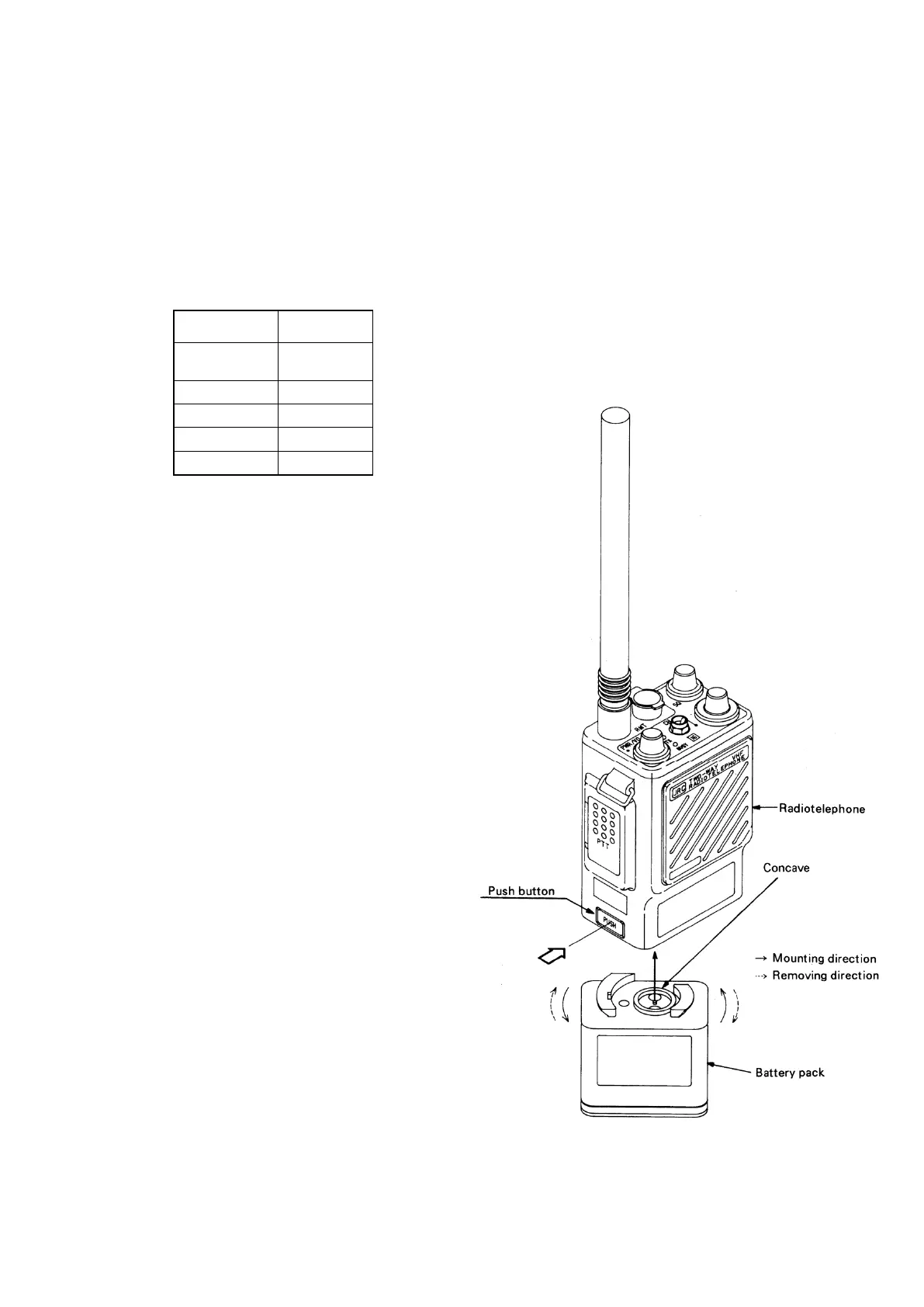
3.3 Replacement of Battery Pack NBB-248/248A /389
(1) Removal
While holding down the PUSH button on the
left side of the radiotelephone, twist Battery
Pack counterclockwise. (See Figure 3-3.)
(2) Mounting
Align the concave on the top of the battery pack
with the convex on the bottom of
radiotelephone. Twist the battery pack
clockwise until you feel a click, it is not
necessary to press the PUSH button.
Figure 3-3


 To Next Page