14
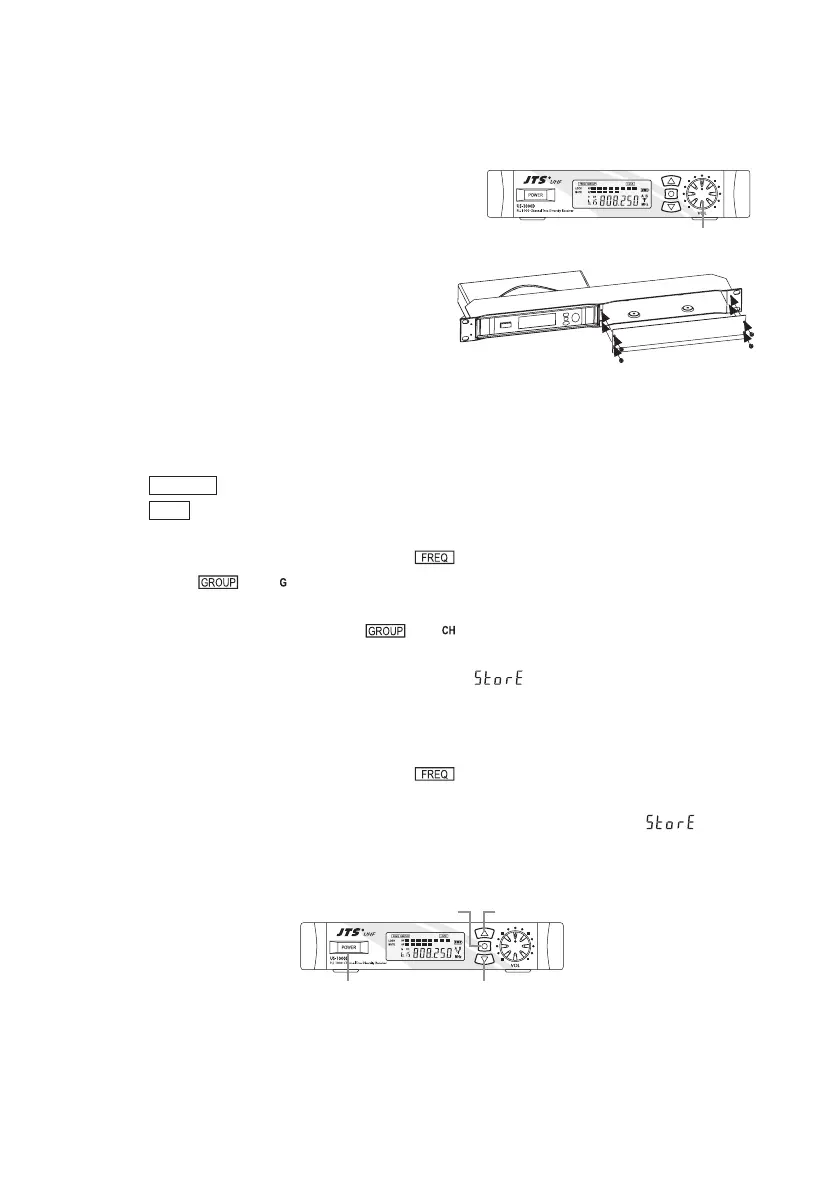
(9) Adjusting the AF output level
Use the AF output level control located on
the front side of the receiver to adjustthe AF
signal level that appears at output.
(10) Dual Rack Adaptor set
The dual rack adaptor is available to unify the
half rack space into a standard EIA size with
single or dual units.
(11) Basic operation
POWER Turning the receiver on and o by pressing the POWER button.
SET
1. Setting group channel:
Press “SET” button three sec. till the “ ” show up and then re-press “SET” button till
the “ ” & “ ” show up you can select group.
After that press “UP” or “DOWN” button one sec. to increase or decrease group number.
Press “SET” button again the“ ” & “ ” starts showing up you can select channel,
press “UP” or “DOWN” button one sec. to increase or decreasechannel digit.
After there steps, press “SET” button again the“ ” will display on the LCD, you can
save the setting now.
2. Setting Frequency :
Press “SET” button three sec. till the “ ” show up and then you can press “UP” or
“DOWN” button one sec. to increase or decrease frequency. In case the frequeney meets
the re-set group channel it willl be displayed. Re-press “SET” button the“ ” will
display on the LCD, you can save the setting now.
AF OUTPUT LEVEL
POWER ON/OFF DOWN
UPSET


 To Next Page