EasyManua.ls Logo

Justop Smart TV Player - Remote Control Overview; Mouse Operation Guide

Justop Smart TV Player
20 pages
Print Icon
To Next Page IconTo Next Page
To Previous Page IconTo Previous Page
Loading...
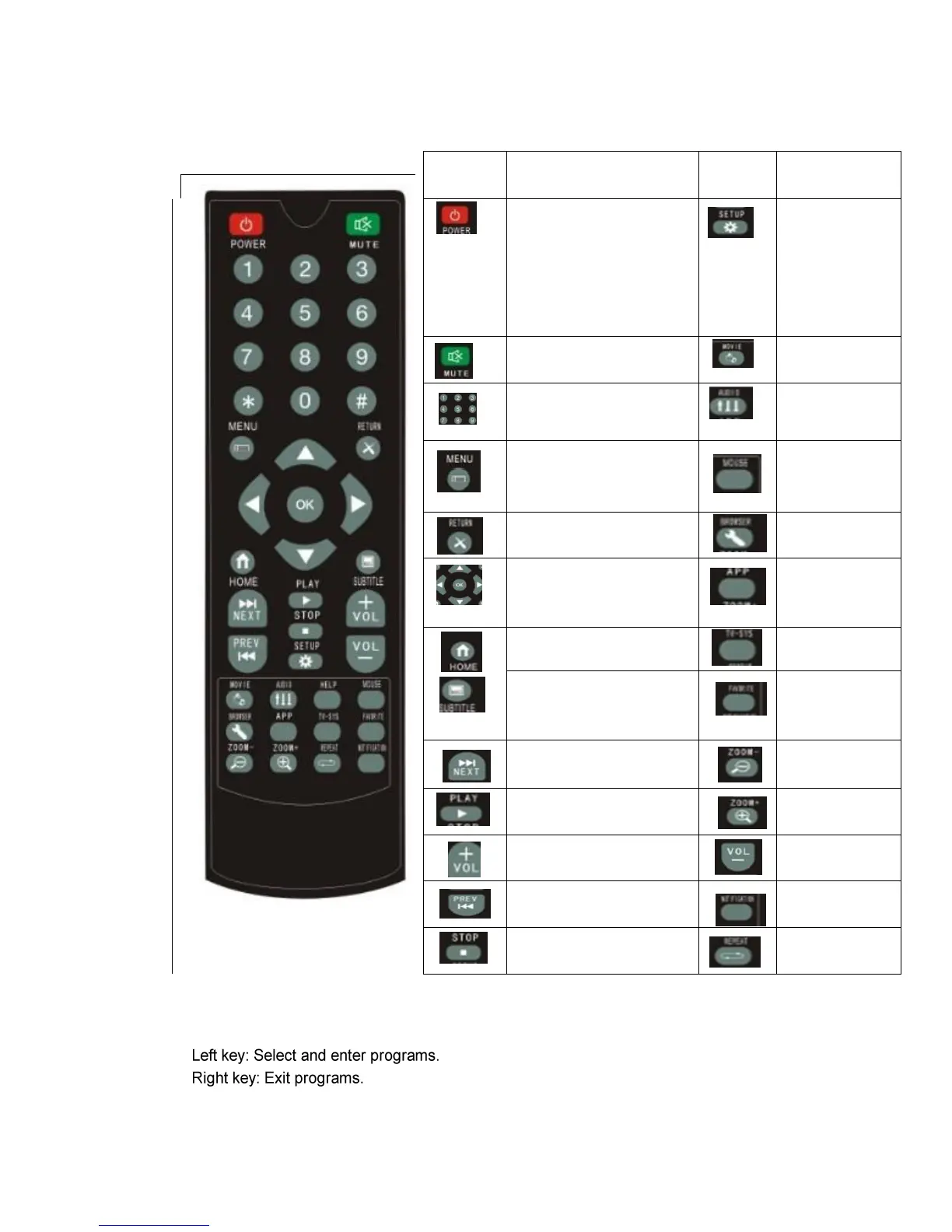
1.3 Remote Control
Key
Function
Key
Function
1.Press the power button to
turn device on or turn into
standby mode.
2.Press and hold the power
button for 4 seconds to turn
the device off.
System settings
Mute
Short cut button
to Movies Screen
Numeric Buttons
Audio tracks
button
Quick manual button
Mouse mode Button
(Navigating with
arrow keys)
Return to previous screen
Web browser quick
launch button
Navigational arrow buttons
and confirm button
Main application
screen quick
access button
Home screen button
TV mode button
Subtitle selection button
Favorite screen
quick access
button
Next button
Zoom in button
Play button
Zoom out button
Volume + button
Volume - button
Previous button
Device
notifications
Stop button
Repeat mode
button
1.4 Mouse Operation*
*Notes: Mouse is not included in the package.