EasyManua.ls Logo

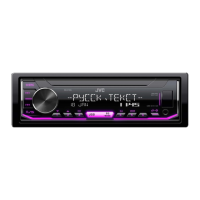
JVC KENWOOD KD-X165 - User Manual

JVC KENWOOD KD-X165
24 pages
Print Icon
To Next Page IconTo Next Page
Loading...
Data Size: B6L (182 mm x 128 mm)
Book Size: B6L (182 mm x 128 mm)
РУCCKИЙ
B5A-2625-00 [Q]
KD-X165 / KD-X163
ЦИФРОВОЙ МЕДИА-РЕСИВЕР
ИHCTPУKЦИЯ ПO ЭKCПЛУATAЦИИ
JS_JVC_KD_X165_Q_C.indd 1JS_JVC_KD_X165_Q_C.indd 1 20/6/2018 11:39:45 AM20/6/2018 11:39:45 AM

Questions and Answers

  • A
    Ashley BondAug 15, 2025
    How to fix sound not working on JVC KENWOOD Receiver?
    • D
      Denise GalvanAug 15, 2025
      If you cannot hear any sound from your JVC KENWOOD Receiver, first, adjust the volume to the desired level. If the sound is still not audible, check the cords and connections to ensure they are properly connected.
  • C
    Christina HernandezAug 18, 2025
    What to do if JVC KENWOOD KD-X165 Receiver does not work?
    • M
      michael08Aug 19, 2025
      If your JVC KENWOOD Receiver isn't working, try resetting the unit to restore its functionality.
  • R
    reyesjaclynAug 22, 2025
    Why is the radio reception poor on my JVC KENWOOD KD-X165 Receiver?
    • K
      Kevin ObrienAug 22, 2025
      If you are experiencing poor radio reception on your JVC KENWOOD Receiver, ensure the antenna is firmly connected to improve signal quality.
  • J
    Jessica JohnsAug 25, 2025
    What to do if “MISWIRING CHECK WIRING THEN PWR ON” appears on JVC KENWOOD KD-X165 Receiver?
    • S
      Stephen JohnsonAug 26, 2025
      If the message “MISWIRING CHECK WIRING THEN PWR ON” appears on your JVC KENWOOD Receiver, turn the power off. Then, check to ensure the terminals of the speaker wires are properly insulated. After checking the wiring, turn the power on again.
  • W
    Whitney MartinAug 28, 2025
    What to do if “NOT SUPPORT” appears and track skips on JVC KENWOOD KD-X165 Receiver?
    • A
      Anna JacksonAug 28, 2025
      If “NOT SUPPORT” appears and the track skips on your JVC KENWOOD Receiver, verify that the track is in a playable format.
  • J
    Jason WilliamsSep 1, 2025
    Why correct characters are not displayed on JVC KENWOOD KD-X165 Receiver?
    • J
      Jackie SteeleSep 1, 2025
      Your JVC KENWOOD Receiver can only display uppercase letters, numbers, and a limited number of symbols. Also, depending on the display language you have selected, some characters may not be displayed correctly.
  • E
    eprinceSep 4, 2025
    What to do if “READING” keeps flashing on JVC KENWOOD KD-X165?
    • B
      bowmanangelaSep 4, 2025
      If “READING” keeps flashing on your JVC KENWOOD Receiver, try these steps: 1. Avoid using too many hierarchical levels and folders. 2. Reattach the device (USB).
  • N
    Nathaniel LongSep 7, 2025
    Why is the playback order not as intended on JVC KENWOOD KD-X165 Receiver?
    • N
      Natalie BrooksSep 8, 2025
      If the playback order on your JVC KENWOOD Receiver is not as expected, note that the playback order is determined by the file name.
  • A
    adam00Sep 12, 2025
    Why elapsed playing time is not correct on JVC KENWOOD Receiver?
    • L
      Lindsey SmithSep 12, 2025
      The accuracy of the elapsed playing time on your JVC KENWOOD Receiver depends on the earlier recording process.
  • В
    ВикторJan 7, 2026
    не выходит из режима DEMO-ON

    JVC KENWOOD KD-X165 Specifications

    General IconGeneral
    DIN SizeSingle DIN
    Channels4
    TunerAM/FM
    BluetoothYes
    USB PortFront
    Display TypeLCD
    Preamp Voltage2.5 volts
    RMS Power Bandwidth20-20kHz
    Preamp Outputs1 Pair
    Sub Preamp OutputYes
    Auxiliary InputFront
    Memory Card SlotNo
    Satellite Radio ReadyNo
    HD RadioNo
    iPod CompatibilityYes
    Android CompatibilityYes
    Pandora ControlNo
    Display ColorWhite
    FaceplateDetachable
    Warranty1 year
    Audio Formats SupportedMP3, WMA, WAV, FLAC
    RMS Power Output22 watts x 4 channels
    Peak Power Output50 watts x 4 channels

    Related product manuals