No. 52029
V-14A3
V-1415EE
V-14AMG3
24
Item
Measuring
instrument
Test point Ad justment part Description
5. COLOUR [Method of adjustment using measuring instrument]
PAL COLOUR
1. Input a PA L f ull field colou r bar sig nal (7 5% wh it e).
2. En ter th e SERVICE MENU.
3. Select 2. V/C f rom SERVICE ME NU.
4. Select 5. COLOUR with the MENU ▼/▲ key.
5. Set the initial setting value of PAL COLOUR with the MENU
- / + key.
6. Con nect th e osc illosc ope be twee n TP -4 7G /R and TP-E (
#
).
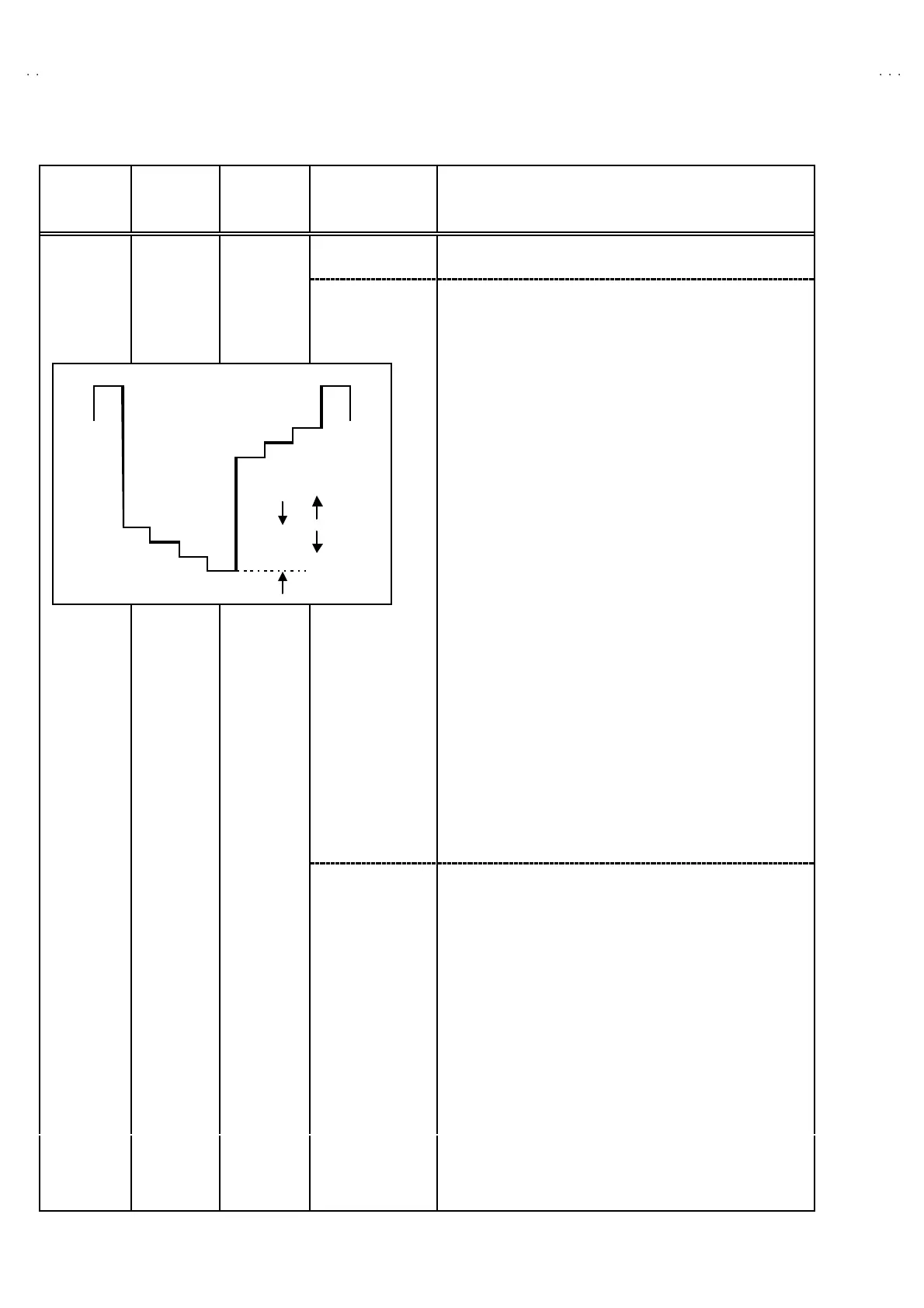
7. Ad just P AL COL OUR to bring the valu e o f (A) in the illustration
to + 11V (W -G). ( Volt age valu e b et we en (W) and ( G))
SECAM COLOUR
1. Input a SECAM full field colour bar signal (75% white).
2. Set the initial settin
value of SECAM COLOUR with the MENU
- / + key.
3. Ad just SE CAM CO LOUR to b rin g the valu e of
(A)
in the
illustration t o +4V(W-G). (Voltage value b etween (W) an d (G))
NTSC 3.58 COLOUR
1. Input a NTSC 3. 58 full fie ld colo ur b ar sign al (75 % white) .
2. Set the initial setting value of NTSC 3.58 COLOUR with the
MENU - / + key.
3. Ad just NTSC 3.58 COLOUR to bring t he valu e of (A) in th e
illustration t o +7V(W-G). (Voltage value b etween (W) an d (G))
Ad ju st ment
of SUB
COLOUR
Ⅱ
ⅡⅡ
Ⅱ
Signal
generator
Oscillo-
sc ope
Remote
control unit
TP-47G/R
TP-E (#
##
#)
[CRT SOCKET
PWB]
NTSC 4.43 COLOUR
When NTSC 3.5 8 is set, NTSC 4. 43 will be aut omatica lly se t at t he
resp ective va lues .
W
Y
Cy
G
M
R
B
(A)
0V
(-)
(+)






 To Next Page