10
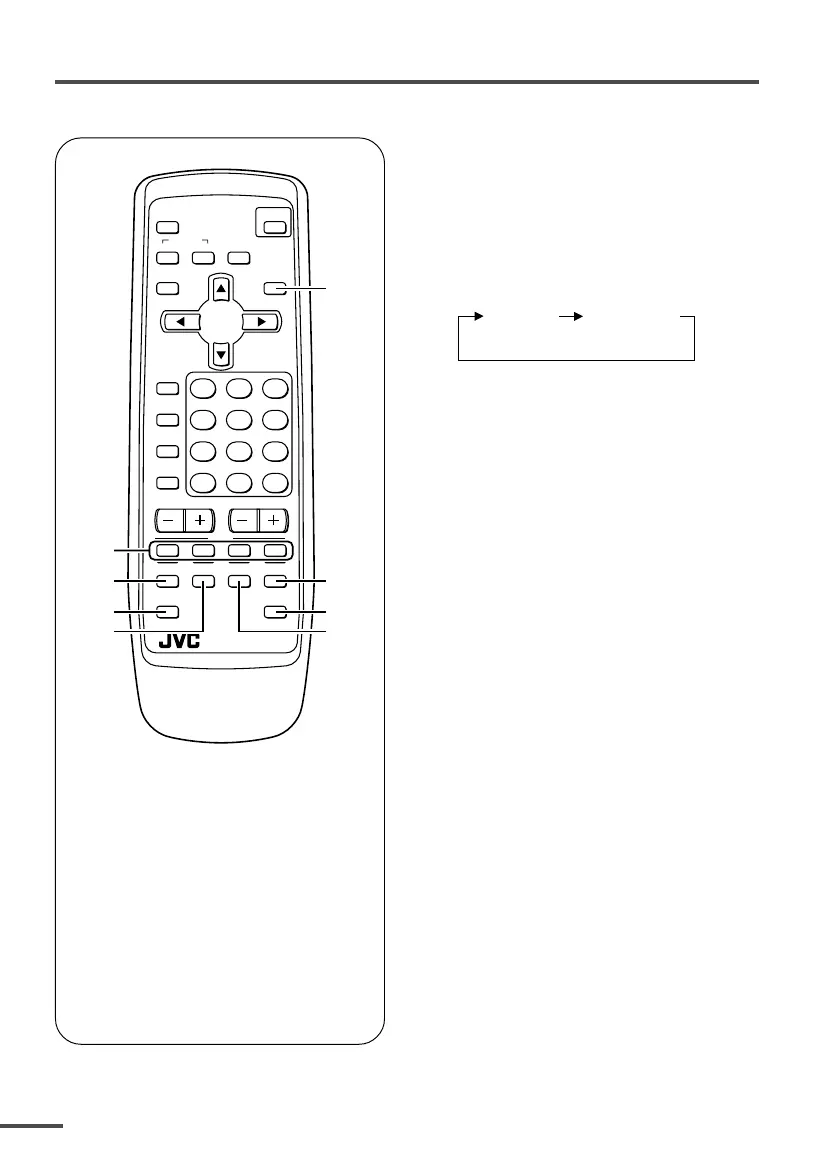
Viewing teletext programmes
1 TV/TEXT button
2 Coloured buttons
3 REVEAL button
4 SUBPAGE button
5 HOLD button
6 SIZE buttonI
7 CANCEL button
8 INDEX button
ECO
SENSOR
OFF
TIMER
PICTURE
MODE
CHANNEL
SCAN
REVEAL
SUBPAGE CANCEL
TV
TEXT
HOLD
RM-C90
INDEX SIZE
SYSTEM
COLOUR SOUND
MUTING
MENU
CHANNEL
RETURN+
POWER
DISPLAY
TV/VIDEO
TV/TEXT
VOLUME
123
456
789
0
-
/
--
2
5
7
6
4
3
1
8
■ Basic operation
1 Select a TV channel with a
teletext programme.
2 Press TV/TEXT button to change
the TV mode to the teletext
mode.
TV mode TEXT mode
(TEXT only)
3 Select a teletext page by
pressing the CHANNEL –/+
button, number buttons or
coloured buttons.
To return to the TV mode, press the
TV/VIDEO button or the TV/TEXT
button.
• If you have trouble receiving teletext
broadcasts, consult your local dealer or the
teletext station.
<AV-1435TEE/AV-2135TEE only>
LCT1195-001A-H 28/5/2002, 10:0110



 To Next Page