19
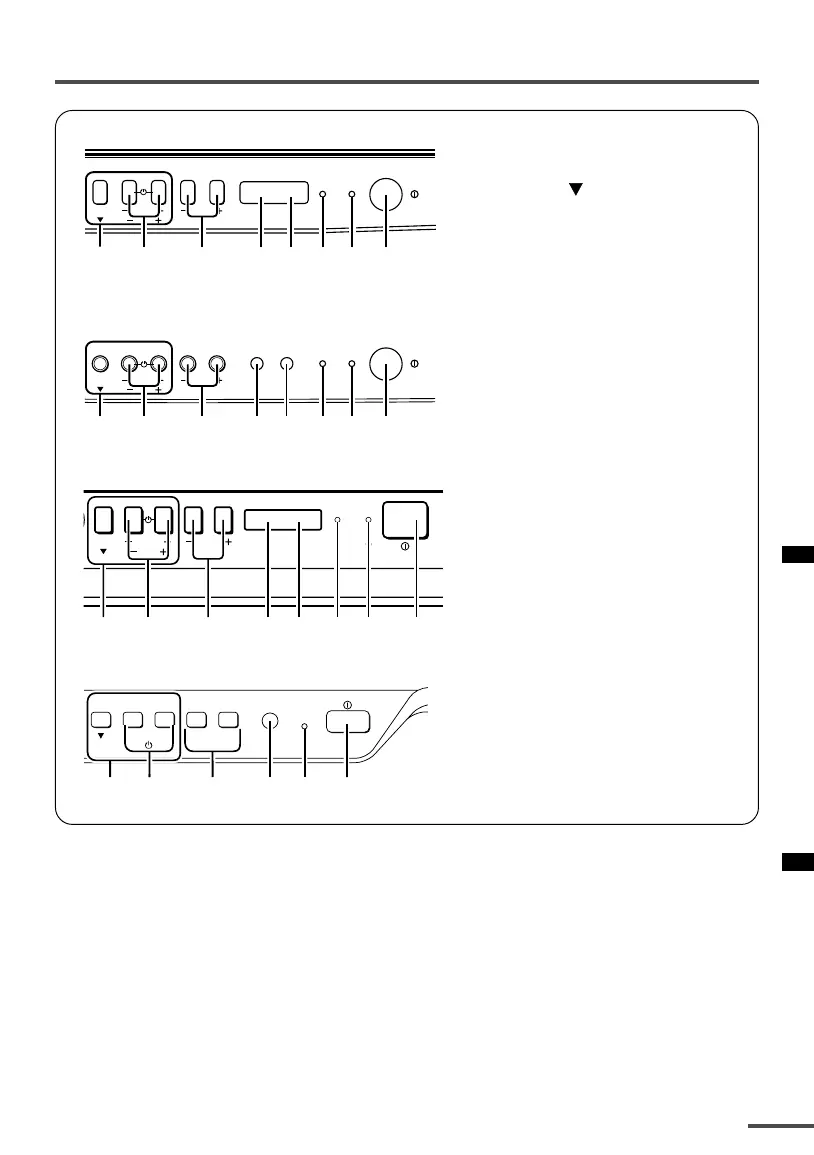
Using the buttons on the TV
<AV-2135EE/AV-2135TEE/AV-2105EE>
<AV-2115EE>
<AV-1435EE/AV-1435TEE>
<AV-1415EE>
MENU
CHANNEL
VOLUME
ON
TIMER
POWER
EXIT
1
2
3
7
6
5
49
MENU
CHANNEL
VOLUME
ON
TIMER
POWER
EXIT
1
2
3
7
6
5
49
MENU
CHANNEL
VOLUME
POWERON TIMER
EXIT
1
2
3
67
45 9
CHANNEL VOLUME
––
–
++
+
MENU
EXIT
POWER/
ON TIMER
83921 5
1 MENU buttons
• MENU
button
• MENU m buttons
2 CHANNEL –/+ buttons
3 VOLUME –/+ buttons
4 AI ECO sensor
5 Remote control sensor
6 ON TIMER lamp
The light is switched on while
ON TIMER function is operating.
7 POWER lamp
When the Main power is on,
the light is red.
8 POWER/ON TIMER lamp
When the Main power is on,
the light is green.
When ON TIMER function is on,
it is red.
9 Main power button
LCT1195-001A-H 28/5/2002, 10:0219



 To Next Page