19
Playing back sources from external devices
■ IMPORTANT
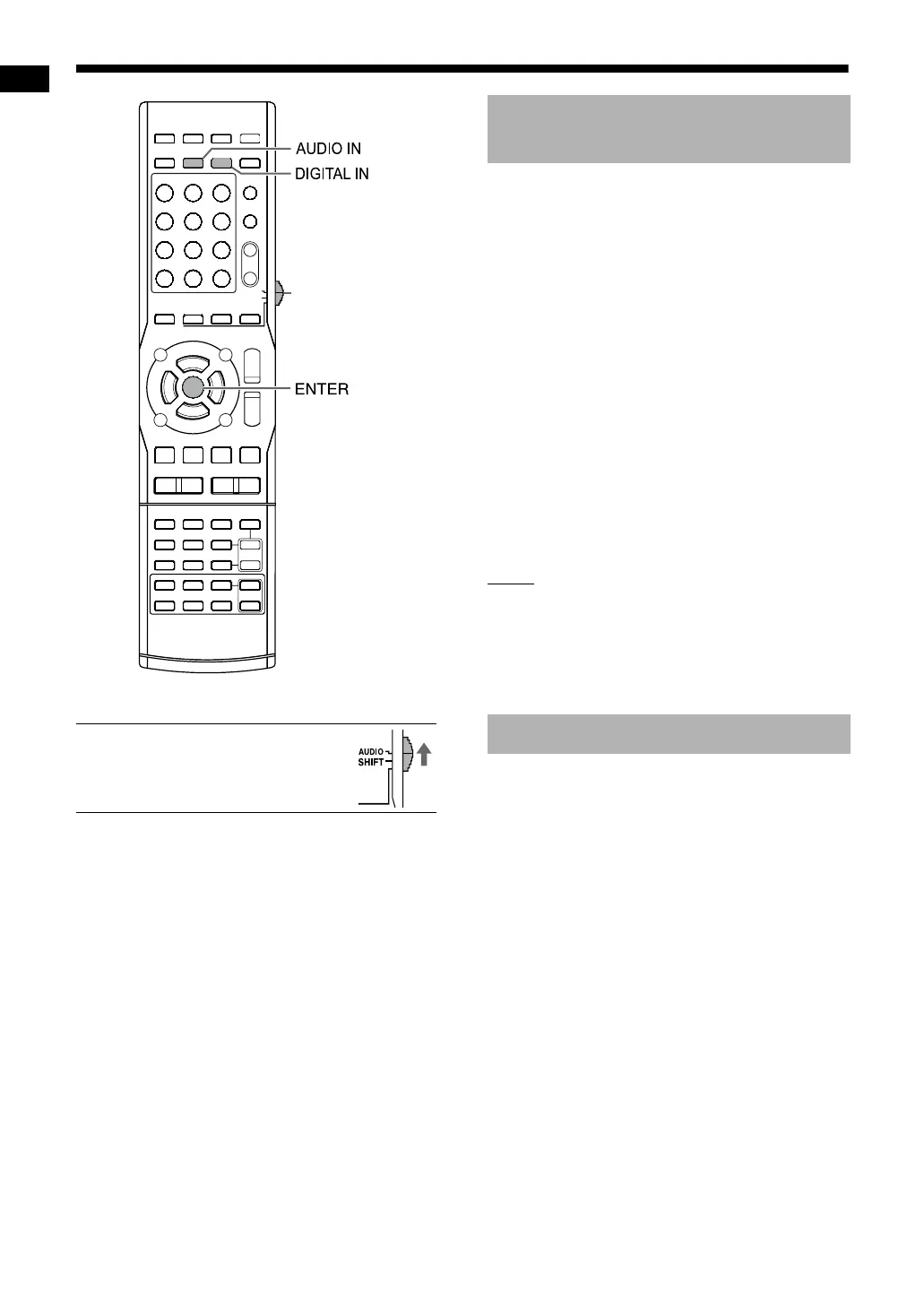
• Slide the remote control mode
selector to [AUDIO].
1 Press [AUDIO IN] or [DIGITAL IN].
• Pressing [AUDIO IN] displays “AUDIO IN”
and selects the device connected to the
[AUDIO IN] terminals.
• Pressing [DIGITAL IN] displays “DGTL IN”
and selects the device connected to the
[DIGITAL IN] terminal.
• You can also select the connected device as
the source by repeatedly pressing
[SOURCE] on the main unit.
2 Start playback on the connected
device.
3 Adjust the volume or the sound
quality for your preference.
• Refer to page 13.
NOTE
• Refer also to the operation manual for the con-
nected device.
• You can also operate your digital broadcast sat-
ellite and video cassette recorder using the
remote control of this system. Refer to pages 58-
60.
You can select the gain of the signal from the
[AUDIO IN] terminals. Use the initial settings for
normal operation. If the sound is too small or too
loud, change the settings.
1 Press [AUDIO IN].
• “AUDIO IN” appears in the display window.
2 Hold down [ENTER].
• “LEVEL 1” or “LEVEL 2” appears in the dis-
play window.
3 Press [ENTER] repeatedly to
select “LEVEL 1” or “LEVEL 2”.
• Each time you press [ENTER], the display
toggles between “LEVEL 1” and “LEVEL 2”.
• The signal gain in “LEVEL 1” is lower than
that in “LEVEL 2”.
• The display returns to “AUDIO IN” in approx-
imately 5 seconds.
Remote control
mode selector
Playing back sources from
external devices
Selecting the signal gain
Playing back sources from external devices
NX-F3_NX-F7[US]-06.fm Page 19 Wednesday, April 2, 2008 4:28 PM


 To Next Page