EasyManua.ls Logo

JVC CA-DXU10 - Service Manual

JVC CA-DXU10
103 pages
Print Icon
To Next Page IconTo Next Page
Loading...
SERVICE MANUAL
COPYRIGHT © 2008 Victor Company of Japan, Limited
No.MB616<Rev.002>
2008/4
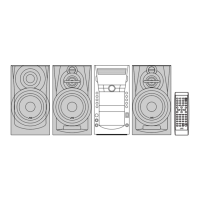
COMPACT COMPONENT SYSTEM
MB616<Rev.002>20084SERVICE MANUAL
DX-U10A, DX-U10US, DX-U10UX, DX-U10UG,
DX-U10UN, DX-U8US, DX-U8UX, DX-U8UG,
DX-U8UN, DX-U6US, DX-U6UX, DX-U6UG,
DX-U6UN, DX-U10UH
COPYRIGHT © 2008 Victor Company of Japan, Limited
Lead free solder used in the board (material : Sn-Ag-Cu, melting point : 219 Centigrade)
Lead free solder used in the board (material : Sn-Cu, melting point : 230 Centigrade)
TABLE OF CONTENTS
1 PRECAUTION. . . . . . . . . . . . . . . . . . . . . . . . . . . . . . . . . . . . . . . . . . . . . . . . . . . . . . . . . . . . . . . . . . . . . . . . . 1-4
2 SPECIFIC SERVICE INSTRUCTIONS. . . . . . . . . . . . . . . . . . . . . . . . . . . . . . . . . . . . . . . . . . . . . . . . . . . . . . 1-7
3 DISASSEMBLY . . . . . . . . . . . . . . . . . . . . . . . . . . . . . . . . . . . . . . . . . . . . . . . . . . . . . . . . . . . . . . . . . . . . . . . 1-8
4 ADJUSTMENT . . . . . . . . . . . . . . . . . . . . . . . . . . . . . . . . . . . . . . . . . . . . . . . . . . . . . . . . . . . . . . . . . . . . . . . 1-34
5 TROUBLESHOOTING . . . . . . . . . . . . . . . . . . . . . . . . . . . . . . . . . . . . . . . . . . . . . . . . . . . . . . . . . . . . . . . . . 1-35
SUPER VIDEO
SUPER VIDEO
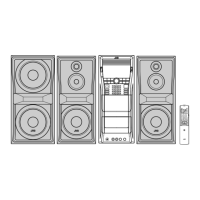
CA-DXU6
SP-DXU6F SP-DXU6F
SP-DXU10W
CA-DXU8
SP-DXU10F
SP-DXU10F
SP-DXU10W
SP-DXU8S
SP-DXU8S
SP-DXU10C
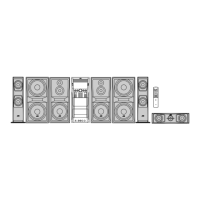
CA-DXU10
SP-DXU10F SP-DXU10F
SP-DXU10W SP-DXU10W
SP-DXU10S SP-DXU10S
SP-DXU10C


Table of Contents

Other manuals for JVC CA-DXU10

Questions and Answers

  • C
    Cory BaldwinSep 23, 2025
    Why isn't the timer working on my JVC Speaker System?
    • A
      Amanda BoydSep 23, 2025
      If the Daily Timer or Recording Timer does not work on your JVC Speaker System, it may be because the system has been turned on when the on-time comes. Turn off the system.
  • A
    Austin PorterAug 23, 2025
    Why is there no sound coming from my JVC CA-DXU10 Speaker System?
    • A
      Adam LawrenceAug 23, 2025
      If no sound is heard from your JVC Speaker System, it might be due to incorrect or loose speaker connections. Ensure that all speaker connections are correctly connected. Another possible reason is that headphones are connected to the system. Disconnect the headphones to restore sound through the speakers.
  • D
    dperryAug 25, 2025
    What should I do if my JVC Speaker System disc does not play?
    • A
      Adam WilsonAug 26, 2025
      If the disc does not play in your JVC Speaker System, check if you have inserted a DVD Video with an incorrect Region Code. If so, use a DVD with the correct region code. Also, ensure that the disc is placed correctly with the label side up.
  • E
    Erin EdwardsAug 27, 2025
    What to do if there is no picture on my JVC CA-DXU10 Speaker System screen?
    • S
      smithkristinAug 27, 2025
      If no picture appears on the screen of your JVC Speaker System, check and correct the video cord connections, as they might be incorrect or loose.
  • T
    Thomas CantuAug 27, 2025
    What to do if the disc tray on my JVC CA-DXU10 Speaker System won't open or close?
    • M
      Michael PerezAug 27, 2025
      If the disc tray on your JVC Speaker System does not open or close, ensure that the AC power cord is properly plugged in. If it is plugged in, Child Lock may be enabled. In this case, disable Child Lock. Also, check if Program Play is active, and if so, cancel Program Play.
  • J
    Jonathan BarreraSep 18, 2025
    Why is the karaoke scoring result wrong on my JVC CA-DXU10 Speaker System?
    • P
      Patricia BakerSep 18, 2025
      If the scoring result seems wrong (or “– –” appears) on your JVC Speaker System, it may be because the time of playback and singing along are too short to obtain a correct scoring result. Extend the duration of playback. Also, check if there is no sound from the microphone or the input level (MIC LEVEL) is too low; adjust the input level. Finally, ensure that you sing louder.
  • L
    Laura FloresSep 15, 2025
    Why can't I activate the karaoke function on my JVC CA-DXU10 Speaker System?
    • A
      Angela CrawfordSep 15, 2025
      To activate the Karaoke function on your JVC Speaker System, ensure at least one microphone is connected and Mic Mixing is activated.
  • J
    Joanna BentonSep 16, 2025
    Why isn't the karaoke scoring working on my JVC CA-DXU10 Speaker System?
    • E
      Eric DoyleSep 16, 2025
      Karaoke Scoring cannot be activated on your JVC Speaker System while recording, or while the disc menu for DVD Video/SVCD/VCD is shown on the TV screen. End recording and return to the main menu.
  • R
    rodgersdanielSep 6, 2025
    Why does the playback on my JVC CA-DXU10 sound strange?
    • M
      mullinscraigSep 7, 2025
      If the playback sounds strange on your JVC Speaker System, cancel Vocal Masking. Also, cancel Key adjustment.
  • B
    brianlaraSep 4, 2025
    Why does the cassette holder on my JVC CA-DXU10 not open?
    • A
      Amber BrewerSep 4, 2025
      If the cassette holder on your JVC Speaker System cannot be opened, it may be because the power supply from the AC power cord was cut off while the tape was running. Turn on the system to resolve this.

Summary

Safety Precautions and Laser Product Handling

General Safety Precautions

Essential safety guidelines for handling the product and performing repairs.

Static Electricity Prevention

Measures to prevent electrostatic discharge damage to sensitive components.

Laser Product Safety Warnings

Important warnings and cautions regarding Class 1 laser product operation.

Disassembly Procedures

Main Body Disassembly Steps

Step-by-step guide to disassembling the main unit components.

DVD Changer Mechanism Removal

Detailed instructions for removing the DVD changer mechanism assembly.

Main Board Assembly Removal

Procedure for safely disconnecting and removing the main control board.

DVD Pickup Removal and Attachment

Instructions for removing and reattaching the critical DVD pickup unit.

Sensor Board and SV Resistor Removal

Steps for removing the sensor board and SV resistor from the DVD mechanism.

Adjustment and Diagnostic Modes

Entering DVD Test Mode

Procedure for accessing the DVD module's test mode for diagnostics.

DVD Module EEPROM Initialization

Steps for initializing the DVD module's EEPROM after component replacement.

DVD Check Modes and Display

Explanation of various DVD check modes and their display outputs.

Circuit Diagrams and Layouts

Block Diagrams Overview

High-level block diagrams illustrating system interconnections.

Standard Schematic Diagrams

Detailed circuit schematics for various sections of the unit.

Printed Circuit Board Layouts

Visual representation of component placement on printed circuit boards.

Parts Identification and Lists

DX-U10 General Assembly Exploded View

Exploded view and parts list for the DX-U10 general assembly.

DX-U8 General Assembly Exploded View

Exploded view and parts list for the DX-U8 general assembly.

DX-U6 General Assembly Exploded View

Exploded view and parts list for the DX-U6 general assembly.

Electrical Parts List - Main Board

Comprehensive list of electrical components for the main board.

JVC CA-DXU10 Specifications

General IconGeneral
BrandJVC
ModelCA-DXU10
CategorySpeaker System
LanguageEnglish

Related product manuals